- Products
- Learn
- Local User Groups
- Partners
- More
MVP 2026: Submissions
Are Now Open!
What's New in R82.10?
Watch NowOverlap in Security Validation
Help us to understand your needs better
CheckMates Go:
Maestro Madness
I am trying to do natting by creating object with IP address which is in subnet not connected to firewall-1 and natting it to an IP address that is also not connected. In fw monitor it is only showing pre-in. how can I do so?
Thanks in advance.
Not only is neither subnet attached to the FW-1, they are off the same interface.
It's not impossible.
In fact, more than 15 years ago, I had devised a solution a similar problem.
Before you can even discuss the NAT rules on the firewall, there are several other things you will need to do in the environment to ensure 172.20.20.222 even reaches the firewall.
Specifically:
Once you've done that, there will need to be a firewall rule permitting connections from the relevant hosts to 172.20.20.222.
In order to ensure that the firewall stays between the connection between the two hosts, you will need to create a manual dual NAT rule.
The NAT rule will look at both the source and destination of the packet and translate both the source and the destination of the packet.
Because the rules are processed in order, the dual NAT rule must come before other rules that might relate to the destination IP.
Note that since you did not say what IP your firewall is on the 10.2.0.0/24 network, I am going to assume it's 10.2.0.1 in this example.
You also need to specify what IP addresses the connection will come from, as it cannot come from ANY.
Let's assume it's coming from 10.20.1.0/24.
| Source | Destination | Service | Source | Destination | Service |
| 10.20.1.0/24 | 172.20.20.222 | Any | 10.2.0.1(H) | 192.168.1.222(S) | Orig |
This rule will ensure all traffic coming from 10.20.1.0/24 that is destined for 172.20.20.222 will get hidden behind 10.2.0.1 (the internal IP address of the firewall) and have a destination of 192.168.1.222.
The side effect of this is that for each connection to your "internal" SMTP server using the external IP address, you will see the network connection traverse your internal network twice:
Plus you've created a whole bunch of extra routes in your network that you have to maintain.
A route elsewhere in the environment to direct the traffic for the source IP is required.
If you're seeing the traffic at all in fw monitor, that most likely means the traffic is being routed to the firewall correctly.
If it's not going past pre-in, that suggests the firewall rulebase is not configured to allow the traffic.
That is also a requirement.
What rule(s) in your rulebase allow traffic to this IP?
Are you configuring the NAT IPs in the object or are you using the NAT rulebase?
What does your logs say when someone tries to connect to the IP address?

Thanks Daemon for reply. The Scenario is as above. Now on FW-1, I am trying to do natting on FW-1.
I created an host object 172.20.20.222 and doing natting with 192.168.1.222. Is it possible as both this IPs subnets are not attached directly to FW-1 if yes how can I do so.
Thanks.
Not only is neither subnet attached to the FW-1, they are off the same interface.
It's not impossible.
In fact, more than 15 years ago, I had devised a solution a similar problem.
Before you can even discuss the NAT rules on the firewall, there are several other things you will need to do in the environment to ensure 172.20.20.222 even reaches the firewall.
Specifically:
Once you've done that, there will need to be a firewall rule permitting connections from the relevant hosts to 172.20.20.222.
In order to ensure that the firewall stays between the connection between the two hosts, you will need to create a manual dual NAT rule.
The NAT rule will look at both the source and destination of the packet and translate both the source and the destination of the packet.
Because the rules are processed in order, the dual NAT rule must come before other rules that might relate to the destination IP.
Note that since you did not say what IP your firewall is on the 10.2.0.0/24 network, I am going to assume it's 10.2.0.1 in this example.
You also need to specify what IP addresses the connection will come from, as it cannot come from ANY.
Let's assume it's coming from 10.20.1.0/24.
| Source | Destination | Service | Source | Destination | Service |
| 10.20.1.0/24 | 172.20.20.222 | Any | 10.2.0.1(H) | 192.168.1.222(S) | Orig |
This rule will ensure all traffic coming from 10.20.1.0/24 that is destined for 172.20.20.222 will get hidden behind 10.2.0.1 (the internal IP address of the firewall) and have a destination of 192.168.1.222.
The side effect of this is that for each connection to your "internal" SMTP server using the external IP address, you will see the network connection traverse your internal network twice:
Plus you've created a whole bunch of extra routes in your network that you have to maintain.
Thank u very much sir. It worked.
Hi all,
I commented that I have a similar scenario and in the R77.30 version it operates in an appropriate way; but when placing equipment in R80.20 version this scenario stops operating, you know there is some limitation in that version.
Regards.
I have configured a Checkpoint firewall as an internet gateway in my ESX lab and wanted to check with you if they is anything missing .
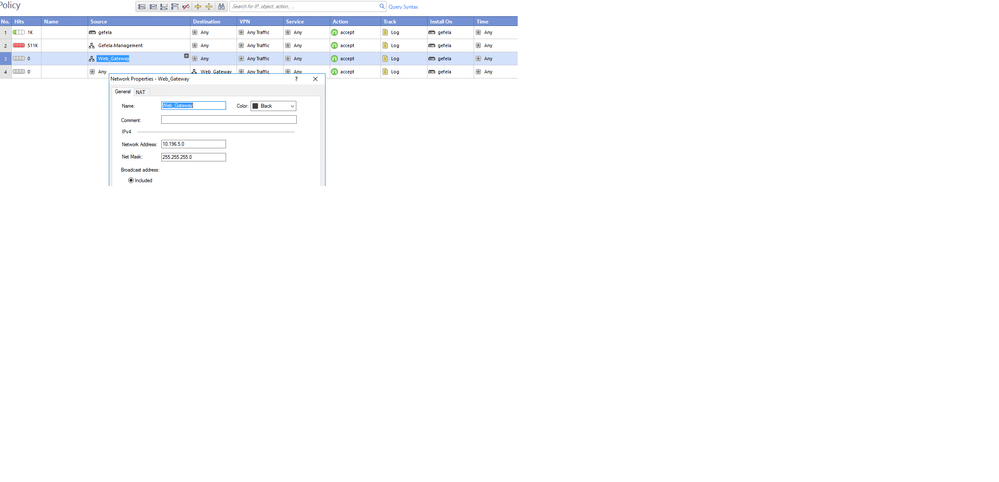
• This gateway is acting to hide ( NAT) for the following IP addresses
10.196.5.0/24
10.196.10.0/24
• They should be hiding behind the IP address 10.196.0.254
• The 172.16.203.0/24 network is automatically natted and traffic is already passing through this to the internet
Internet
-------------------------------- (192.168.1.254)- Router
|
|
192.168.1.165 - External
FireWall - Checkpoint
(10.196.0.254) - internal
|
|
(10.196.0.1)
Firewall
(10.196.5.1) (10.196.10.1)
| |
Web Browsing (10.196.5.x)| | Email (10.196.10.x)
| |
When I tried to initiate traffic from the 10.196.5.0/24 network , I cannot see any traffic hitting the Checkpoint gateway firewall ..
I have added the mac addresses for the 10.196.5.1 and 10.196.10.1 interfaces on the checkpoint firewallRules
Leaderboard
Epsum factorial non deposit quid pro quo hic escorol.
| User | Count |
|---|---|
| 11 | |
| 9 | |
| 9 | |
| 8 | |
| 6 | |
| 3 | |
| 2 | |
| 2 | |
| 2 | |
| 1 |
Tue 16 Dec 2025 @ 05:00 PM (CET)
Under the Hood: CloudGuard Network Security for Oracle Cloud - Config and Autoscaling!Thu 18 Dec 2025 @ 10:00 AM (CET)
Cloud Architect Series - Building a Hybrid Mesh Security Strategy across cloudsTue 16 Dec 2025 @ 05:00 PM (CET)
Under the Hood: CloudGuard Network Security for Oracle Cloud - Config and Autoscaling!Thu 18 Dec 2025 @ 10:00 AM (CET)
Cloud Architect Series - Building a Hybrid Mesh Security Strategy across cloudsAbout CheckMates
Learn Check Point
Advanced Learning
YOU DESERVE THE BEST SECURITY