- Products
- Learn
- Local User Groups
- Partners
- More

MVP 2026: Submissions
Are Now Open!
What's New in R82.10?
Watch NowOverlap in Security Validation
Help us to understand your needs better
CheckMates Go:
Maestro Madness
Hello CheckMates,
We suddenly have issues on our CheckPoint Firewall 4800 going out to internet.
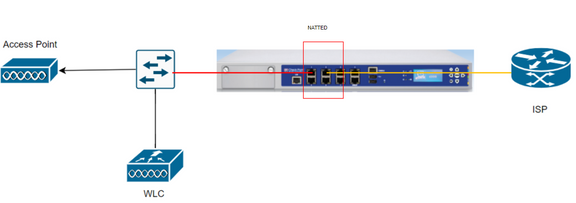
It is a WIFI to our Guest and I have check the Switch, APs, WLC and our Modem(Direct connection is working)
We are associated in our WLC and it was even to provide us an IP address from WLC.
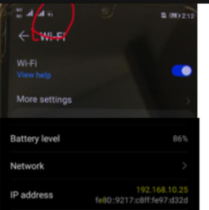
The issue is that the WIFI logo is showing with ! using our mobile
Troubleshooting Done.
1.) Reboot AP
2.) Shut/Unshut ports on switch
3.) Adjust Power Level
4.) Turn off/on the SSID
5.) No Changes on VLANs/WLC on the switch
6.) Direct Connection in the ONT – Working
Here is the result when doing a ping test to 8.8.8.8, btw we have a spare same firewall but same issue
PING 8.8.8.8 (8.8.8.8) 56(84) bytes of data.
From 10x.x.x icmp_seq=2 Destination Host Unreachable
From 10x.x.x icmp_seq=3 Destination Host Unreachable
From 10x.x.x icmp_seq=4 Destination Host Unreachable
From 10x.x.x icmp_seq=6 Destination Host Unreachable
From 10x.x.x icmp_seq=7 Destination Host Unreachable
From 10x.x.x icmp_seq=8 Destination Host Unreachable
Sometimes the firewall can ping 8.8.8.8
8.8.8.8: bytes=32 time=5ms TTL=116
8.8.8.8: bytes=32 time=4ms TTL=116
R75.40 is very, very End of Support at this point (several years now) and recommend upgrading to a supported release.
Setting a default route to point to a given interface is not recommended and could cause issues with the arp table filling up.
You only need to configure it to point to the next hop IP.
Remove that specific route.
The NAT is probably configured in the object that represents the Guest WiFI network in SmartDashboard.
First of all, when you remove the route, the arp cache being full should no longer be an issue, assuming there is an ARP entry for the default route.
Second, I don't believe there is a way to clear the arp cache, but it should clear on its own.
What host is generating the Destination Unreachable message?
That generally means it doesn’t have the necessary route.
How is the default route defined on the 4800?
What version/JHF is running on the 4800?
It is intermittent, it can ping destination and mostly it will result to host unreachable.
Interface eth2 10x.x.110 /30
set static-route default nexthop gateway address 10x.x.x.109 priority 1 on
set static-route default nexthop gateway logical eth2 priority 1 on
This config is being used since 2018 then few days ago we experience an issue on our guest wifi.
Our version is using Check Point R75.4
R75.40 is very, very End of Support at this point (several years now) and recommend upgrading to a supported release.
Setting a default route to point to a given interface is not recommended and could cause issues with the arp table filling up.
You only need to configure it to point to the next hop IP.
Remove that specific route.
The NAT is probably configured in the object that represents the Guest WiFI network in SmartDashboard.
Hi,
I will remove the following config
set static-route default nexthop gateway logical eth2 priority 1 on
Then leave the remaining config
set static-route default nexthop gateway address 10x.x.x.109 priority 1 on
How do I clear the ARP cache using a cli config?
Thanks
First of all, when you remove the route, the arp cache being full should no longer be an issue, assuming there is an ARP entry for the default route.
Second, I don't believe there is a way to clear the arp cache, but it should clear on its own.
I will remove the config then hopefully it will fix the issue.
I am new using checkpoint, what is the command to remove set static-route default nexthop gateway logical eth2 priority 1 on?
Thanks
Hi All,
Removing set static-route default nexthop gateway logical eth2 priority 1 on able to resolve the issue of destination host unreachable.
Thanks for all the help!
This one have a NAT config from the smart console.
I am still figuring out how to access it.
Basically,
The guest user segment is 192.168.10.0/24
All the wifi client will be natted to ip 10x.x.x.110 when accessing internet
I would not do any troubleshooting here at all until I had carried out an update, as also recommended by Phoneboy.
Leaderboard
Epsum factorial non deposit quid pro quo hic escorol.
| User | Count |
|---|---|
| 12 | |
| 10 | |
| 9 | |
| 8 | |
| 6 | |
| 3 | |
| 2 | |
| 2 | |
| 2 | |
| 1 |
Tue 16 Dec 2025 @ 05:00 PM (CET)
Under the Hood: CloudGuard Network Security for Oracle Cloud - Config and Autoscaling!Thu 18 Dec 2025 @ 10:00 AM (CET)
Cloud Architect Series - Building a Hybrid Mesh Security Strategy across cloudsTue 16 Dec 2025 @ 05:00 PM (CET)
Under the Hood: CloudGuard Network Security for Oracle Cloud - Config and Autoscaling!Thu 18 Dec 2025 @ 10:00 AM (CET)
Cloud Architect Series - Building a Hybrid Mesh Security Strategy across cloudsAbout CheckMates
Learn Check Point
Advanced Learning
YOU DESERVE THE BEST SECURITY