- Products
- Learn
- Local User Groups
- Partners
- More

Step Into the Future of
AI-Powered Cyber Security
The State of Ransomware Q1 2026
Key Trends and Their Impact
AI Security Masters E8:
Claude Mythos: New Era in Cyber Security
Blueprint Architecture for Securing
The AI Factory & AI Data Center
Call For Papers
Your Expertise. Our Stage
CheckMates Go:
CheckMates Fest
I logged into Smart Console yesterday late and noticed my SG3200 is sporting a red X.
Investigating I discovered under Device and License Information the error:
"Error:Disk Space usage is above allowed value."
Now normally that error would be fairly self explanatory, except it isn't in this case.
1) I do not use local threat emulation. We are using Threat Cloud. Therefore no disk limits are set.
2) Disk space on the appliance is mostly empty sitting at 22Gb free.
Logging into the SG directly, GAIA is showing no issues.
Hello,
Can you provide output of following command? ls -l /var/log/files_repository/images
If it is not empty the emulation images are being downloaded to your local appliance, i've seen this in an appliance whith remote emulation configured (NOT locally).
Regards
[expert@host:0]# ls -l /var/log/files_repository/images
total 0
[expert@host:0]#
hostname was edited. It is not 'host'.
A 3200 appliance has ~320GB storage (total) of which part is allocated to /var/log it's needs 20% free in that volume.
What's the output of "cpstat threat-emulation" on the gateway?
Refer also: sk101149 / sk92907
Same as posted. Status 2 Error Disk space usage is above allowed value.
Have a look at this sk. I would still double check the disk space on the appliance.
Andy
Best way I always follow - few quick trick
cd /var/log
du -hs * | grep -E 'M|G|T'
```
And it would show the usage; this would help to clear the files more conveniently.
There are some large files on /var/log but I have no idea what can be cleared.
Is there an SK outlining files that can be deleted. or cat /dev/nulled?
Are you able to send a screenshot? Blur out any sensitive info.
Andy
Screenshot of what?
Large files you see in /var/log.
This is great command our mate @G_W_Albrecht provided in a different post:
find / -type f -size +100000 -exec ls -lh {} \; 2> /dev/null | awk '{ print $NF ": " $5 }' | sort -nk 2,2
So say to search for files bigger than 500 MB in /var/log, just run this:
find /var/log -type f -size +500000 -exec ls -lh {} \; 2> /dev/null | awk '{ print $NF ": " $5 }' | sort -nk 2,2
Andy
There is like 6 pages of files so screenshots a bit difficult. However, there is a gigantic file:
/var/log/aspose/opt/CPsuite-R81.10/fw1/aspose_jail/proc/kcore.
It is 140737486266368 in size.
Hm, I dont pretend to know answer to it, so I will let someone else confirm, but I found below, which does make sense.
Andy
I have a 8 versions of these as well. They are 1-5G each
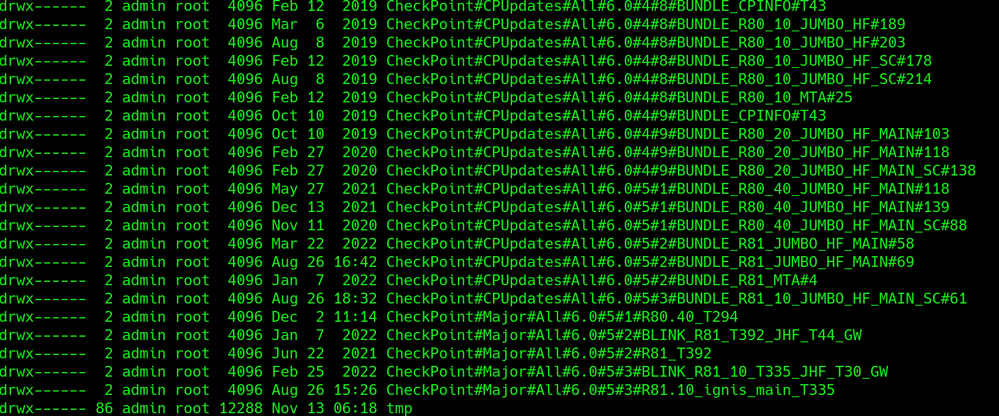
/var/log/CPda/repository/CheckPoint#CPUpdates#All#6.0#5#2#BUNDLE_R81_JUMBO_HF_MAIN#69/Check_Point
_R81_JUMBO_HF_MAIN_Bundle_T69_FULL.tgz
I suspect these can be removed but is there a process within SmartConsole for doing so?
I don't like munging around in the filesystem. Not sure why CP allows these types of conditions
to occur in the first place. I keep clean systems on the front end so I don't understand why it's
so trashy on the back side.
Ok, just something important (customer did this once without knowing and they could not install new jumbo hotfix).
Its OK to delete files from /var/log/CPda/repository
Its NOT good to delete ones from below dir:
/opt/CPda/backup
Seem to be very old update files - all not R81.10 can be deleted CPinfo excluded 8))
So let's assume your message got lost in the train here and I mayyy have deleted a cpinfo...
How does one fix that or am I now completely hosed...
These are the installed Jumbo Fixes! To free this space, use a new GA Jumbo HF:
- uninstall all Jumbo takes (1 command)
- delete all uninstalled Jumbo Packages (if not visible in GAiA WebGUI, from CLI)
- install latest GA Jumbo
Not sure I am following you.
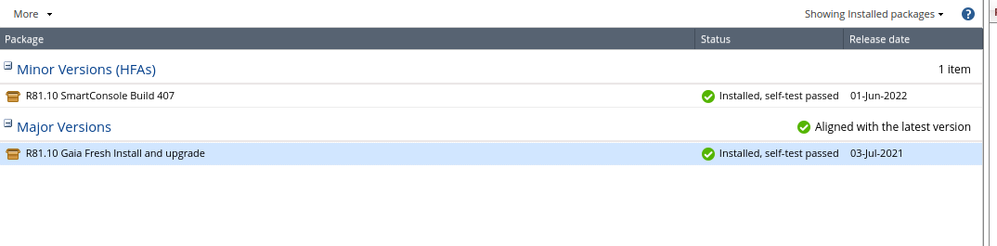
These are the only packages that are installed according to GUI.
Okay so kcores can be ignored.
I found in the GUI where they were hiding. I will purge them.
Where was it?
I am back to Green but the GUI is not reflecting all the versions sitting on the disk.
I had to use the drop down to select 'All' packages, instead of Installed. Then I could see that there were packages downloaded that were just sitting there.
I thought you were talking about smart console, but you meant web UI, gotcha.
Sorry I confused you. I've been bouncing around between CLI, WebUI and SmartConsole.
All good man, no sweat : - )

Leaderboard
Epsum factorial non deposit quid pro quo hic escorol.
| User | Count |
|---|---|
| 23 | |
| 19 | |
| 10 | |
| 9 | |
| 8 | |
| 7 | |
| 6 | |
| 4 | |
| 4 | |
| 4 |
Fri 29 May 2026 @ 09:00 AM (EDT)
Caracas: Executive Breakfast: Innovación en Ciberseguridad – IA y Threat IntelligenceTue 02 Jun 2026 @ 06:00 PM (IDT)
Under the Hood | Check Point SASE: Identity Integration & Access Policy Design Best PracticesThu 04 Jun 2026 @ 02:00 PM (CEST)
Deep Dive Webinar: New CloudGuard GWLB Deployment Without NAT Gateways - EuropeTue 02 Jun 2026 @ 06:00 PM (IDT)
Under the Hood | Check Point SASE: Identity Integration & Access Policy Design Best PracticesThu 04 Jun 2026 @ 02:00 PM (CEST)
Deep Dive Webinar: New CloudGuard GWLB Deployment Without NAT Gateways - EuropeThu 04 Jun 2026 @ 07:00 PM (IDT)
Deep Dive Webinar: New CloudGuard GWLB Deployment Without NAT Gateways - AmericaFri 12 Jun 2026 @ 10:00 AM (CEST)
CheckMates Live Netherlands - Sessie 47: Continuous Threat Exposure ManagementThu 18 Jun 2026 @ 10:00 AM (CEST)
The Cloud Architects Series: Check Point WAF - The Next Generation of AI powered protectionFri 29 May 2026 @ 09:00 AM (EDT)
Caracas: Executive Breakfast: Innovación en Ciberseguridad – IA y Threat IntelligenceAbout CheckMates
Learn Check Point
Advanced Learning

YOU DESERVE THE BEST SECURITY