- Products
- Learn
- Local User Groups
- Partners
- More

Scaling Check Point Automation with Arodonata
7 October @ 5pm CET / 11am EDT
AI Security Masters
LGTM: Bypassing an LLM Build Gate
When Prompt Injection Fails
What's New in Check Point SASE
The State of Ransomware Q2 2026:
This Quarter's Trends, and Their Impact on Your Defenses
CheckMates Go:
Half is Not Enough
Some users observe that when connecting to VPN (from Capsule on Windows or IOS in our case), there is a delay until they can reach internal resources. They have to wait between 15 seconds and half a minute until they can reach devices with the allowed protocols.
Has anybody else experienced this problem?
For iOS setting the "tunType" custom data value to force snx (SSL) may improve the delay in cases where the client might be attempting IPSec first for example and failing.
Refer: http://supportcontent.checkpoint.com/documentation_download?id=20361
What about Endpoint Security VPN client ? It has a nice progress window where you can see which phase of VPN establishment takes the most time. Usually that is the one where topology is downloaded from gateway if needed.
Also happpens with Endpoint Security Client. The delay occurs after negotiation is complete.
The other strange thing is that this does not happen for all connections. Some connections (few) get immediate connectivity.
I have not performed any measurements. Basically user experience being reported. And my own.
Also, as mentioned in other reports, it does not happen very time. Some connections get immediate connectivity.
How do I get a tcpdump on a 1550?
I would instantly involve TAC using chat if there is a good chance to replicate the issue in a quick RAS !
For iOS setting the "tunType" custom data value to force snx (SSL) may improve the delay in cases where the client might be attempting IPSec first for example and failing.
Refer: http://supportcontent.checkpoint.com/documentation_download?id=20361
Hi Chris.
I will test this creating an iPhone profile to add the setting.
Nevertheless I must note that:
- the delay in accessing internal devices occurs after negotiation is over and "connected" status is presented by the client.
- users have also reported the delay using Windows 10 Capsule and Enpoint Security from Mac, so it does not seem to be specific to IOS, but rather to the 1550.
- we have no reports on this delay when connecting to R80.10, R80.30 or R80.40 open servers
Thanks.
Thanks for clarifying, please test the latest build of R80.20.05 if not already and engage TAC to assist further.
We had a very bad experience with TAC (Premium Support) in previous issue with 1550, so I prefer to wait and test available recommendations posted here.
Users will have to live with the short delay (sometimes a couple of retries connecting to their device) in the meantime.
Thanks again and best regards.
Btw, are you talking about slow RDP connection ?
The problem is with the first connection attempts failing to any device independently of protocol (RDP, http, https or vnc). Once connected speed and latency are fine with all protocols.
I am asking because recently I had a problem with my 1470 where RDP will connect instantly on WAN interface but very slow on DMZ interface.
I guess you have already eliminated possible sources of delays such as TP blades ?
These are VPN connections from Internet (WAN) to intranet.
No Threat Prevention issues detected or logged.
Have you tried to temporarily disable SecureXL ?
No. I have not.
I will have to leave this issue alone for a while.
Thanks to all.
Yes. Disabling SecureXL seems to solve the issue. TAC also suggested we do that.
Question is: what is the performance hit for not using SecureXL?
It depends. Paste 'fwaccel stats -s' with SecureXL enabled to check it.
Btw, leaving SecureXL disabled is only a workaround and shall be temporary solution, not permanent one. You should really involve TAC for this and escalate if not satisfied with how is the problem handled. Especially if you have Premium Support.
Thanks.
I had to revert back from R80.20.05 as we started to get a "violated unidirectional connection" errors on many outbound connections.
Now back with R80.20.02 which seems to be stable. Not willing to spend more time as Checkpoint debugger with this appliance..
Have you checked this SK that might relate to your symptoms?
Connections through port forwarding or from VPN to 1500 are slow when SecureXL is enabled
https://supportcenter.checkpoint.com/supportcenter/portal?eventSubmit_doGoviewsolutiondetails=&solut...
We had issues with S2S-VPN between two 1500 appliances where CIFS connections get stuck with SecureXL enabled.
Workaround for us was to either turn [vpn accel off] or, turn whole SXL off.
Issue is scheduled to resolve in R80.20.10, but I believe there is a hotfix over R80.20.05 that includes the kernel parameter to be optimized value from the first place.
Hi Tom,
We upgraded to R80.20.05 (1229) but started having other problems with outbound connections (“violated unidirectional connection” errors). So we reverted back to R80.20.02 (936) and will disable SecureXL. After that, staty put for a while until we find the next bug.
Thanks and regards.
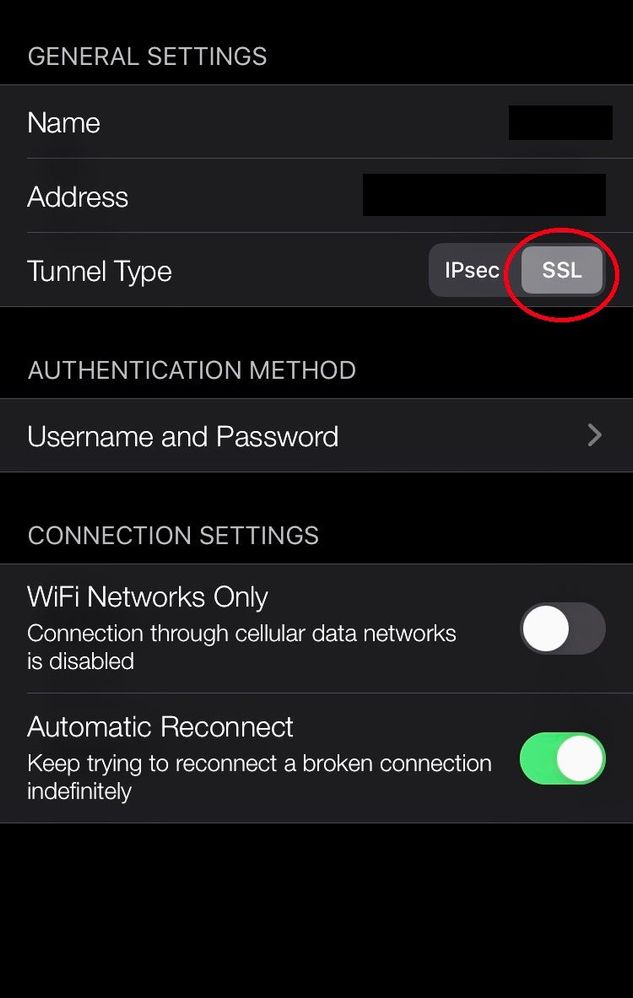
In another thread I was told to test changing the IOS Capsule tunnel type from IPsec to SSL.
After a few initial tests, this seems to solve the problems accesing internal devices (delayed availability or no availability).
The previous problem we had with R80.20.05 (1229) was not caused by the version but by the fact that TAC had suggested to turn off SecureXL.
We are now running again R80.20.05 (1229) with normal configurations and using SSL tunnel type in Capsule. I will post again in a few days if solution is stable.
It was very simple and I had not seen it at first. In the settings of the IOS capsule connection.
Glad it helped 🙂

Leaderboard
Epsum factorial non deposit quid pro quo hic escorol.
| User | Count |
|---|---|
| 2 | |
| 1 | |
| 1 | |
| 1 | |
| 1 |
Tue 06 Oct 2026 @ 12:00 PM (ACDT)
Rethinking Network Security for the AI Era : Session 2 - From User, to Branch and Campus APACTue 06 Oct 2026 @ 03:00 PM (CEST)
Rethinking Network Security for the AI Era : Session 2 - From User, to Branch and Campus EMEATue 06 Oct 2026 @ 02:00 PM (EDT)
Rethinking Network Security for the AI Era : Session 2 - From User, to Branch and Campus AMERTue 06 Oct 2026 @ 12:00 PM (ACDT)
Rethinking Network Security for the AI Era : Session 2 - From User, to Branch and Campus APACTue 06 Oct 2026 @ 03:00 PM (CEST)
Rethinking Network Security for the AI Era : Session 2 - From User, to Branch and Campus EMEATue 06 Oct 2026 @ 02:00 PM (EDT)
Rethinking Network Security for the AI Era : Session 2 - From User, to Branch and Campus AMERThu 08 Oct 2026 @ 11:00 AM (EDT)
Under the Hood: Check Point SASE | Zero Trust Network Access, Step by StepAbout CheckMates
Learn Check Point
Advanced Learning

YOU DESERVE THE BEST SECURITY