- Products
- Learn
- Local User Groups
- Partners
- More

MVP 2026: Submissions
Are Now Open!
What's New in R82.10?
Watch NowOverlap in Security Validation
Help us to understand your needs better
CheckMates Go:
Maestro Madness
Hello,
During last months i've heard mutilple version from CP TAC regarding the best pratices in core affinity for FWK in vsx R80.20
- Put all available core (minus SND) to all VSs, add FWK instances (each time we have performance issues) with dynamic dyspatcher (current setup with 28 cores to all VSs, some cpu core are maxed ou some are doing nothing)
- Put specific cores to Specific VSs and their FWKs (eg vs 1 -> cpu 4-12, VS2-> cpu 13-20)
Where is the truth ? 😄
Kr,
Khalid
Where is the documentation of these best practices available ? I only have Check Point VSX Administration Guide R80.20 that explains CoreXL config starting p.87.
That's the what i asked the TAC when he suggested what was the best practices.
That's why i'm asking the community..
More informations:
- R80.30 VSX Administration Guide
- R80.30 VSX Administration Guide
@Kaspars_Zibarts will share best practices on leveraging VSX technology to provide scalable and optimized security while keeping maximum performance.
- Presentation - nice presentation 100 points from me👍
And more Tuning tips from me:
- R80.x Architecture and Performance Tuning - Link Collection
- R80.x - Top 20 Gateway Tuning Tips
PS:
In your overview you should consider whether SMT (R80.x - Performance Tuning Tip - SMT (Hyper Threading)) is on or off. Here there can be massive performance differences with CoreXL, if the cores are not assigned correctly. The correct use of MQ (R80.x - Performance Tuning Tip - Multi Queue) should also be observed. The dynamic dispatcher (sk105261: CoreXL Dynamic Dispatcher in R80.10 and above) only brings a better distribution of connections in some situations, so I would only use it in specific cases.
Actually it's very difficult to prescribe "best" model for VSX when it comes to CoreXL. Everyone is using it in different ways so solution at the end will be quite different. But I understand your frustration - it's not easy and it takes years to get some good understanding. And then when you think you know it all bam! New version and new tricks 🙂
First things first - all I know from "inside" is that you should not be running R80.20 on gateways, upgrade to R80.30 latest jumbo. I just heard that feedback and case numbers on R80.20 gateways (not mgmt!) was not great. We have been running VSX on R80.30 since january and it's been great. You might want to read this too if you decide to upgrade
Secondly, I'm not really good on VSX running on open servers - they seem to behave somewhat different, looks like open servers are more efficient and you can just run all VSes sharing the same FWK cores. At least that's what I've heard from "big" customers. We run appliances, mix of 23800, 26000 and 41000 chassis and they all needed tweaking to get best results.
Your next decision will be based on blades you use - is it just FW or also advanced blades. Basically VSX runs better without hyperthreading or SMT enabled if you only use FW and most traffic is accelerated. If you see a lot of PXL and you use advanced blades, you definitely will benefit from extra cores.
One special high CPU case for us for example was Identity Awareness (pdpd and pepd) - therefore we run those on dedicated cores so that they do not affect real firewalling.
To give you short answer - I prefer dedicated cores for each VS and even processes as it really helps troubleshooting, especially high CPU cases. Plus you are protecting your other VSes from being impacted.
It's a lot of careful work to plan your CoreXL split manually, especially if you use hyperthreading - you must consider CPU core sibblings! That's very important.
But it would be very difficult to give you exact answer without knowing exact circumstances.
HT is on 🙂
Here you go
[Expert@Exxxxxxxx:0]# cat $FWDIR/state/local/VSX/local.vsall | grep "vs create vs" | awk '{print "VS-"$4" instances: "$12}'
VS-1 instances: 1
VS-1 instances: 1
VS-3 instances: 12
VS-3 instances: 12
VS-2 instances: 12
VS-2 instances: 12
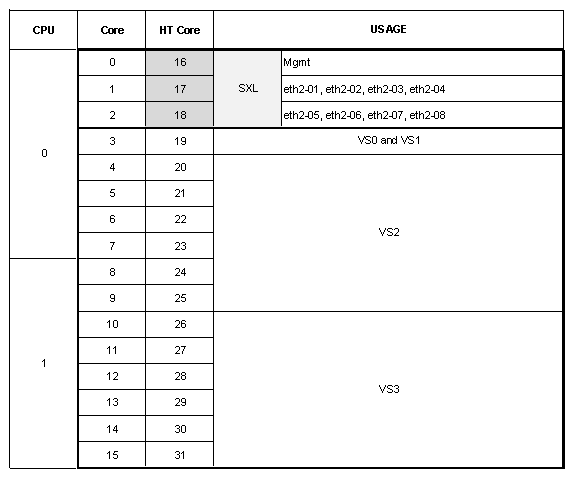
I would start with something like this. It's not ideal as VS-2 is stretched over 2 physical CPUs but it might help to fix overloaded CPUs
Note that cores 16-18 must not be used for FWKs at all! They are HT sibblings for cores 0-2 that are used for SND.
Which two cores are maxing out BTW?
What are throughput, connections per second and concurrent connections on each VS? You can check that with cpview on corresponding vsenv
Actual commands to achieve this
fw ctl affinity -s -d -vsid 0 1 -cpu 3 19
fw ctl affinity -s -d -vsid 2 -cpu 4-9 20-25
fw ctl affinity -s -d -vsid 3 -cpu 10-15 26-31
Such a change has any impact on live prod traffic i guess ?
Will plan this.
Correct me if i'm wrong your recommendation is still to dedicate specific cores per VS ?

Leaderboard
Epsum factorial non deposit quid pro quo hic escorol.
| User | Count |
|---|---|
| 20 | |
| 20 | |
| 16 | |
| 8 | |
| 7 | |
| 3 | |
| 3 | |
| 3 | |
| 3 | |
| 3 |
Fri 12 Dec 2025 @ 10:00 AM (CET)
Check Mates Live Netherlands: #41 AI & Multi Context ProtocolTue 16 Dec 2025 @ 05:00 PM (CET)
Under the Hood: CloudGuard Network Security for Oracle Cloud - Config and Autoscaling!Fri 12 Dec 2025 @ 10:00 AM (CET)
Check Mates Live Netherlands: #41 AI & Multi Context ProtocolTue 16 Dec 2025 @ 05:00 PM (CET)
Under the Hood: CloudGuard Network Security for Oracle Cloud - Config and Autoscaling!About CheckMates
Learn Check Point
Advanced Learning

YOU DESERVE THE BEST SECURITY