- Products
- Learn
- Local User Groups
- Partners
- More

Stop Babysitting Rules.
Go Agentic
Step Into the Future of
AI-Powered Cyber Security
The State of Ransomware Q1 2026
Key Trends and Their Impact
AI Security Masters E8:
Claude Mythos: New Era in Cyber Security
Blueprint Architecture for Securing
The AI Factory & AI Data Center
Call For Papers
Your Expertise. Our Stage
CheckMates Go:
CheckMates Fest
Hello,
is auto hide NAT possible for the FW IP (external interface of course) in VSX configuration?
Specifically, we have an Edge Firewall (Virtual System) with two interfaces (internal and external). Both interfaces are directly connected to a border router (Cisco 6800).
[Expert@lntfw-pgtw2:4]# route -n
Kernel IP routing table
Destination Gateway Genmask Flags Metric Ref Use Iface
192.168.196.0 0.0.0.0 255.255.255.240 U 0 0 0 bond2.997
192.168.196.16 0.0.0.0 255.255.255.240 U 0 0 0 bond2.998
10.100.98.0 0.0.0.0 255.255.255.0 UD 0 0 0 bond2.998
10.100.97.0 0.0.0.0 255.255.255.0 UD 0 0 0 bond2.997
x.x.0.0 10.100.97.1 255.255.0.0 UGD 0 0 0 bond2.997
0.0.0.0 10.100.98.1 0.0.0.0 UGD 0 0 0 bond2.998
Since the external interface has a private IP (10.100.98.101), the VS can't go to the Internet. So, I'd like to add a hide NAT (with one of our public IPs) to the 10.100.98.101 IP address. I already tried these two methods:
- Created an object with IP 10.100.98.101 and set the option "NAT --> Add automatic address translation rules --> Hide behind IP address" (with public IP).
- Created an object with IP 10.100.98.101 (let's call it Priv) and another object with public IP (let's call Pub). Then I added the object Priv in "Original Source" and the object Pub in "Translated Source".
Unfortunately, I didn't have success... both methods didn't work. Tcpdump shows always 10.100.98.101 as source if I try to ping or telnet some destination. So, since I read here this mechanism is feasible, I'm worndering if that is the same in VSX environments...
Thanks,
Francesco
I would just create a NAT rule that has a group with all the addresses/nets you want to hide-nat as original source. Original destination would be any. Translated source would then be an object with your selected public address with method Hide. Place it at below all you other more specific NAT-rules.
That was exactly the second method I tried. Please see the following images (tried again towards a single Public IP as destination for a test):
As you can see, the source IP remains 10.100.98.101...
What if you tried with the VS-object for Original Source, instead of an object containing just the external ip?
Already tried:
but...
Gateway: lntfw-pVSX1_Frontiera
Policy: Frontiera
Status: Failed
- Invalid Object 'lntfw-pVSX1_Frontiera' in Original Source of Address Translation Rule 1. The valid objects are: host, gateway, network, address range and router.
- Policy verification failed.
--------------------------------------------------------------------------------
hmm.. never had to do NAT for traffic from the firewall itself, so I have not run into this before. Is this how it is supposed to be in production?
Don't you have a host behind the firewall you can test from?
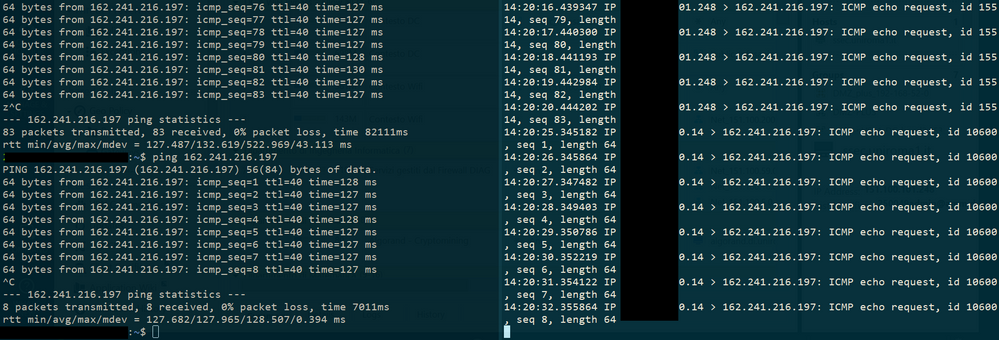
Yes, a test host works well. Please see the example below (before and after the NAT )
Any other ideas?
Thanks,
Francesco
Hi,
Just a dumb question but, is there an ACL for the traffic to be permitted ? I mean the 443 traffic and not the ICMP.
@Maarten_Sjouw: the VSX/Gateway version is 80.20, while the Server Management is running version 80.30.
After the installation, the command outputs "No Proxy ARP entries"
The "Install On" is set to the correct VS.
@funkylicious: I've just added an explicit rule as you suggested, but that traffic, I think, should be ensured by Implied Rules... anyway, nothing changed; please see the telnet/tcpdump screenshot above.
Since I'd like to enable advanced functionalities, for instance:
Leaderboard
Epsum factorial non deposit quid pro quo hic escorol.
| User | Count |
|---|---|
| 23 | |
| 19 | |
| 9 | |
| 9 | |
| 8 | |
| 7 | |
| 7 | |
| 6 | |
| 4 | |
| 4 |
Fri 29 May 2026 @ 09:00 AM (EDT)
Caracas: Executive Breakfast: Innovación en Ciberseguridad – IA y Threat IntelligenceTue 02 Jun 2026 @ 06:00 PM (IDT)
Under the Hood | Check Point SASE: Identity Integration & Access Policy Design Best PracticesThu 04 Jun 2026 @ 02:00 PM (CEST)
Deep Dive Webinar: New CloudGuard GWLB Deployment Without NAT Gateways - EuropeTue 02 Jun 2026 @ 06:00 PM (IDT)
Under the Hood | Check Point SASE: Identity Integration & Access Policy Design Best PracticesThu 04 Jun 2026 @ 02:00 PM (CEST)
Deep Dive Webinar: New CloudGuard GWLB Deployment Without NAT Gateways - EuropeThu 04 Jun 2026 @ 07:00 PM (IDT)
Deep Dive Webinar: New CloudGuard GWLB Deployment Without NAT Gateways - AmericaFri 12 Jun 2026 @ 10:00 AM (CEST)
CheckMates Live Netherlands - Sessie 47: Continuous Threat Exposure ManagementThu 18 Jun 2026 @ 10:00 AM (CEST)
The Cloud Architects Series: Check Point WAF - The Next Generation of AI powered protectionFri 29 May 2026 @ 09:00 AM (EDT)
Caracas: Executive Breakfast: Innovación en Ciberseguridad – IA y Threat IntelligenceAbout CheckMates
Learn Check Point
Advanced Learning
YOU DESERVE THE BEST SECURITY