- Products
- Learn
- Local User Groups
- Partners
- More
MVP 2026: Submissions
Are Now Open!
What's New in R82.10?
10 December @ 5pm CET / 11am ET
Announcing Quantum R82.10!
Learn MoreOverlap in Security Validation
Help us to understand your needs better
CheckMates Go:
Maestro Madness
Hi all,
I would like we shared our best smartlog query and their appropriate columnsprofiles (if you do not choose 'Automatic Profile Selection').
We all should have generalize at least once a query in order to understand if a specific comportment/situation could be found in other firewalls.
And if you do not remember what were your perfect queries, see your complete history (from you SmartLog enabled server):
$SMARTLOGDIR/data/users_settings/<your login name>/history.xml
Queries:
Regarding Endpoint Security Remote Access solutions:
tunnel_test or action:"Key Install" or action:"Failed Log In" OR action:"Log In" OR action:"Log Out" OR action:reject OR action:Update
blade:vpn AND action:Reject ( "endpoint" OR "user" OR "Office Mode" )
"Could not obtain user object" "IKE failure"
Certificates: any alert regarding crl (Certification Revocation List) or certificates (see sk104400 for more details)
type:alert (certificate or CRL)
Security Management Log Server : when logs were not able to be sent to it:
"were not sent to log server"
Any TCP state errors listed in sk101221 (personally, I've discovered this possibility thanks to "Max Power" Book Second Edition Released! 😞
tcp (fin OR syn) NOT "both fin" NOT "established"
Every logs of a specific rule (Hit count detail could be useful as well):
{ABC12345-ABC1-ABC1-ABC1-ABC123ABC12}
Columns Profiles:
First of all, did you know that we can generalize our best columns profiles for every or selected users (seesk109512 )?
My default columns profile (for general logs) is:
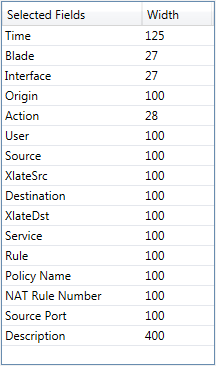
with which I can see immediately src/dst IPs, src/dst ports and Xlate src/dst and basics.
So : what are your perfect and efficient queries ?
As I have a number of firewalls in my lab, I'm always trying to isolate logs for a specific one.
So I use:
origin:firewall_name
Among other queries.
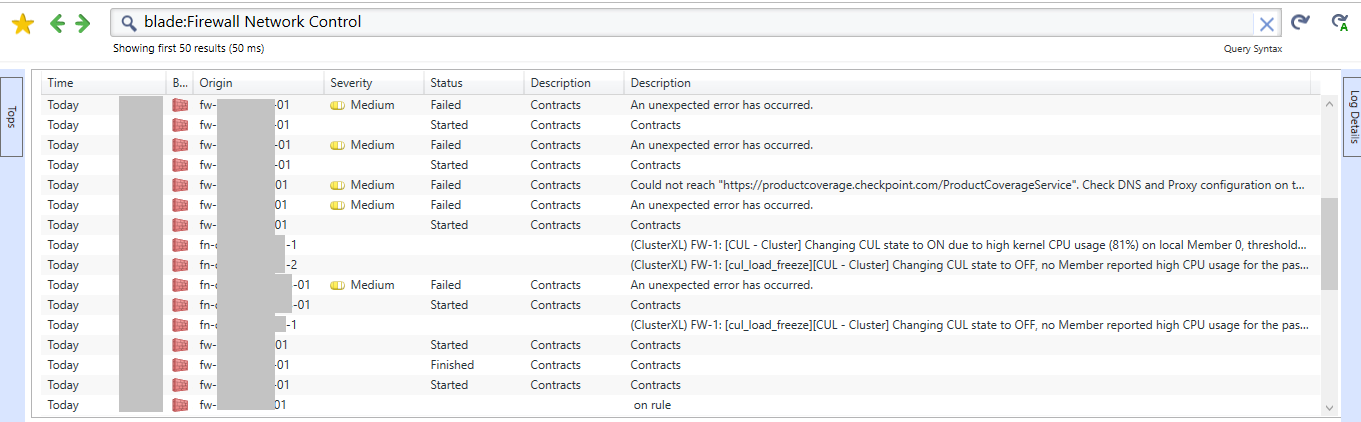
In order to see any 'Control' log events, we can query:
blade:Firewall Network Control
For such query, I've created a ColumnProfile.
I didn't find a sk which explains how to do so I've tried and it works for me (dedicated Log Server, R77.30):
<?xml version="1.0" encoding="utf-8"?>
<profile>
<Properties>
<name>{NAME OF YOUR PROFILE}</name>
<blade>{THE BLADE FOR WHICH IT WILL BE USED}</blade>
<product_family>{THE PRODUCT FAMILY FOR WHICH IT WILL BE USED}</product_family>
</Properties>
<col><name>{NAME OF AVAILABLE INDEXED FIELDS 1}</name><width>125</width></col>
<col><name>{NAME OF AVAILABLE INDEXED FIELDS 2}</name><width>27</width></col>
...
</profile>
If you are using 'Automatic Profile Selection':

...SmartLog will used preferably a ColumnsProfile which corresponds to the blade and Product family which is shown based on your query.
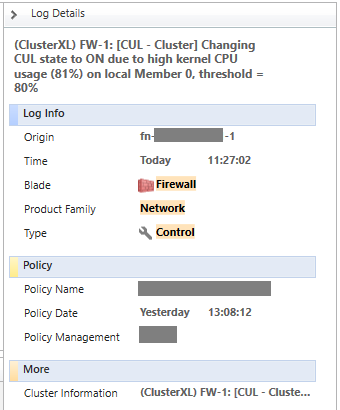
Control log events are something like:

Note that : blade = Firewall, Product Family = Network
So, for such log events, I've created the following Firewall_Network_Control.xml:
<?xml version="1.0" encoding="utf-8"?>
<profile>
<Properties>
<name>Firewall Network Control</name>
<blade>Firewall</blade>
<product_family>Network</product_family>
</Properties>
<col><name>time</name><width>125</width></col>
<col><name>product</name><width>27</width></col>
<col><name>orig</name><width>100</width></col>
<col><name>severity</name><width>100</width></col>
<col><name>calc_desc</name><width>100</width></col>
<col><name>status</name><width>100</width></col>
<col><name>description</name><width>100</width></col>
</profile>
Then you should see:

We are integrating a new web-based log viewer to SmartView, with profile editor capabilities.
It will allow customizing the fields in profile, and define a filter to auto select a profile above others.
We also planning to allow saving log views with existing filters and custom column profile to create your own custom views.
Question is:
- Do you use the width property, or prefer "auto-width" based on content feature?
Hi Kfir, thanks for this announcement.
Well, I'll give you one answer and one question (I take this opportunity
):
Thanks a lot Kfir,
Xavier.
The auto width feature is only available in the new Web Log Viewer ![]()
Adding custom commands is in the roadmap, and will probably be implement in the following version (post R80.20).
Since implemented on the web, commands will have to run on the server.
BR,
Kfir Dadosh
if I create a custom profile in smartconsole R81, how do I share it with my colleagues?
Leaderboard
Epsum factorial non deposit quid pro quo hic escorol.
| User | Count |
|---|---|
| 21 | |
| 15 | |
| 6 | |
| 6 | |
| 5 | |
| 5 | |
| 4 | |
| 4 | |
| 4 | |
| 4 |
Fri 12 Dec 2025 @ 10:00 AM (CET)
Check Mates Live Netherlands: #41 AI & Multi Context ProtocolTue 16 Dec 2025 @ 05:00 PM (CET)
Under the Hood: CloudGuard Network Security for Oracle Cloud - Config and Autoscaling!Fri 12 Dec 2025 @ 10:00 AM (CET)
Check Mates Live Netherlands: #41 AI & Multi Context ProtocolTue 16 Dec 2025 @ 05:00 PM (CET)
Under the Hood: CloudGuard Network Security for Oracle Cloud - Config and Autoscaling!Thu 18 Dec 2025 @ 10:00 AM (CET)
Cloud Architect Series - Building a Hybrid Mesh Security Strategy across cloudsAbout CheckMates
Learn Check Point
Advanced Learning
YOU DESERVE THE BEST SECURITY