- Products
- Learn
- Local User Groups
- Partners
- More

Stop Babysitting Rules.
Go Agentic
Step Into the Future of
AI-Powered Cyber Security
The State of Ransomware Q1 2026
Key Trends and Their Impact
AI Security Masters E8:
Claude Mythos: New Era in Cyber Security
Blueprint Architecture for Securing
The AI Factory & AI Data Center
Call For Papers
Your Expertise. Our Stage
CheckMates Go:
CheckMates Fest
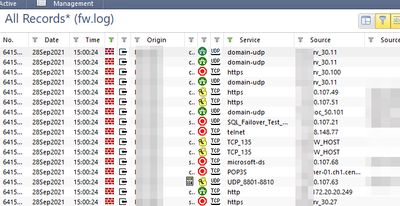
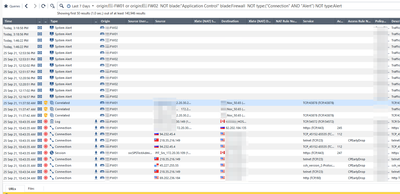
I have an odd one. Over the weekend I had a customer running 80.30 JHF236 stop logging all FW events. Logging is working as expected. GW log files are not incrementing, the date and time is good, SmartLog shows recent App/URLF/TE logs. I have rebooted each GW in the cluster as well as the log server. Still no logs. When I say I see not FW logs that is not exactly true. Any FW log with and "alert" type shows up. But regular accepts/drops for sessions or connections are not visible. If I go back to Tracker (CPlgv.exe) I can see the FW logs. Any thoughts or ideas?
Tracker:
SmartLog:
Hm, could be log indexing issue, sounds like, but not 100% sure. Do you have that enabled?
Yes, its been a working installation for years. All was working fine until Saturday. Boxes not pegged or exhausted and they have been rebooted within the past 45 days. I guess what I didn't explain before is my environment is distributed. Separate SMS/Log/SE. The only thing I did not reboot was the SMS. After rebooting it, it was resolved. Still, no signs of problems before reboot. Odd for sure.
I agree with you brother, it is odd, for sure. I will tell you, normally what I follow to fix any logging issue is below:
OR
Change $FWDIR/conf/masters file on gateway(s) to reflect management object IP rather than name and then apply below sk:
There is "old school" way of fixing logging too, but I shall not mention it here, as probably no one uses it any more anyway : )
Cheers,
Andy
Yup. I do installs/upgrades/troubleshooting for a living. I'm very familiar with both of those SKs. I am used to seeing logs work or not work, not some logs work and some not (from the same log source). I just never figured it would be the SMS since it doesn't do the indexing, but what do I know? You learn something new every day. Thanks for the input.
Paul
When you open the logfile itself, is the info there?
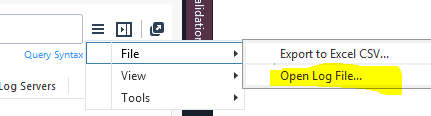
Yes, there were logs in there. I actually opened it through tracker though, I forgot about that piece in SmartLog. I assume if its visible in tracker it would be visible there. Or is that an indexed 2G file?
It is the same, just not the indexed piece.
I have had many issues with logging in R80.30 and R80.40 and had to do a evstop and mdsstart to get it to resolve, but in your case it sounds like there is an issue with the indexer itself or there is a an issue in Solr, however rebooting the SMS and log server should resolve that.
Do keep in mind that your not directly connecting to the log server but to the SMS which is forwarding your request to the log server. so you should also do the evstop/cpstart on the SMS.
To restart Solr only:
cd /opt/CPrt-R81/scripts/
./stopSolr.sh;./startSolr.sh
The SMS in fact does do the indexing - you enable it on SMS Tab Logs...
I just have to take a guess on the old school methods:
- Replace log server with dummy object with same IP as "proper" log server. Push policy. Swap out with proper log server and push policy.
<or>
- Nuke from orbit (aka delete FetchedFiles)
Yup, pretty much on both 🙂
Definitely sounds like a log indexing issue; my experience is that TAC will normally need to figure out what is happening. If you'd like to avoid a full reboot in the future for resolution, run these:
If the problem still persists try these:
Leaderboard
Epsum factorial non deposit quid pro quo hic escorol.
| User | Count |
|---|---|
| 23 | |
| 19 | |
| 9 | |
| 9 | |
| 8 | |
| 7 | |
| 7 | |
| 6 | |
| 4 | |
| 4 |
Fri 29 May 2026 @ 09:00 AM (EDT)
Caracas: Executive Breakfast: Innovación en Ciberseguridad – IA y Threat IntelligenceTue 02 Jun 2026 @ 06:00 PM (IDT)

Under the Hood | Check Point SASE: Identity Integration & Access Policy Design Best PracticesThu 04 Jun 2026 @ 02:00 PM (CEST)
Deep Dive Webinar: New CloudGuard GWLB Deployment Without NAT Gateways - EuropeTue 02 Jun 2026 @ 06:00 PM (IDT)
Under the Hood | Check Point SASE: Identity Integration & Access Policy Design Best PracticesThu 04 Jun 2026 @ 02:00 PM (CEST)
Deep Dive Webinar: New CloudGuard GWLB Deployment Without NAT Gateways - EuropeThu 04 Jun 2026 @ 07:00 PM (IDT)
Deep Dive Webinar: New CloudGuard GWLB Deployment Without NAT Gateways - AmericaFri 12 Jun 2026 @ 10:00 AM (CEST)
CheckMates Live Netherlands - Sessie 47: Continuous Threat Exposure ManagementThu 18 Jun 2026 @ 10:00 AM (CEST)
The Cloud Architects Series: Check Point WAF - The Next Generation of AI powered protectionFri 29 May 2026 @ 09:00 AM (EDT)
Caracas: Executive Breakfast: Innovación en Ciberseguridad – IA y Threat IntelligenceAbout CheckMates
Learn Check Point
Advanced Learning
YOU DESERVE THE BEST SECURITY