- Products
- Learn
- Local User Groups
- Partners
- More

AI Security Masters
E1: How AI is Reshaping Our World
MVP 2026: Submissions
Are Now Open!
What's New in R82.10?
Watch NowOverlap in Security Validation
Help us to understand your needs better
CheckMates Go:
Maestro Madness
For the first time I've just been setting up Endpoint Compliance in the cloud portal. My question to the community is this: Is there a way to make the Restricted policy kick in immediately? TAC said no, it's just the way the blade is designed. But I think this is poor. My customer specifically wants this so that machines that are not compliant are immediately restricted and prevented from being able to log in to VPN. It seems at the moment this isn't possible as it takes several minutes of warning before the Restricted policy actually kicks in. Does anyone know a way around this?
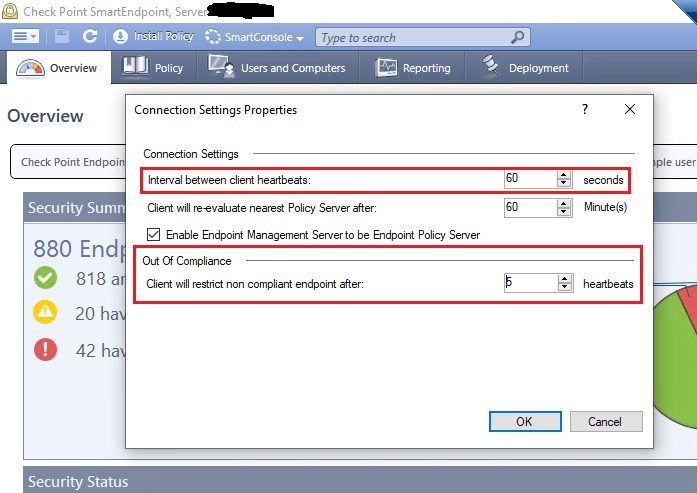
Our Compliance Blade state changes are based on our client heartbeat which by default is every 60 seconds. Also by default, our Out Of Compliance state of Restricted is set to 5 heartbeats. If you are using our Harmony Endpoint Cloud/EPMaaS product, these settings/configurations are not configurable via the Infinity Portal/Harmony Endpoint Web Management. You would have configure/manage this through the Smart Endpoint Console application.
What you can try and test with is setting the Out Of Compliance/Client will restrict non compliant endpoint after: 5 heartbeats to 1 heartbeat and see if this improves it to what you are expecting.
I would not recommend changing the client heartbeat (Interval between client heartbeats) as this can cause a ton of communication from the client to the server and will cause the Harmony Endpoint Cloud/EPMaaS resources to run very high and with enough clients deployed even bring down the Harmony Endpoint Cloud/EPMaaS Server.
I think even with the Out Of Compliance set to 1 heartbeat you will still see somewhat of a delay still due to the communication the client needs to have internally with it's services. drivers and the Compliance Blade itself. This can take anywhere from a few seconds to a couple of minutes depending on the client machine resources and our current Harmony Endpoint client design.
And as TAC has already told you, they are correct. There is no such configuration today with our products that will give you an absolute immediate Compliant/Restrict state. You may be able to, like I explained above, get it down to seconds or a minute but that would be the best that can be done.
Hi @jcortez,
Thanks for your reply. That all makes sense 🙂
I know the blade is currently behaving "by design" but I believe the current design isn't necessarily the right design. I still believe there's room for a "feature request" here. If an endpoint is not compliant we should have the option to apply an immediate policy - at least (in my case) denying them access to the VPN until the endpoint issues are remedied. Unless you can convince me that it's actually a good idea to not immediately restrict an uncompliant machine?
Thanks,
Matt
Oh I agree. I think the behavior should change as well for immediate restricted state. It makes sense from a security aspect. However, above I was just stating current design. If this is something you and or other customers would like to see change and behave differently, it would require a Request For Enhancement (RFE).
If we think about what makes a EP client client compliant. one minute versus immediate restriction makes no difference at all, as the client already had enough time to wrack havoc in the unrestricted hours before...
True... but that doesn't mean I want the uncompliant laptop to connect to VPN and start wreaking havoc on the LAN before it gets restricted. Maybe EP needs to have two levels of non compliance? Something like Minor and Major, with different rulebases? So anything with AV older than 3 days is immediately in Major non-compliance as it boots up and is therefore prevented from connecting to VPN. Just for example...
Maybe SCV is the other option as I believe that checks every 20 seconds? But that is a nightmare to get right in my experience.
Leaderboard
Epsum factorial non deposit quid pro quo hic escorol.
| User | Count |
|---|---|
| 8 | |
| 4 | |
| 2 | |
| 2 | |
| 1 | |
| 1 | |
| 1 | |
| 1 | |
| 1 | |
| 1 |
Tue 16 Dec 2025 @ 05:00 PM (CET)
Under the Hood: CloudGuard Network Security for Oracle Cloud - Config and Autoscaling!Thu 18 Dec 2025 @ 10:00 AM (CET)
Cloud Architect Series - Building a Hybrid Mesh Security Strategy across cloudsTue 16 Dec 2025 @ 05:00 PM (CET)
Under the Hood: CloudGuard Network Security for Oracle Cloud - Config and Autoscaling!Thu 18 Dec 2025 @ 10:00 AM (CET)
Cloud Architect Series - Building a Hybrid Mesh Security Strategy across cloudsThu 08 Jan 2026 @ 05:00 PM (CET)
AI Security Masters Session 1: How AI is Reshaping Our WorldAbout CheckMates
Learn Check Point
Advanced Learning
YOU DESERVE THE BEST SECURITY