- Products
- Learn
- Local User Groups
- Partners
- More
MVP 2026: Submissions
Are Now Open!
What's New in R82.10?
Watch NowOverlap in Security Validation
Help us to understand your needs better
CheckMates Go:
Maestro Madness
In a TE log you can find additional important information how a file was processed:
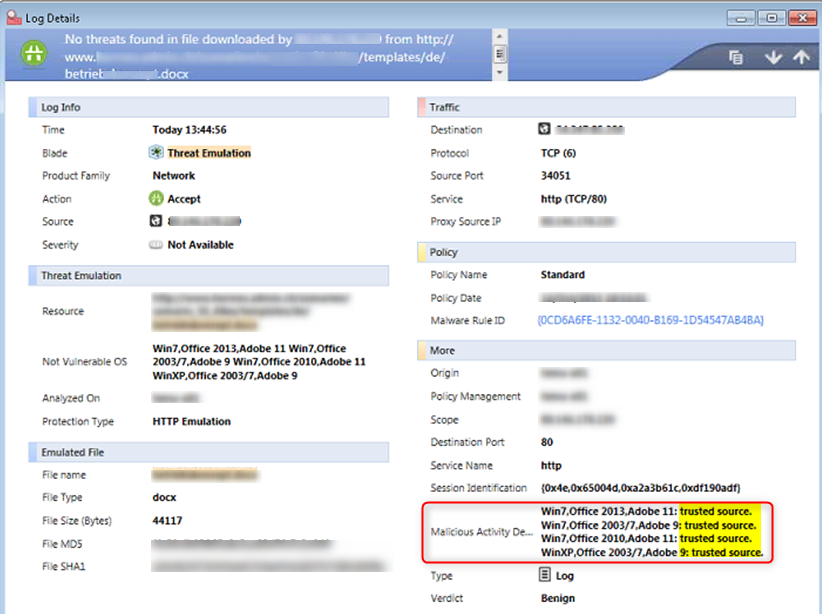
In the example above "trusted source" means that this file was bypassed by the global whitelist hence it was not emulated.
Different values explained:
| Value | Comment |
|---|---|
| trusted source | file bypassed emulation due to Check Point maintained and automatically updated TE whitelist |
| emulator | file was locally emulated on a SandBlast Appliance |
| cloud emulation | file was sent to cloud emulation |
| remote emulation | file was sent to a remote SandBlast Appliance for emulation (this log is usually issued by a gateway connected to a SandBlast appliance) |
| static analysis | file was pre-filtered by static analysis and was not emulated |
| local cache | file´s SHA1 was already found in cache (# tecli cache dump all) and was not emulated; action is based on the cached verdict |
| archive | handled file was an archive |
| logger | You get "logger" for a "malicious" file as verdict decider when the file was not successfully emulated but other advisories already convitced the file as malicious |
| file | When trying to emulate the file the actual file size was 0 |
In depth info of e.g. static analyis, cache handling etc can be found in the amazing ATRG: Threat Emulation SK:
With this knowledge you can easily query all files that e.g. were really sent to cloud for emulation:
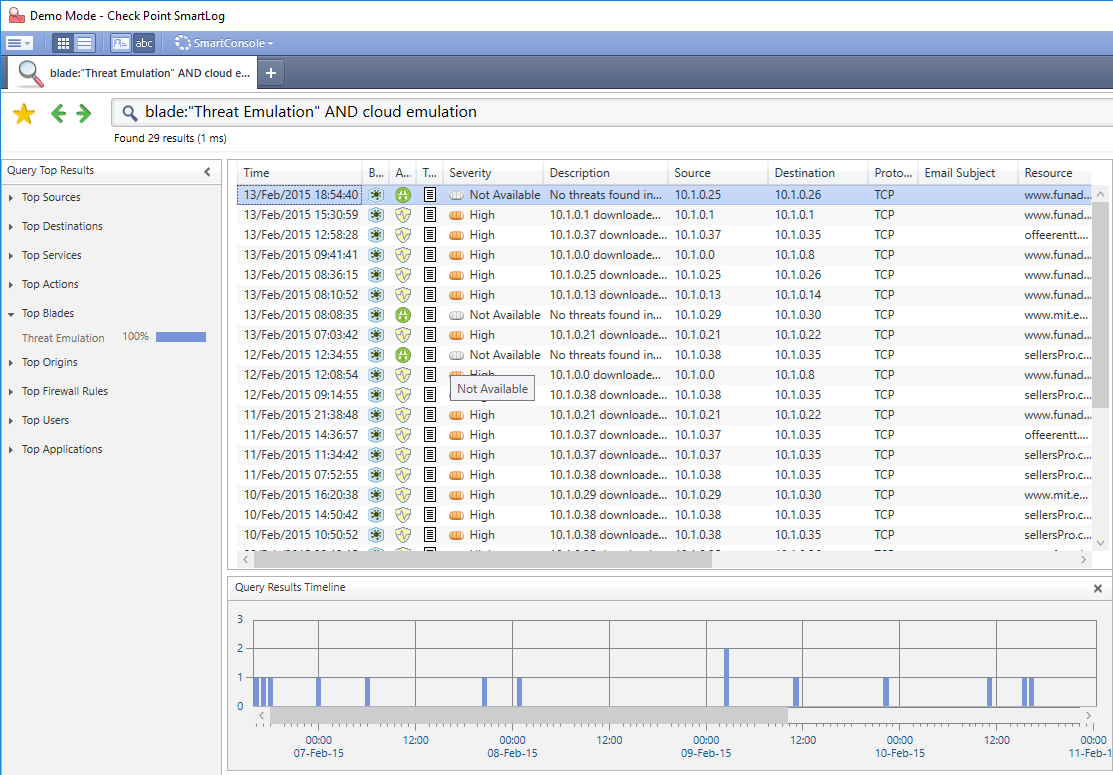
With SmartLogs Timeline results you can even quickly check how file amount was handled over a certain timeframe.
This is also helpful for investigating performance/throuput issues.
Thanks for explanation! But what does this output mean?
Win7,Office 2013,Adobe 11:logger
Hi Olga,
good question 🙂
We run several so called "investigators" in TE. One of them is "logger" - it is responsible for creating a summarized report when the verdict is "malicious".
The logger is then sending the log to the Mgmt. When the verdict "decider" is "logger" it means that the file arrived at the logger investigator with no previous conviction by TE.
This can happen when emulation is not possible due to an error in the emulation process. So usually this results also in an emulation error but if other advisories (besides the sandbox emulation) already convicted the file as malicious the logger changes the "error" verdict to "malicious".
So as a summary:
You get "logger" for a "malicious" file as verdict decider when the file was not successfully emulated but other advisories already convicted the file as malicious.
Regards Thomas
What about logs with "policy" ? We found that too with r80.30 gateway.
Win10 64b,Office 2016,Adobe DC: policy. Win7,Office 2013,Adobe 11: policy.
Leaderboard
Epsum factorial non deposit quid pro quo hic escorol.
| User | Count |
|---|---|
| 19 | |
| 17 | |
| 14 | |
| 8 | |
| 7 | |
| 3 | |
| 3 | |
| 3 | |
| 3 | |
| 2 |
Tue 16 Dec 2025 @ 05:00 PM (CET)
Under the Hood: CloudGuard Network Security for Oracle Cloud - Config and Autoscaling!Thu 18 Dec 2025 @ 10:00 AM (CET)
Cloud Architect Series - Building a Hybrid Mesh Security Strategy across cloudsTue 16 Dec 2025 @ 05:00 PM (CET)
Under the Hood: CloudGuard Network Security for Oracle Cloud - Config and Autoscaling!Thu 18 Dec 2025 @ 10:00 AM (CET)
Cloud Architect Series - Building a Hybrid Mesh Security Strategy across cloudsAbout CheckMates
Learn Check Point
Advanced Learning
YOU DESERVE THE BEST SECURITY