- Products
- Learn
- Local User Groups
- Partners
- More
MVP 2026: Submissions
Are Now Open!
What's New in R82.10?
Watch NowOverlap in Security Validation
Help us to understand your needs better
CheckMates Go:
Maestro Madness
Hi CheckMates,
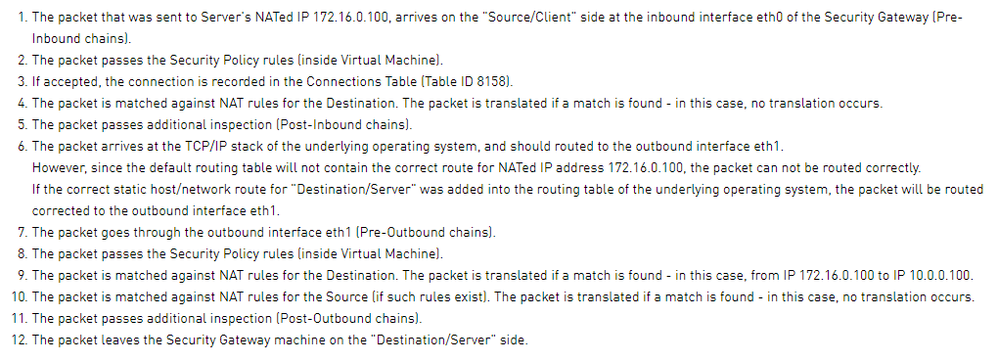
Per sk85460 says:
Detailed example:
Server side scenario:
If the correct static host/network route for "Destination/Server" was added into the routing table of the underlying operating system, the packet will be routed corrected to the outbound interface eth1.
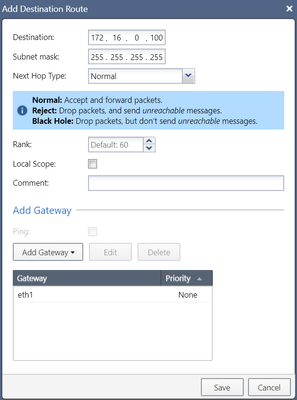
I add 172.16.0.100 as below, but not work.
In this case, what routed I should add ?
If the NAT IP is 172.16.0.100 and the real IP is 10.0.0.100, you would add a route for 172.16.0.100 with 10.0.0.100 configured as the nexthop.
That said, I'm not sure why you're doing this as the the default configuration (with Translate Destination on Client Side enabled) does not require a route like this.
Hi PhoneBoy,
I just LAB (Translate destination on client side / Translate destination on server side), because in this case (Translate destination on server side) I can not LAB success.
"If the correct static host/network route for "Destination/Server" was added into the routing table of the underlying operating system, the packet will be routed corrected to the outbound interface eth1."
My Lab topology is show as below:
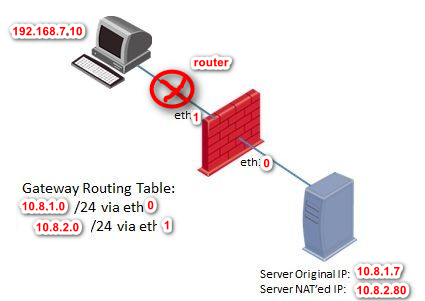
I create 2 NAT rule :

When translate on client side is check, I can revived web portal. fw monitor show as below:

When translate on client side is uncheck, fw monitor show as below:

but O is not current, it should be eth0, show I add routing as below:

fw monitor:
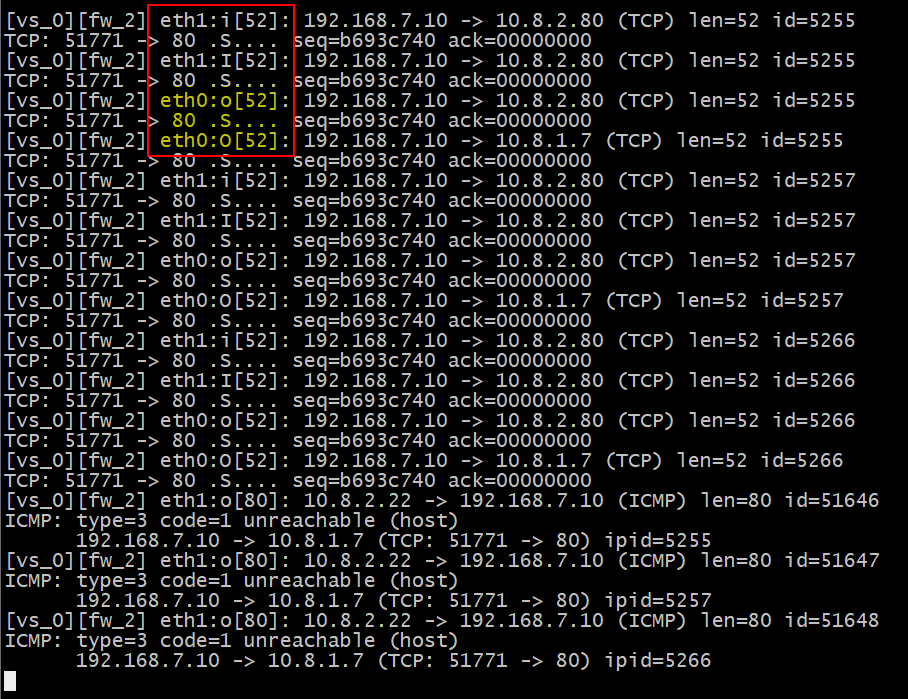
now it looks current interface, but still can't received web portal.
so I add web server second IP 10.8.2.80. and it is work. I can received web portal. fw monitor is show as below

In my lab, is it connection or route issue with access web portal even I add route?
or this is current configuration for this lab (translate on server side) ?

My Lab topology is show as below:
I create 2 NAT rule :
When translate on client side is check, I can revived web portal. fw monitor show as below:
When translate on client side is uncheck, fw monitor show as below:
but O is not current, it should be eth0, show I add routing as below:
fw monitor:
now it looks current interface, but still can't received web portal.
so I add web server second IP 10.8.2.80. and it is work. I can received web portal. fw monitor is show as below
In my lab, is it connection or route issue with access web portal even I add route?
or this is current configuration for this lab (translate on server side) ?
Please remove this manual route and configure Static NAT in the properties of the Object of your server entering it's "Public" IP in the NAT tab.
This will create an automatic Proxy ARP entry on the "external" interface and will accept and forward traffic to the destination.
As far as routes go, both, Internal and External networks are going to be shown in your "Connected Routes".
Leaderboard
Epsum factorial non deposit quid pro quo hic escorol.
| User | Count |
|---|---|
| 20 | |
| 20 | |
| 16 | |
| 8 | |
| 7 | |
| 3 | |
| 3 | |
| 3 | |
| 3 | |
| 3 |
Fri 12 Dec 2025 @ 10:00 AM (CET)
Check Mates Live Netherlands: #41 AI & Multi Context ProtocolTue 16 Dec 2025 @ 05:00 PM (CET)
Under the Hood: CloudGuard Network Security for Oracle Cloud - Config and Autoscaling!Fri 12 Dec 2025 @ 10:00 AM (CET)
Check Mates Live Netherlands: #41 AI & Multi Context ProtocolTue 16 Dec 2025 @ 05:00 PM (CET)
Under the Hood: CloudGuard Network Security for Oracle Cloud - Config and Autoscaling!About CheckMates
Learn Check Point
Advanced Learning
YOU DESERVE THE BEST SECURITY