- Products
- Learn
- Local User Groups
- Partners
- More
MVP 2026: Submissions
Are Now Open!
What's New in R82.10?
10 December @ 5pm CET / 11am ET
Announcing Quantum R82.10!
Learn MoreOverlap in Security Validation
Help us to understand your needs better
CheckMates Go:
Maestro Madness
Hi,
Customer has a VTI VPN between office Check Point and Data Centre Check Point and there is connectivity between the 2 sites.
Internet access is via DC Check Point.
Traffic from office Check Point (e.g. DNS to 8.8.8.8) is dropped on DC Check Point due to "clear text packet should be encrypted".
I can't see why the DC gateway expects this to be encrypted - no overlapping encryption domains, etc.
As expected the tunnel test traffic is encrypted/decrypted between the 2.
Any ideas?
Hi,
I applied sk25675 (NON_VPN_Traffic rules), added the peer IP and it resolved the issue.
Clear-text connections from the peer to the Internet were allowed.
We need some more information including:
The Office gateway didn't think it needed to encrypt the traffic to the remote gateway.
Hi
Office: SMB 1600 R81.10
Main DC: R81.10 JHF take 55
Both gateways have an empty group as the encryption domain as the VPN is route based.
Its correct that the office SMB doesn't encrypt as this traffic is not routed down the VPN.
You said in your original post that all traffic from the office site is routed over VPN to the DC site.
That would imply all traffic to the Internet would be routed to the DC site, including DNS lookups.
Because of the empty encryption domain, it seems reasonable for the DC gateway to assume everything that comes from the specific remote gateway SHOULD be encrypted.
Thus, the error message.
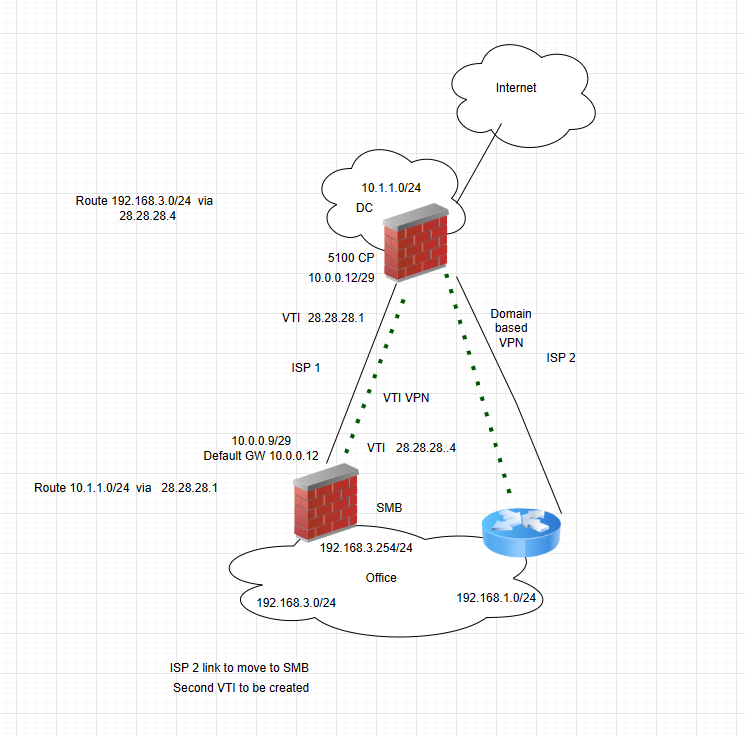
A simple network diagram might be helpful to understand where traffic is supposed to be going.
Hey @Mark_Edwards ,
I think maybe fw monitor capture would help us here, so we can see if traffic even takes the right path. So lets assume src is 1.1.1.1 and dst is 2.2.2.2 and dst port is 3389, as we dont care about src port, you could do something like below (-o to output to a file)
fw monitor -F "srcip,srcport,dstip,dstport,protocol" -F "srcip,srcport,dstip,dstport,protocol"
fw monitor -F "1.1.1.1,0,2.2.2.2,3389,0" -F "2.2.2.2,0,1.1.1.1,3389,0" -o /var/log/vpncapture.pcap
Once you dump the file in wireshark, you can filter for fw direction -> fw1.direction eq "i"
or whatever inspection point you want to see
Andy
Hi,
I applied sk25675 (NON_VPN_Traffic rules), added the peer IP and it resolved the issue.
Clear-text connections from the peer to the Internet were allowed.
Leaderboard
Epsum factorial non deposit quid pro quo hic escorol.
| User | Count |
|---|---|
| 27 | |
| 20 | |
| 16 | |
| 5 | |
| 5 | |
| 4 | |
| 4 | |
| 4 | |
| 3 | |
| 3 |
Fri 12 Dec 2025 @ 10:00 AM (CET)
Check Mates Live Netherlands: #41 AI & Multi Context ProtocolTue 16 Dec 2025 @ 05:00 PM (CET)
Under the Hood: CloudGuard Network Security for Oracle Cloud - Config and Autoscaling!Fri 12 Dec 2025 @ 10:00 AM (CET)
Check Mates Live Netherlands: #41 AI & Multi Context ProtocolTue 16 Dec 2025 @ 05:00 PM (CET)
Under the Hood: CloudGuard Network Security for Oracle Cloud - Config and Autoscaling!Thu 18 Dec 2025 @ 10:00 AM (CET)
Cloud Architect Series - Building a Hybrid Mesh Security Strategy across cloudsAbout CheckMates
Learn Check Point
Advanced Learning
YOU DESERVE THE BEST SECURITY