- Products
- Learn
- Local User Groups
- Partners
- More
MVP 2026: Submissions
Are Now Open!
What's New in R82.10?
10 December @ 5pm CET / 11am ET
Announcing Quantum R82.10!
Learn MoreOverlap in Security Validation
Help us to understand your needs better
CheckMates Go:
Maestro Madness
Dear friends i have never done PBR in Checkpoint so i need help suggestions for this concrete question.
I have read the SK's so i have some kind of understanding.
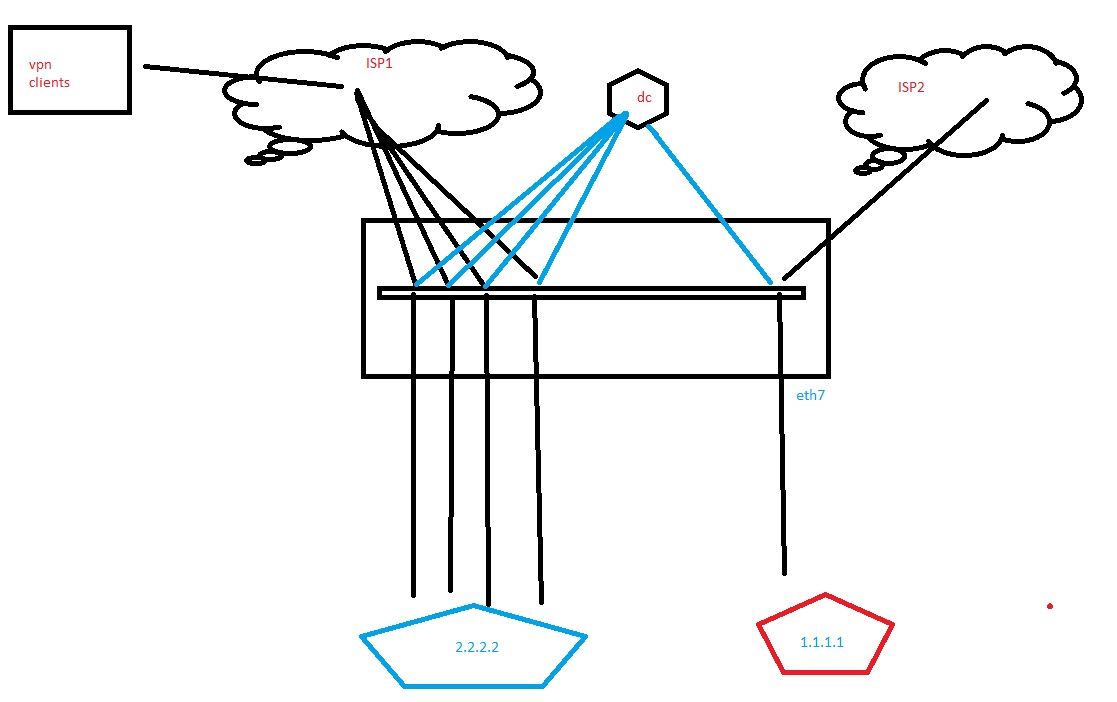
What baffles me is as you see in attach i have one internal network that should communicate with DC and it does.
Now we got second ISP ISP2 on the drawing, i want to send all internet traffic from that 1.1.1.1 LAN to that ISP2.
all other networks are going to internet to ISP1.
i have in static routes 0.0.0.0 next hop ISP1
and for the communication with DC i have x.x.x.x next hop some internal gw.
everything works .
Now i want to send\receive internet traffic from 1.1.1.1 to ISP2 and not to disrupt communication with DC.
Hope i was clear and simple.
thanks in advance 🙂

Hi,
You need to create two PBR rules in your PBR configuration and in the order below.
1. Traffic from 1.1.1.1 to DC needs to use the routing table (Main Table via internal gateway)
2. Traffic from 1.1.1.1 to internet needs to use the ISP2 Table.
If traffic goes to the DC, the first rule is hit. All other traffic is going via IPS2.
Maybe more rules are needed to suit your routing requirements.
Good luck.
Martijn
Create an Action Table specifying ISP2's default route.
Create a policy rule that references this table something like below.
Only the source(s) specified will be routed to ISP2.
Thanks for help,
i have tried this kind of settings but than my communication from 1.1.1.1 to DC is broken .Internet works.
so do i have to have more than one rule or table regarding the dc communication?
Please help
thank you
I would suggest to contact CP TAC to get this resolved!
It's been a while, but for as far as I can remember, PBR takes absolute precedence over all other routes. So if you create a Policy Based Route that sends all traffic from 1.1.1.1 to ISP2, you should add another PBR for the traffic from 1.1.1.1 towards DC as well.
Make sure to take the Hide-NAT for your internet traffic into account as well, as this will most probably differ between ISP1 and ISP2.
Just my two cents...
Hi,
You need to create two PBR rules in your PBR configuration and in the order below.
1. Traffic from 1.1.1.1 to DC needs to use the routing table (Main Table via internal gateway)
2. Traffic from 1.1.1.1 to internet needs to use the ISP2 Table.
If traffic goes to the DC, the first rule is hit. All other traffic is going via IPS2.
Maybe more rules are needed to suit your routing requirements.
Good luck.
Martijn
Thanks to you all i have managed to setup this to work .
There were some shenanigan's with the NAT but now it is solved .
Leaderboard
Epsum factorial non deposit quid pro quo hic escorol.
| User | Count |
|---|---|
| 28 | |
| 20 | |
| 15 | |
| 5 | |
| 5 | |
| 5 | |
| 4 | |
| 4 | |
| 4 | |
| 3 |
Fri 12 Dec 2025 @ 10:00 AM (CET)
Check Mates Live Netherlands: #41 AI & Multi Context ProtocolTue 16 Dec 2025 @ 05:00 PM (CET)
Under the Hood: CloudGuard Network Security for Oracle Cloud - Config and Autoscaling!Fri 12 Dec 2025 @ 10:00 AM (CET)
Check Mates Live Netherlands: #41 AI & Multi Context ProtocolTue 16 Dec 2025 @ 05:00 PM (CET)
Under the Hood: CloudGuard Network Security for Oracle Cloud - Config and Autoscaling!Thu 18 Dec 2025 @ 10:00 AM (CET)
Cloud Architect Series - Building a Hybrid Mesh Security Strategy across cloudsAbout CheckMates
Learn Check Point
Advanced Learning
YOU DESERVE THE BEST SECURITY