- Products
- Learn
- Local User Groups
- Partners
- More

MVP 2026: Submissions
Are Now Open!
What's New in R82.10?
10 December @ 5pm CET / 11am ET
Announcing Quantum R82.10!
Learn MoreOverlap in Security Validation
Help us to understand your needs better
CheckMates Go:
Maestro Madness
Hello, everybody.
I have a curiosity about "Address Spoofing".
It is clear to me that when the log shows you a "DETECT" action, the traffic is "allowed", but is it important to "check" the reason for this traffic?
Having this type of logs, can give us "indications" of "Networking" problems in the network of a company?
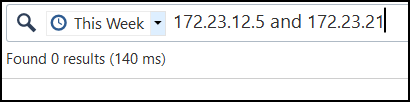
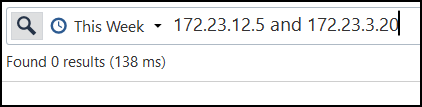
I want to communicate to IP:172.23.12.5 with IP:172.23.3.21, but there is no traffic registered in the CP.
I have policies, I have routes, I have tried with "TCPDUMP" "CPPCAP" "FW MONITOR", but none of these tools show me traffic, when traffic is generated (a simple PING, or a Telnet to any port).
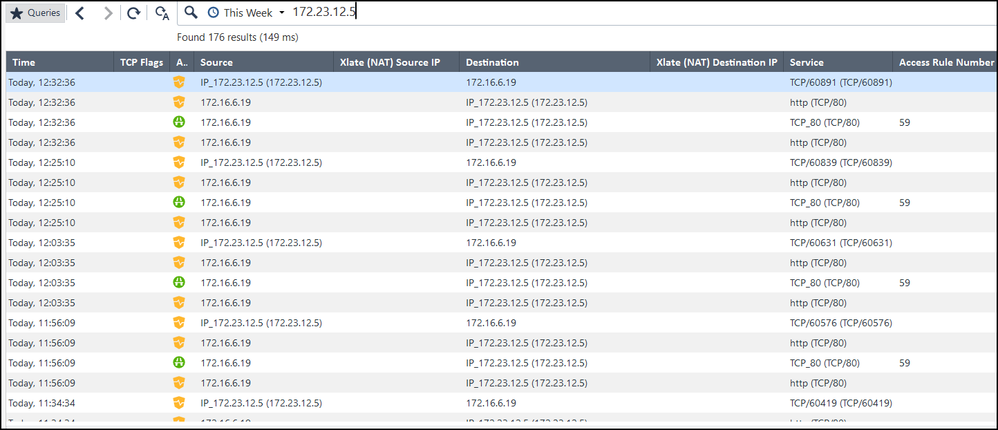
When I "search" in the logs for the origin with IP:172.23.12.5, I only get irrelevant traffic to "other IPs" that have nothing to do with my target.
Could this be a routing problem?
Cheers :).
Absolutely that looks like a routing problem. It appears to be the reply traffic that is triggering anti-spoofing because the source port and destination port are inverted in the logs. So a device out on bond2.303 is sending traffic with a destination of 10.10.100.1 back to the firewall. I am guessing the firewall just routed that packet with a destination of 172.23.12.5:80 out that bond2.303 interface. Could be something else going on though. Potential ICMP redirects flying around but you would see that in pcap. Could be post NAT if that packet was previously NATted.
log filters of
xlatesrc:10.10.100.1 or s_port:58432 or xlatesport:58432
or some combination of that may help you find the initial request that the packet triggering anti-spoofing is replying to, that is assuming the request went through the firewall, may be some async routing going on where the firewall is only catching that reply
Hello,
I have a dilemma with "certain" types of traffic and Antispoofing messages.
Source: 172.23.12.5
Destination: 172.23.3.21, 172.23.3.20
Service (Test): ICMP
I have made attempts to capture traffic, with "tcpdump" "cppcap" "fw monitor" "fw ctl zdebug" and the active "Firewall" of my ClusterXL is not able to "capture" anything, when traffic is generated with a simple PING.
When I just filter in the logs, the source IP, I do get "data" but to my perception, it is "junk data", because it is nothing of what I am trying to capture.
The only thing I see "relevant" when I filter only the ORIGIN, is that all the logs I see, most of them, "emphasize" an Address spoofing issue and I am not sure, if it is an important point to take into account, for my analysis.
Greetings.
I think filter might be slightly off bro...usually people would do src:x.x.x.x AND dst:x.x.x.x
example -> src:1.1.1.1 AND dst:2.2.2.2
Andy
See example below. One of my lab fws is 172.16.10.249 and I was pinging google dns from it.
Andy
What does the anti-spoofing configuration for bond2.303 look like? I would guess that bond2.303 is missing that source address 172.23.12.5 from its topology. Or that address is configured behind a different interface's topology, so the firewall does not like seeing that source address 172.23.12.5 coming inbound on bond2.303.
Leaderboard
Epsum factorial non deposit quid pro quo hic escorol.
| User | Count |
|---|---|
| 21 | |
| 20 | |
| 16 | |
| 8 | |
| 7 | |
| 3 | |
| 3 | |
| 3 | |
| 3 | |
| 3 |
Fri 12 Dec 2025 @ 10:00 AM (CET)
Check Mates Live Netherlands: #41 AI & Multi Context ProtocolTue 16 Dec 2025 @ 05:00 PM (CET)
Under the Hood: CloudGuard Network Security for Oracle Cloud - Config and Autoscaling!Fri 12 Dec 2025 @ 10:00 AM (CET)
Check Mates Live Netherlands: #41 AI & Multi Context ProtocolTue 16 Dec 2025 @ 05:00 PM (CET)
Under the Hood: CloudGuard Network Security for Oracle Cloud - Config and Autoscaling!About CheckMates
Learn Check Point
Advanced Learning
YOU DESERVE THE BEST SECURITY