


- Products
- Learn
- Local User Groups
- Partners
- More

Simplify Admin Operations with R82.20
Wed, 19 August @ 5pm CET/11am EDT
The industry's first AI Network Firewall
Securing AI traffic, everywhere
The State of Ransomware Q2 2026:
This Quarter's Trends, and Their Impact on Your Defenses
READY OR NOT: Securing the AI Enterprise
AI Research & Threat Landscape
CheckMates Go:
No Attack Required


asy Backup Tool
| Features |
|---|
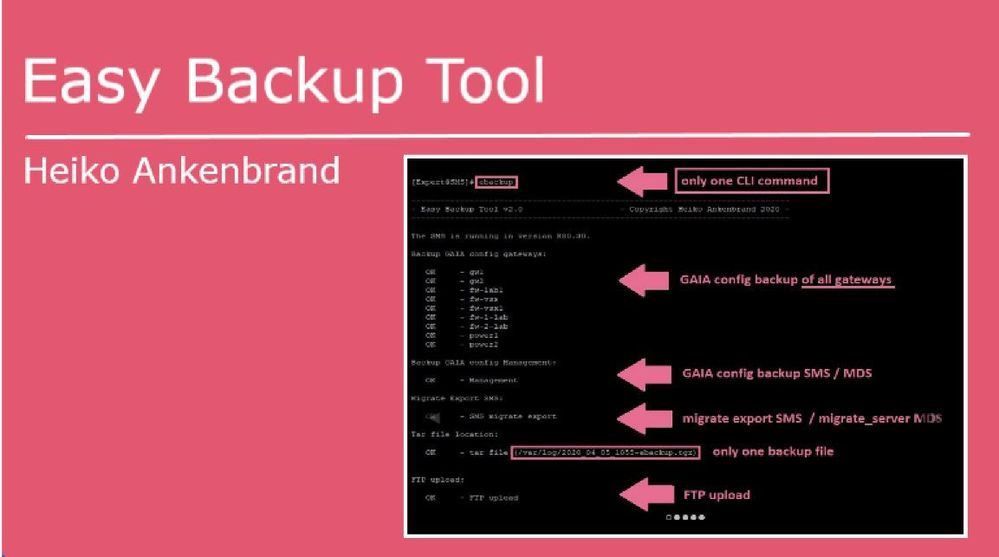
This tool creates a backup of all GAIA gateway configurations with one CLI command "ebackup":
- Only one CLI command "ebackup"
- Backup of all Gaia gateway configurations (Check Point appliances, Open Server, SMB appliances 11xx, 14xx)
- Migrate export on SMS
- Migrate-server on MDS
- Backup all files to one TGZ file
- FTP upload support backup file
- CP upload support for backup file via cprid_util
- MDS > All CMA's are read out and their gateways backuped.
- SMS > All gateways are read out and backuped.
Note:
- Tested with R80.10, R80.20 and R80.30.
- If the tool is started on a MDS, a mdsstop and mdsstart is performed during the migrate_server export.
| CLI Parameter |
|---|
| Syntax | Description |
| -s |
The option -s performs a cpstop and cpstart when the migrate export tool is executed. |
| -v |
The option -v shows the gateway OS, JHF, Kernel, Type of all gateways. |
| -l | The option -l shows all ebackup tgz files in /var/log/. |
| -d | The option -d delete all ebackup tgz files in /var/log/. |
| -no_migrate / -n | The option -no_migrate has the consequence that no migrate export is executed. |
| -port <sms port> / -p <sms port> |
The option -port <sms port> add the management server port, if it's not running on port 443. |
| -ftpserver <ftp server ip> -ftpuser <username> -ftppw <password> |
The ftp options allow to upload the tar file to a ftp server. |
| - cpupload <cp_system_ip> |
The option -cpupload performs a backup upload to a other Check Point gateway or SMS via cprid_util. |
| Example |
|---|
# ebackup -> Backup all GAIA configs from all gateways + migrate export with locale backup file (/var/log/[date]_ebackup.tgz)
# ebackup -s -> Backup all GAIA configs from all gateway + migrate export with cpstop and cpstart for migrate export
# ebackup -no_migrate -> Backup all GAIA configs from all gateway without migrate export
# ebackup -ftpserver 1.1.1.1 -ftpuser username -ftppw test123 -> Backup all GAIA configs from all gateway + migrate export with ftp upload
# ebackup -cpupload 1.1.1.1 -> Backup all GAIA configs from all gateway + migrate export with cp upload via cprid_util
|
Install Tool |
|---|
Use this auto installer script from "Spoiler" on the SMS or MDS as CLI command in expert mode:
curl_cli -k http://www.ankenbrand24.de/inst_ebackup > /tmp/inst_ebackup && chmod 770 /tmp/inst_ebackup && /tmp/inst_ebackupOr "copy and past" the following script block from "Spoiler" to your SMS or MDS (in expert mode):
cat <<EOT > /usr/bin/ebackup
#!/bin/bash
#
# Script Author  : Heiko Ankenbrand
# Script Website : https://www.ankenbrand24.de
# Script Source  : https://www.ankenbrand24.de/inst_ebackup
# License        : GNU General Public License (GPL)
#
if [[ -e /etc/profile.d/CP.sh ]]; then source /etc/profile.d/CP.sh; else echo "Unsupported Environment"; exit 1; fi
if [[ -e /etc/profile.d/vsenv.sh ]]; then source /etc/profile.d/vsenv.sh; fi
FILE_PATH="/var/log/ebackup";
mkdir \$FILE_PATH > /dev/null 2>&1;
rm /tmp/ebackup_topo > /dev/null 2>&1;
rm /tmp/ebackup_MGTIP > /dev/null 2>&1;
# rm /usr/local/bin/ebackup > /dev/null 2>&1;
rm /tmp/ebackup_mdsstatus > /dev/null 2>&1;
rm /tmp/ebackup_login > /dev/null 2>&1;
rm /tmp/ebachup_cpupload /dev/null 2>&1;
REMOTE_RM="\$FILE_PATH/202*";
rm \$REMOTE_RM > /dev/null 2>&1;
NOW=\$(date +"%Y_%m_%d_%H%M");
clear;
echo -e "\e[7m";
printf '%.s-' {1..78};echo;
echo '- Easy Backup Tool v3.0                    - Copyright Heiko Ankenbrand 2023 -';
printf '%.s-' {1..78};
echo -e "\e[0m"
SHOW_SUM="0";
MIGRATE="1";
MGPORT="443";
FTPSERVER="";
FTPPW="non";
FTPUSER="anonymous";
serv_value="99";
REMOTE_INFO_V="0";
RVER=`fwm ver | awk '{print \$8}'`;

mSITIONAL=()
while [[ \$# -gt 0 ]]
do
key="\$1"
case \$key in
    -h|--help|-\?)
       shift;
       echo;echo 'Help: ';echo;
       echo "-l, --list                 The option -l  shows all ebackup tgz files in /var/log/.";
       echo "-d, --delete               The option -d  delete all ebackup tgz files in /var/log/.";
       echo "-s, --stop                 The option -s  performs a cpstop and cpstart when the migrate export tool is executed.";
       echo "-n, --no_migrate           The option -n  has the consequence that no migrate export/ migrate_server is executed.";
       echo "-v, --version              The option -v  shows the gateway OS, JHF, Kernel, Type";
       echo "-u, --user                 The option -u  shows the conneted users on the SMS";
       echo "-p <port>, -port <port>    The option -p  <port> add the management server port, if it's not running on port 443.";
       echo "-ftpserver <ftp server ip> The ftp options allow to upload the tar file to a ftp server.";
       echo "-ftpuser <username> ";
       echo "-ftppw <password>";
       echo "-cpupload <cp system ip>   The option -cpupload performs a backup upload to a other Check Point gateway or SMS via cprid_util.";
       echo "";
       echo "Examples:";
       echo "ebackup -s -ftpserver 192.168.1.1 -ftpuser test -ftppw secret -> backup all gateways + migrate export + cpstop + ftp upload";
       echo "ebackup -s -cpupload  192.168.1.1                             -> backup all gateways + migrate export + cpstop+ ";
       echo "                                                                 backup of the tgz file to another gateway or SMS";
       echo "ebackup -n                                                    -> backup all gateways + without migrate export";
       echo;printf '%.s-' {1..78};echo;
       SHOW_SUM="0";
       exit 1;
    ;;
    -s|--stop)
       shift;
       SHOW_SUM="1";
    ;;
    -v|--version)
       shift;
       SHOW_SUM="1";
       REMOTE_INFO_V="1";
    ;;
    -u|--user)
       shift;
       SHOW_SUM="1";
       echo; cpstat mg |grep -e '|\|-' | cat; echo;
       exit 1;
    ;;
    -d|--delete)
       shift;
       SHOW_SUM="1";
       echo; echo "Delete all ebackup tgz files.";echo;
       rm /var/log/202* > /dev/null 2>&1;
       exit 1;
    ;;
    -l|--list)
       shift;
       SHOW_SUM="1";
       echo;echo -e "File \t\t\t\t\tBytes";
       printf '%.s-' {1..78};
       echo; ls -la /var/log/202* 2>&1| grep -v access|  awk '{print \$9 "\t\t" \$5}' |sed 's/\/var\/log\///'; echo;
       exit 1;
    ;;
    -port|-p)
       MGPORT="\$2";
       shift;
       shift;
       SHOW_SUM="0";
    ;;
    -ftpserver)
       FTPSERVER="\$2";
       shift;
       shift;
       SHOW_SUM="0";
    ;;
    -ftpuser)
       FTPUSER="\$2";
       shift;
       shift;
       SHOW_SUM="0";
    ;;
    -ftppw)
       FTPPW="\$2";
       shift;
       shift;
       SHOW_SUM="0";
    ;;
     -cpupload)
       CPUPLOAD="\$2";
       shift;
       shift;
       SHOW_SUM="0";
    ;;
    --no_migrate|-no_migrate|-n)
       shift;
       SHOW_SUM="0";
       MIGRATE="0";
    ;;

    *)    # unknown option
    #echo "unknown"
    POSITIONAL+=("\$1") # save it in an array for later
    shift # past argument
    SHOW_SUM="1";
    ;;
esac
done

############ Check MDS and SMS     #########
echo;

if [ "X\$MDSDIR" != "X" ]; then
     MDSSTATUS_HA=\$(mdsstat | grep -m 1 MDS | awk '{print \$8}');
     if [ \$MDSSTATUS_HA = "up"  ]; then
           mgmt_cli -r --port \$MGPORT true show version 2>&1> /tmp/ebackup_login;
           if grep -q Gaia /tmp/ebackup_login; then
               echo -n "The MDS is running in version "\$RVER;echo ".";echo;
               serv_value="1";
           else
               echo "The MDS is running but a connect to management API isn't possible.";echo;
               exit 1;
           fi
     else
         echo -n "MDS is not running. (Status > "\$MDSSTATUS_HA;echo ")";echo;
         exit 1;
     fi
else
     #Check SMS
     CPM_PID=\$(ps -efww | grep java | grep cpm.Cpm | awk '{print \$2}');
     if [ -z \$CPM_PID ]; then
           echo "The SMS is not running.";echo;
     exit 1;
     else
           mgmt_cli -r --port \$MGPORT true show version 2>&1> /tmp/ebackup_login;
           if grep -q Gaia /tmp/ebackup_login; then
               echo -n "The SMS is running in version "\$RVER;echo ".";echo;
               serv_value="0";
           else
               echo "The SMS is running but a connect to management API isn't possible.";echo;
               exit 1;
           fi
     fi
fi
if [ \$serv_value -eq 1  ]; then
   mdsenv > /dev/null 2>&1;
   mdsstat | grep CMA | awk '{print \$6}' >> /tmp/ebackup_MGTIP
   mdsstat | grep MDS | awk '{print \$6}' >> /tmp/ebackup_MDSIP
fi
############ Read gateways     #########
if  [ \$serv_value -gt 0  ]; then
       echo "Read gateways from CMA: ";echo;
       while read -r hostip;
       do
           CMASTATUS_HA=\$(mdsstat | grep CMA| grep \$hostip | awk '{print \$8}');
           CMANAME_HA=\$(mdsstat | grep CMA| grep \$hostip | awk '{print \$4}');
           if [ \$CMASTATUS_HA = "up"  ]; then
               echo "   OK     - "\$CMANAME_HA;
               CMACOUNT=\$(mgmt_cli -r --port \$MGPORT true -d \$hostip show gateways-and-servers offset 0 limit 500 details-level full --format json | \$CPDIR/jq/jq -r '.objects[] | select(.type | contains("Member","simple-gateway")) | ."ipv4-address",."name"  ' |xargs -n 2| grep -c ".");
               if [ \$CMACOUNT != 0 ]; then
                     mgmt_cli -r --port \$MGPORT true -d \$hostip show gateways-and-servers offset 0 limit 500 details-level full --format json | \$CPDIR/jq/jq -r '.objects[] | select(.type | contains("Member","simple-gateway","CpmiClusterMember", "cluster-member")) | ."ipv4-address",."name"  ' |xargs -n 2 | grep -v 0.0.0.  | sed -e "s/\$/ \$hostip/"  >> /tmp/ebackup_topo;
               fi
           else
               echo " Failed   - "\$CMANAME_HA;
           fi
       done < /tmp/ebackup_MGTIP
       echo;
else
     # read SMS gateways
     mgmt_cli -r --port \$MGPORT true show gateways-and-servers details-level full limit 500 offset 0 --format json | \$CPDIR/jq/jq -r '.objects[] | select(.type | contains("Member","simple-gateway","CpmiClusterMember", "cluster-member")) | ."ipv4-address",."name"  ' |xargs -n 2 | grep -v 0.0.0. |grep -v null | sed -e "s/\$/ x.x.x.x/" 2>&1> /tmp/ebackup_topo;
fi
######## GAIA Config save all gateways   #########
if [ ! -f /tmp/ebackup_topo ]; then
   echo "No gateways found!";
else
   echo "clish -c 'show configuration' > /var/log/g_output.txt" > /tmp/g_command.txt;
   echo "Backup GAIA config gateways:";echo;
   while read -r REMOTE_IP REMOTE_NAME REMOTE_CMA;
     do
     REMOTE_FILE="\$NOW-\$REMOTE_NAME";
     REMOTE_DATEI="\$FILE_PATH/\$REMOTE_FILE";
     mdsenv \$REMOTE_CMA > /dev/null 2>&1;
     $CPDIR/bin/cprid_util -server \$REMOTE_IP putfile -local_file /tmp/g_command.txt -remote_file /var/log/g_command.txt > /dev/null 2>&1;
     $CPDIR/bin/cprid_util -server \$REMOTE_IP -verbose rexec -rcmd /bin/bash -f /var/log/g_command.txt > /dev/null 2>&1;
     $CPDIR/bin/cprid_util -server \$REMOTE_IP getfile -remote_file /var/log/g_output.txt -local_file \$REMOTE_DATEI > /dev/null 2>&1;
     #echo -n "";
     if [ ! -f \$REMOTE_DATEI ]; then
       echo -n " Failed   - ";
       else
       if grep -q hostname \$REMOTE_DATEI; then
          echo -n "   OK     - ";
          if [ \$REMOTE_INFO_V == "1" ] ; then
            $CPDIR/bin/cprid_util -server \$REMOTE_IP putfile -local_file /usr/bin/ebackup_command -remote_file /var/log/ebackup_command.txt > /dev/null 2>&1;
            $CPDIR/bin/cprid_util -server \$REMOTE_IP -verbose rexec -rcmd /bin/bash -f /var/log/ebackup_command.txt > /dev/null 2>&1;
            $CPDIR/bin/cprid_util -server \$REMOTE_IP getfile -remote_file /var/log/g_output1.txt -local_file /tmp/ebackup_gateway_info.txt > /dev/null 2>&1;
          fi
       else
          echo -n " Failed   - ";
       fi
     fi
     echo -n \$REMOTE_NAME;
     echo -n "   ";
     if [ \$REMOTE_INFO_V == "1" ] ; then
        if [ -f /tmp/ebackup_gateway_info.txt ]; then
           REMOTE_INFO=\$(cat /tmp/ebackup_gateway_info.txt);
           echo; echo -n "           " \$REMOTE_INFO;
           rm /tmp/ebackup_gateway_info.txt;
           else
           echo; echo -n "            (no gateway information available)";
        fi
     fi
     if [ \$serv_value -eq 1  ]; then
        CMANAME_HA=\$(mdsstat | grep \$REMOTE_CMA | awk '{print \$4}');
        echo;    echo -n "            (CMA: "\$CMANAME_HA;echo -n ")";
     fi
     echo;
    done < /tmp/ebackup_topo;
fi
echo;
######## GAIA config management save     #########
echo "Backup GAIA config Management:";echo;
REMOTE_FILE="\$NOW-Management";
REMOTE_DATEI="\$FILE_PATH/\$REMOTE_FILE";
clish -c 'show configuration' > \$REMOTE_DATEI;
     if [ ! -f \$REMOTE_DATEI ]; then
       echo -n "  Failed - ";
       else
       if grep -q hostname \$REMOTE_DATEI; then
          echo -n "   OK     - ";
       else
          echo -n " Failed   - "
       fi
     fi
     echo -n "Management   ";
     /usr/bin/ebackup_command;
     if [ \$REMOTE_INFO_V == "1" ] ; then
        if [ -f /var/log/g_output1.txt ]; then
           REMOTE_INFO=\$(cat /var/log/g_output1.txt);
           echo; echo -n "           " \$REMOTE_INFO;
           rm /var/log/g_output1.txt;
        fi
     fi
     echo;echo;

############## SMS ############################
# SMS migrate export
if [ \$serv_value -eq 0  ]; then
  if [ \$MIGRATE == "1" ] ; then
    REMOTE_FILE="\$NOW-SMS-Migrate-Export";
    REMOTE_DATEI="\$FILE_PATH/\$REMOTE_FILE";
    echo;echo "Migrate Export SMS:";echo;
    if [ \$SHOW_SUM == "1" ] ;
      then
        cpstop > /dev/null 2>&1;
        echo "   OK     - cpstop";
    fi
    REMOTE_DATEI_CHK="\$REMOTE_DATEI.tgz";

    $FWDIR/bin/upgrade_tools/migrate export -n \$REMOTE_DATEI 2>&1> \tmp\ebackup_migrate ;
       if [ ! -f \$REMOTE_DATEI_CHK ]; then
           echo " Failed   - SMS migrate export";
       else
           echo "   OK     - SMS migrate export";
       fi

    if [ \$SHOW_SUM == "1" ] ;
      then
        cpstart > /dev/null 2>&1;
        echo "   OK     - cpstart";
    fi
  fi
fi
############## MDS ############################
if [ \$MIGRATE == "1" ] ; then
 if  [ \$serv_value -gt 0  ]; then
   VER=`fwm ver | awk '{print \$8}' | sed 's/R80.//g'`
   if [ \$VER -lt 30  ]; then
        ### MDS version R80, R80.10, R80.20 migrate export
        REMOTE_FILE="\$NOW-MDS-Migrate-Export";
        REMOTE_DATEI="\$FILE_PATH/\$REMOTE_FILE";
        mds/tmp/ebackup_migrateenv > /dev/null 2>&1
        echo -n "MDS migrate export (migrate export) "\$RVER;echo ":";echo;
        if [ \$SHOW_SUM == "1" ] ;then
           mdsstop > /dev/null 2>&1;
           echo "   OK     - MDS mdsstop";
        fi
        \$MDS_FWDIR/bin/upgrade_tools/migrate export -n \$REMOTE_DATEI 2>&1> /tmp/ebackup_migrate ;
        if [ ! -f \$REMOTE_DATEI_CHK ]; then
           echo " Failed   - MDS R80, R80.10, R80.20 (migrate export)";
        else
           echo "   OK     - MDS R80, R80.10, R80.20 (migrate export)";
        fi
        if [ \$SHOW_SUM == "1" ] ;then
           mdsstart > /dev/null 2>&1;
           echo "   OK     - MDS mdsstart";
        fi
   else
        ### MDS version R80.30+ migrate_server
        REMOTE_FILE="\$NOW-MDS-Migrate-Server";
        REMOTE_DATEI="\$FILE_PATH/\$REMOTE_FILE";
        mdsenv > /dev/null 2>&1;
        echo;echo -n "MDS migrate server (migrate_server) "\$RVER;echo ":";echo;
        \$MDS_FWDIR/scripts/migrate_server export -skip_upgrade_tools_check -n -v \$RVER \$REMOTE_DATEI 2>&1> /tmp/ebackup_migrate ;

            if grep -q "sk135172" /tmp/ebackup_migrate; then
                echo " Failed   - MDS R80.30+ migrate_server export (No upgrade tools package is installed refer to sk135172)";
            else
                if [ ! -f \$REMOTE_DATEI ]; then
                    echo " Failed   - MDS R80.30+ migrate_server export";
                else
                    echo "   OK     - MDS R80.30+ migrate_server export";
                fi
            fi
   fi
 fi
fi
############## TAR ############################
echo;echo "Tar file location:";echo;
REMOTE_FILE="\$NOW-ebackup";
REMOTE_DATEI="/var/log/\$REMOTE_FILE.tgz";
REMOTE_TAR="\$FILE_PATH";
# echo \$REMOTE_TAR
# echo \$REMOTE_DATEI

tar -czf \$REMOTE_DATEI \$REMOTE_TAR> /dev/null 2>&1;

     if [ ! -f \$REMOTE_DATEI ]; then
            echo " Failed   - tar file";
       else
          echo -n "   OK     - tar file (" ;
          echo -n \$REMOTE_DATEI;
          echo ")";
     fi
echo;
############## FTP ############################
if [ "X\$FTPSERVER" != "X" ]; then

   FTPDATEI="\$REMOTE_FILE.tgz";
   echo;echo "FTP upload:";echo;
   echo "
   verbose
   user \$FTPUSER \$FTPPW
   bin
   lcd /var/log
   put \$FTPDATEI
   bye
   " | /usr/bin/ftp -in \$FTPSERVER > /tmp/ebackup_ftp 2>&1;
   if grep -q 226 /tmp/ebackup_ftp; then
       echo "   OK     - FTP upload";
   else
       echo " Failed   - FTP upload (Log: /tmp/ebackup_ftp)";
   fi
   echo;
fi

############## CPUPLOAD ############################
if [ "X\$CPUPLOAD" != "X" ]; then


     #REMOTE_FILE="\$NOW-\$REMOTE_NAME";
     #REMOTE_DATEI1="\$FILE_PATH/\$REMOTE_FILE";
     CPUPLOADDATEI="\$REMOTE_DATEI";
     echo "CP upload to \$CPUPLOAD:";echo;
     echo "ls \$CPUPLOADDATEI > /var/log/g_output.txt" > /tmp/g_command.txt;
     $CPDIR/bin/cprid_util -server \$CPUPLOAD putfile -local_file /tmp/g_command.txt -remote_file /var/log/g_command.txt > /dev/null 2>&1;
     $CPDIR/bin/cprid_util -server \$CPUPLOAD putfile -local_file \$CPUPLOADDATEI -remote_file \$CPUPLOADDATEI  > /dev/null 2>&1;
     $CPDIR/bin/cprid_util -server \$CPUPLOAD -verbose rexec -rcmd /bin/bash -f /var/log/g_command.txt > /dev/null 2>&1;
     $CPDIR/bin/cprid_util -server \$CPUPLOAD getfile -remote_file /var/log/g_output.txt -local_file /tmp/ebachup_cpupload > /dev/null 2>&1;
     if [ ! -f /tmp/ebachup_cpupload ]; then
       echo " Failed   - CP upload to \$CPUPLOAD ";
       else
       if grep -q tgz /tmp/ebachup_cpupload; then
          echo "   OK     - CP upload file (\$CPUPLOADDATEI)";

       else
          echo " Failed   - CP upload to \$CPUPLOAD";
       fi
     fi
     echo;
fi


REMOTE_RM="\$FILE_PATH/202*";
rm \$REMOTE_RM > /dev/null 2>&1;
rm /tmp/g_command.txt > /dev/null 2>&1;
rm /tmp/ebackup_topo > /dev/null 2>&1;
rm /tmp/ebachup_cpupload > /dev/null 2>&1;
rm /tmp/ebackup_MGTIP > /dev/null 2>&1;
rm /tmp/ebackup_migrate > /dev/null 2>&1;
rm /tmp/ebackup_mdsstatus > /dev/null 2>&1;
rm /tmp/ebackup_login > /dev/null 2>&1;
EOT
cat <<EHA > /usr/bin/ebackup_command
#!/bin/bash
J=\`cpinfo -y all 2>/dev/null | grep JUMBO | tail -n1 | awk '{print \$3}'\`;
O=\`cat /etc/cp-release | cut -c 13- | sed 's/^ *//g' | sed 's/\s*$//g'\`;
OSM=\`uname -a | grep -c x86_64\`; [ \$OSM == 0 ] && { OSM=32; } || { OSM=64; };
K=\`uname -r | sed 's/\([0-9]\+\.[0-9]\+\)\..*/\1/'\`;
T=\`cpstat os | grep "Appliance Name" | tr -s ' ' | cut -c 17- \`;
echo "(\${O}, Kernel \${K}, \${OSM} Bit, JHF \${J}, \${T})" > /var/log/g_output1.txt ;
EHA
chmod 770 /usr/bin/ebackup;
chmod 770 /usr/bin/ebackup_command;
|
Create Cronjob |
|---|
If the ebackup tool should be executed automatically, only a cronjob has to be created.
|
More "Easy Tools" |
|---|
- Easy Backup Tool - (migrate export + all GAIA configs) -> Easy backup of all gateway GAIA configs + migrate export with one CLI command.
- Easy execute CLI commands on all gateways simultaneously -> Now you can use the new command to execute bash or clish commands on all gateway simultaneously.
- Easy execute CLI commands from management on gateways -> Easy execute CLI commands from management on gateways
- Mobile User License Tool - replaced "dtps lic" -> It displays all Secure Client, SSL VPN and Mobile Access Portal licenses in total (sum) on the SMS.
- Easy View Tool - (system infos from all gateways simultaneously) -> This toll shows you quickly an overview of status information of all your gateways with only one CLI command.
|
Version |
|---|
0.1 03-15-2020 - oneliner to show backup clish configs
0.6 03-23-2020 - GA version ebackup
0.7 03-25-2020 - add parameter -s for cpstop/cpstart
0.8 03-26-2020 - add parameter -no_migrate (no migrate export)
0.9 03-26-2020 - bug fixed (special thanks to Paul_Gademsky)
1.0 03-27-2020 - bug fixed (SMS and MDS)
1.1 03-30-2020 - add option -port
1.2 03-30-2020 - bug fixed
1.3 03-31-2020 - ftp upload function (-ftpserver, -ftpuser, -ftppw)
2.0 04-04-2020 - MDS support
2.1 04-06-2020 - bug fixed
2.2 04-07-2020 - add option -v
2.3 04-09-2020 - add option -cpupload (upload tgz file to a other Check Point gateway or SMS)
3.0 06-20-2023 - Support for R81.20
3.1 01-28-2026 - Support for R82 + R82.10 + ElasticXL
asy Backup Tool
| Features |
|---|
This tool creates a backup of all GAIA gateway configurations with one CLI command "ebackup":
- Only one CLI command "ebackup"
- Backup of all Gaia gateway configurations (Check Point appliances, Open Server, SMB appliances 11xx, 14xx)
- Migrate export on SMS
- Migrate-server on MDS
- Backup all files to one TGZ file
- FTP upload support backup file
- CP upload support for backup file via cprid_util
- MDS > All CMA's a
...;

Hello Heiko,
Does EasyBackup support R81.10? We recently upgraded and it no longer sees our Gateways. It found an older gateway in our environment but I had to change the gateway detection to .objects[] | select(.type | contains("Member","cluster-member")) in order to get it to see our R81.10 gateways.
Hello Heiko,
Does EasyBackup support R81.10? We recently upgraded and it no longer sees our Gateways. It found an older gateway in our environment but I had to change the gateway detection to .objects[] | select(.type | contains("Member","cluster-member")) in order to get it to see our R81.10 gateways.
ebackup is working but It is failing for 1 gateway and 2 sandbox devices, what could be the issue and how to resolve it ??
Version 3.0 is now 100% compatible with R81.10 and R81.20.
All minor bugs have been fixed and tested with the following versions:
R80.30
R80.40
R81
R81.10
R81.20

 Matt_Ricketts
Super minor and cosmetic, but you may want to update your initial post to reflect the updated/supported versions.
Looking forward to testing this out in my lab. I have missed this backup utility. Thank you @HeikoAnkenbrand for the update.
Super minor and cosmetic, but you may want to update your initial post to reflect the updated/supported versions.
Looking forward to testing this out in my lab. I have missed this backup utility. Thank you @HeikoAnkenbrand for the update.
; Tomer_Noy
Very nice tool @HeikoAnkenbrand !
Thanks for sharing it with the community.
Note that starting from R81.20 and a certain JHF in R81.10, there is no longer a need to restart the MDS or SMS services when performing export. The admins can continue to work seamlessly while the exports are running.
That should make the tool easier to use without worry from an automated job.
Perhaps you should update that in the headline documentation.
Very nice tool
@HeikoAnkenbrand !
Thanks for sharing it with the community.
Note that starting from R81.20 and a certain JHF in R81.10, there is no longer a need to restart the MDS or SMS services when performing export. The admins can continue to work seamlessly while the exports are running.
That should make the tool easier to use without worry from an automated job.
Perhaps you should update that in the headline documentation.
;
Matt_Ricketts
Thanks @Tomer_Noy. This may explain the issue I am having. When I run ebackup -s, the export fails at the pre verification stage and then my API and CPM services fail to restart until a reboot is done. My backup file is 4k in size, which is the GAiA configs.
Thanks @Tomer_Noy. This may explain the issue I am having. When I run ebackup -s, the export fails at the pre verification stage and then my API and CPM services fail to restart until a reboot is done. My backup file is 4k in size, which is the GAiA configs.
;
Matt_Ricketts
As Tomer noted, you no longer need to stop and start the cp services as of R81.20. In addition "migrate" is being depreciated and has been replaced with migrate_server. I ended up modifying Heiko's script a little to fit my SMS and it's been working perfectly. I don't have a MDS, so I didn't touch that part of the script. Below are my edits where I changed the migrate line to use migrate_server and its needed switches. I also commented out the cpstop and cpstart lines.
############## SMS ############################
# SMS migrate export
if [ $serv_value -eq 0 ]; then
if [ $MIGRATE == "1" ] ; then
REMOTE_FILE="$NOW-SMS-Migrate-Export";
REMOTE_DATEI="$FILE_PATH/$REMOTE_FILE";
echo;echo "Migrate Export SMS:";echo;
if [ $SHOW_SUM == "1" ] ;
then
# cpstop > /dev/null 2>&1;
echo " NO - cpstop";
fi
REMOTE_DATEI_CHK="$REMOTE_DATEI.tgz";

/opt/CPsuite-R81.20/fw1/scripts/migrate_server export -v $RVER -skip_upgrade_tools_check -n $REMOTE_DATEI 2>&1> \tmp\ebackup_migrate ;
if [ ! -f $REMOTE_DATEI_CHK ]; then
echo " Failed - SMS migrate export";
else
echo " OK - SMS migrate export";
fi

if [ $SHOW_SUM == "1" ] ;
then
# cpstart > /dev/null 2>&1;
echo " NO - cpstart";
fi
fi
fi
As Tomer noted, you no longer need to stop and start the cp services as of R81.20. In addition "migrate" is being depreciated and has been replaced with migrate_server. I ended up modifying Heiko's script a little to fit my SMS and it's been working perfectly. I don't have a MDS, so I didn't touch that part of the script. Below are my edits where I changed the migrate line to use migrate_server and its needed switches. I also commented out the cpstop and cpstart lines.
#######
Hello Heiko,
Thank You for your ebackup tool script.
We have configured new MGMT server on AWS cloud with vR81.10 & applied your ebackup script v3.0 on it.
We have configured cronjob to create ebackup on every monday & transfer that backup to AWS S3 bucket. EBackup is working as expected but it is not getting stored on S3 bucket through cronjob. Kindly help.
Regards,
Sunil Redekar
Hello Heiko,
Thank You for your ebackup tool script.
We have configured new MGMT server on AWS cloud with vR81.10 & applied your ebackup script v3.0 on it.
We have configured cronjob to create ebackup on every monday & transfer that backup to AWS S3 bucket. EBackup is working as expected but it is not getting stored on S3 bucket through cronjob. Kindly help.
Regards,
Sunil Redekar
;
This is the script I was looking to automate our management server migrate export to a FTP/SFTP server. Thanks for the script.
I'm getting the below error while I try to execute the command to FTP upload. Am I missing something here. Pls help.
ebackup -ftpserver <Server IP> -ftpuser Backup -ftppw <Password>
-bash: syntax error near unexpected token `)'
This is the script I was looking to automate our management server migrate export to a FTP/SFTP server. Thanks for the script.
I'm getting the below error while I try to execute the command to FTP upload. Am I missing something here. Pls help.
ebackup -ftpserver <Server IP> -ftpuser Backup -ftppw <Password>
-bash: syntax error near unexpected token `)'
Hello Heiko,
thank you for providing this tool. During our migration to R82, I noticed an issue in the script.
On line 17, the output was not redirected to /dev/null as intended. Instead, /dev/null gets deleted, which caused problems on our system.
Could you please review and correct this in the next version?
Best regards,
Maurice
Hello Heiko,
thank you for providing this tool. During our migration to R82, I noticed an issue in the script.
On line 17, the output was not redirected to /dev/null as intended. Instead, /dev/null gets deleted, which caused problems on our system.
Could you please review and correct this in the next version?
Best regards,
Maurice

You will notice that /dev/null gets deleted and recreated, resulting in changed file permissions.
You will notice that /dev/null gets deleted and recreated, resulting in changed file permissions.
Matt_Ricketts
I would use caution with this backup script and only with some slight modification. Don't take this the wrong way, it's an awesome script, and I use it in my lab, but it's outdated and doesn't take into account the new migrate_server utility. The migrate utility is being depreciated in favor of migrate_server. (SK135172)
When I look at the script's source link, I still see 'migrate' being called from $FWDIR/bin/upgrade_tools. On my clean install of R82.10 (iso take 467), the 'upgrade_tools' directory at $FWDIR/bin/ is not present on my SMS.
Within my lab, I managed to make the script work without any errors, but it took some modification. Also, using migrate_server, you no longer need to cpstop; cpstart the services. Additionally, there was a variable I needed to fix so the final file verification check would pass.
NOTE: Since this is a 3rd party script, Check Point does not provide technical or customer support for third party content. Yes, I work for Check Point, and yes, I managed to get the script to work. I'm just sharing my experiences and advising you that some modifications may be needed to work properly, especially with the migrate_server utility.
From my notes on the updates I needed for my SMS, but your mileage may vary.
I would use caution with this backup script and only with some slight modification. Don't take this the wrong way, it's an awesome script, and I use it in my lab, but it's outdated and doesn't take into account the new migrate_server utility. The migrate utility is being depreciated in favor of migrate_server. (SK135172)
When I look at the script's source link, I still see 'migrate' being called from $FWDIR/bin/upgrade_tools. On my clean install of R82.10 (iso take 467), the 'upgrade_t
...;
About CheckMates
Learn Check Point
Advanced Learning

YOU DESERVE THE BEST SECURITY
