- Products
- Learn
- Local User Groups
- Partners
- More
MVP 2026: Submissions
Are Now Open!
What's New in R82.10?
10 December @ 5pm CET / 11am ET
Announcing Quantum R82.10!
Learn MoreOverlap in Security Validation
Help us to understand your needs better
CheckMates Go:
Maestro Madness
Hello
I am not quite sure if it is even problem od my 790 appliances, but it happens only in our offices. Every so often Outlook IMAP connections get blocked on sending / receiving emails. When it happens, progress bar freezes in half. After that I cannot close Outlook in ordinary way and I have to do it by task manager killing process. Next start everything works correct but only until next stop.
It started many months ago, but first I thought it will go with next MS Office update. Time is running out and still many different versions of Outlook perform not better.
This does not happens outside office, not on every station but in all offices where we have 7x0 appliances.
Our mail server is hosted by ISP.
I have IPS, Anti-Virus, Anti-Bot and Applications & URL Filtering activated while Anti-Spam, Threat Emulation, QoS not and SSL Inspection set to HTTPS Categorization. I have also standard policy set on FW and other blades. I block security risk categories and "other undesired applications".
Does anyone suffers from similar problem and knows solution, please?

Sorry for the delay but i tried to hunt for error and corresponding logs. No luck. I cannot find anything interesting in the logs.
I was looking for entries about my computer's IP and mail server IP. I found only something like:
Today 21:49:01 | Piotr Wasilewski (pwasilewski) | LAN1 | 192.168.0.121 | 79.96.193.51 | TCP/993 | 1 (Outgoing) | home.pl was allowed |
Today 21:09:00 | Piotr Wasilewski (pwasilewski) | WAN | 192.168.0.121 | 79.96.193.51 | TCP/993 | 1 (Outgoing) | SSL Protocol was allowed |
but not exactly at the time of the connection break. There is no blocked traffic between the two.
How can I get closer to the problem?
The behavior seems to be that the connection gets interrupted somehow and the client doesn't quite know how to deal with it.
I was thinking it could be an IPS signature that was triggering it...and that may still be happening.
You'd have to get some debugs from the appliance while the problem is happening to understand.
TAC should be able to assist with this.
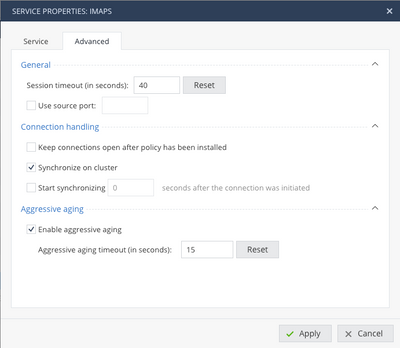
Another, simpler thing to try would be increasing the TCP timeout for IMAPS and possibly SMTP, depending on how your client is sending mail.
For most TCP services, this is usually 3600 seconds (1 hour).
For some reason, IMAPS has a very low timeout (like 40 seconds) and you may want to change it:
Thank you very much for hint. I take it as a suggestion to extend that time.
However I have already 60 seconds sessions timeout for IMAPS while 3600 for IMAP and enabled aggresive agging by default. I put 120 seconds and report back what happened. Is aggresive agging something I should bother with?
Unfortunatelly extended to 120 seconds IMAPS sessions timeout doesn't do the job.
Do you know any other parameters to tune up or maybe some blades to switch off?
Or should I call TAC directly?
Thank you very much. I will try with the command first.
Leaderboard
Epsum factorial non deposit quid pro quo hic escorol.
| User | Count |
|---|---|
| 4 | |
| 2 | |
| 2 | |
| 2 | |
| 1 | |
| 1 | |
| 1 |
Fri 12 Dec 2025 @ 10:00 AM (CET)
Check Mates Live Netherlands: #41 AI & Multi Context ProtocolTue 16 Dec 2025 @ 05:00 PM (CET)
Under the Hood: CloudGuard Network Security for Oracle Cloud - Config and Autoscaling!Fri 12 Dec 2025 @ 10:00 AM (CET)
Check Mates Live Netherlands: #41 AI & Multi Context ProtocolTue 16 Dec 2025 @ 05:00 PM (CET)
Under the Hood: CloudGuard Network Security for Oracle Cloud - Config and Autoscaling!Thu 18 Dec 2025 @ 10:00 AM (CET)
Cloud Architect Series - Building a Hybrid Mesh Security Strategy across cloudsAbout CheckMates
Learn Check Point
Advanced Learning
YOU DESERVE THE BEST SECURITY