- Products
- Learn
- Local User Groups
- Partners
- More
MVP 2026: Submissions
Are Now Open!
What's New in R82.10?
Watch NowOverlap in Security Validation
Help us to understand your needs better
CheckMates Go:
Maestro Madness
Hi,
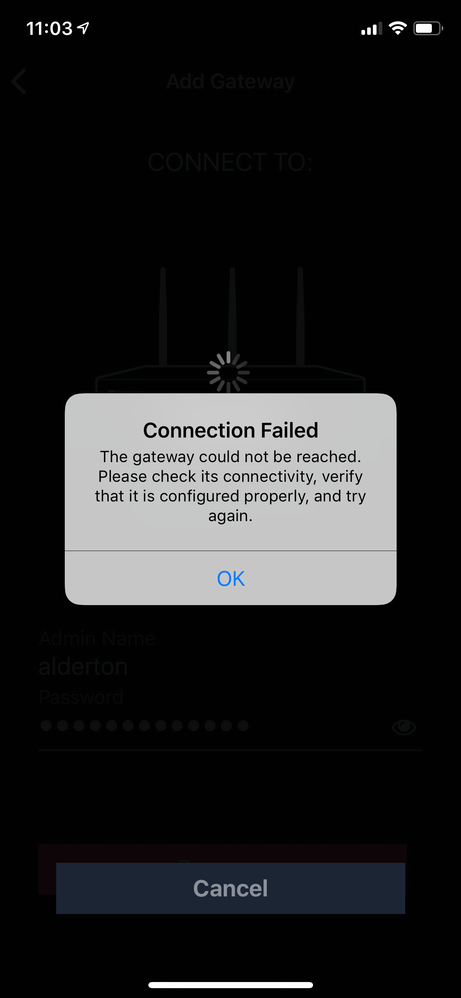
Has anyone successfully managed to pair and connect the iOS WatchTower app to a gateway? It doesn't seem to work manually or automatically.
The one thing the manual or the WebUI doesn't provide is the IP address that the WatchTower app is going to connect from via Reach My Device.
WatchTower won't connect on the internal LAN even though the gateway can be managed from the internal LAN on the same device through the web browser and the credentials are correct.
Doesn't seem to have been thoroughly tested yet...
Screenshot of the error attached.
How are you attempting to pair? Personally, I used the QR code. Also, did you change your default web access port?
Hello Stuart,
I registered through the App and an email was sent to activate.
When I tried to activate through the laptop it did not work, as it was expecting to open the App.
When activating through the phone's email, it succeded.
That was only to have the account active, with no FWs in it.
Once I accessed my profile, there was an option to add a FW, and this is when you have to use the QR @PhoneBoy is talking about.
I believe you can generate one QR per user, but not sure about this.
Hello
same problem
my ChP 770w is in DMZ behind second FW
I was connecting to ChP via his internal WLAN from iPhoneX (trusted wireless)
first of all during account creation process i used my Infinity email address and I received info that account was added to potral.checkpoint.com with admin status
please explain what is a logic behind this flow?
I removed app from iPhone and next time I used different email address not connected to ChP in any way
After few minutes i got email with code.
so far so good 🙂
Next I was trying to use QR to pair devices and I had error ... no connection to host.
I opened Safari and without problems I was able to open GUI of my ChP from iPhone by internal LAN IP and standard management port
Next I was trying to pair manually, same effect ... no connection to host.
I was trying internal LAN IP and WAN IP of firewall, no luck, no connection to host
and finally I connected phone to WLAN of second Firewall and tested WAN IP of ChP from app
no luck either
Next I checked link from FW GUI in Reach My Device ( status connected ) and I was able to connect from external IP by using cellular data ( disabled WLAN and pasting link to GUI in Safari browser)
(user admin and admin device access is opened from WAN, LAN, WLAN, lasted firmware)
Conclusions:
- reach my device is working fine and GUI of FW can be access from Internet even FW is placed behind NAT
- connection from mobile device app during paring process to internal GUI IP or WAN GUI IP is ending with error
please advice how to pair app with FW and what is going on with Watch Tower account and Infinity Portal
Thank You
BR
#MJ

Leaderboard
Epsum factorial non deposit quid pro quo hic escorol.
| User | Count |
|---|---|
| 5 | |
| 2 | |
| 2 | |
| 2 | |
| 1 | |
| 1 | |
| 1 |
Tue 16 Dec 2025 @ 05:00 PM (CET)
Under the Hood: CloudGuard Network Security for Oracle Cloud - Config and Autoscaling!Thu 18 Dec 2025 @ 10:00 AM (CET)
Cloud Architect Series - Building a Hybrid Mesh Security Strategy across cloudsTue 16 Dec 2025 @ 05:00 PM (CET)
Under the Hood: CloudGuard Network Security for Oracle Cloud - Config and Autoscaling!Thu 18 Dec 2025 @ 10:00 AM (CET)
Cloud Architect Series - Building a Hybrid Mesh Security Strategy across cloudsAbout CheckMates
Learn Check Point
Advanced Learning
YOU DESERVE THE BEST SECURITY