- Products
- Learn
- Local User Groups
- Partners
- More
MVP 2026: Submissions
Are Now Open!
What's New in R82.10?
10 December @ 5pm CET / 11am ET
Announcing Quantum R82.10!
Learn MoreOverlap in Security Validation
Help us to understand your needs better
CheckMates Go:
Maestro Madness
Hello,
I have a Spark 1570 with build R81.10.05 and it is connected to the AD, is there a way to assign a fixed IP to a specific VPN user?
VPN users authenticate through AD.
Best regards.
Yes via the ipassignment.conf file.
See: https://support.checkpoint.com/results/sk/sk33422
Manual changes to this file require reinstalling the security policy to take effect.
If this device is centrally managed, install the security policy.
If the device is locally managed, you can do one of two things:
Yes via the ipassignment.conf file.
See: https://support.checkpoint.com/results/sk/sk33422
Hello,
I'm not finding the ipassignment.conf file, there in the SMB?
I have a Spark 1570.
Should be same location...$FWDIR/conf/ipassignment.conf
Hello,
I'm new to this and I'm having a hard time finding the way you're suggesting.
Make sure you are login to the Gateway CLI and NOT Management CLI.
Go to the path mentioned above and modified the file ipassignment.conf
Hello,
I think these gateways (1500 series) do not have or do not allow access to this file.
Yes they do.
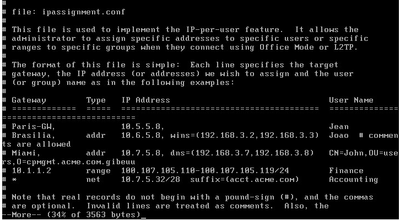
Here's a screenshot from my own 1590 that definitely has this file:
Further, sk33422 references Embedded Gaia explicitly.
Hello @PhoneBoy
Sorry, I wasn't logged in with expert mode.
Now I was able to access the file and made the change I want by adding the IP and user and saving the change.
Then when I try to connect the vpn with the user in question, the assigned IP continues to be by dhcp and not the IP that I specified for the user.
Any suggestions of what might be missing?
Gateway Type IP Address User Name
============= ===== ======================================== =======================
* addr 192.168.125.1 ServidorBackup
* addr 192.168.125.2 infodinamicavpn

Manual changes to this file require reinstalling the security policy to take effect.
If this device is centrally managed, install the security policy.
If the device is locally managed, you can do one of two things:
Thank you,
You help a lot.
Using the expert command fw_configload save the changes.
Leaderboard
Epsum factorial non deposit quid pro quo hic escorol.
| User | Count |
|---|---|
| 4 | |
| 2 | |
| 2 | |
| 2 | |
| 1 | |
| 1 | |
| 1 |
Fri 12 Dec 2025 @ 10:00 AM (CET)
Check Mates Live Netherlands: #41 AI & Multi Context ProtocolTue 16 Dec 2025 @ 05:00 PM (CET)
Under the Hood: CloudGuard Network Security for Oracle Cloud - Config and Autoscaling!Fri 12 Dec 2025 @ 10:00 AM (CET)
Check Mates Live Netherlands: #41 AI & Multi Context ProtocolTue 16 Dec 2025 @ 05:00 PM (CET)
Under the Hood: CloudGuard Network Security for Oracle Cloud - Config and Autoscaling!Thu 18 Dec 2025 @ 10:00 AM (CET)
Cloud Architect Series - Building a Hybrid Mesh Security Strategy across cloudsAbout CheckMates
Learn Check Point
Advanced Learning
YOU DESERVE THE BEST SECURITY