- Products
- Learn
- Local User Groups
- Partners
- More
MVP 2026: Submissions
Are Now Open!
What's New in R82.10?
Watch NowOverlap in Security Validation
Help us to understand your needs better
CheckMates Go:
Maestro Madness
We're successfully running VPN Client 98.60.45 on Windows Server 2012 R2 in Endpoint Security VPN mode. In 2016 we've installed from a file called srE80.62_Win10.msi.
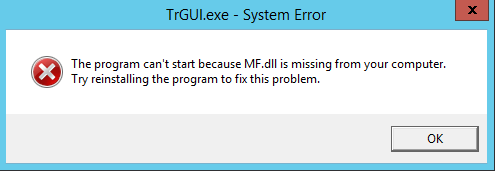
Now we are asked to update to a more recent version. I downloaded E80.90 Remote Access Clients for Windows (E80.90_CheckPointVPN.msi) and installed on our testing server. Now trgui.exe is facing problems: The program can't start because MF.dll is missing … – see attachment.
Did I pick a wrong msi file? Does trgui.exe not run on Server 2012?
What I tried:
Since we're not using trgui.exe and we're only calling trac to connect/disconnect, I disabled trgui.exe from HKLM\SOFTWARE\Wow6432Node\Microsoft\Windows\CurrentVersion\Run und configured watchdog.xml to ignore trgui.exe. Now things seem to run fine (without the taskbar icon) and I can run trac.exe to connect and disconnect to the remote site as desired.
Is it possible to run VPN client on Win Server 2012 just using an official installation file without tweaking? Which file do I need to download?

Hi,
probably too late, but anyway.
I solved exactly the same problem by installing Media Foundation Feature on Server 2012 R2. It seems that mf.dll is installed with it.
Regards,
Tomaz
sorry for maybe irrelevant question but ...
who runs VPN client on Windows Server (regardless of its build)? and why?
that's unique !
ps. once you have had already a client on Windows and want to jumb to newer build (as if you run Windows 10 for example) you need to uninstall and "clean" that installation completely then run new install from binaries downloaded from CP imho.
who runs VPN client on Windows Server (regardless of its build)? and why?
that's unique !
The server is hosting an edi software linked to many internal and external sources and targets. And every now and then it opens a VPN connection to an external partner, gets/puts new data using ftp and then closes the connection again.
ps. once you have had already a client on Windows and want to jumb to newer build (as if you run Windows 10 for example) you need to uninstall and "clean" that installation completely then run new install from binaries downloaded from CP imho.
This is what I tried. I tried a clean installation and I tried just to upgrade. Same result: trgui.exe is lacking mf.dll.
Hi,
probably too late, but anyway.
I solved exactly the same problem by installing Media Foundation Feature on Server 2012 R2. It seems that mf.dll is installed with it.
Regards,
Tomaz
Man, thank you so much, this actually solved my problem! I installed a virtual machine, Windows 10 x86, without ANY media, you know for saving resources… well I tried to install the Check Point Mobile and that same library was missing besides another 2 or 3; next step?
Downloaded Media Feature - Version 1903 (May 2019), from here: https://www.microsoft.com/en-us/software-download/mediafeaturepack
Installed, reboot computer and the client started without problems.
Best regards!
Leaderboard
Epsum factorial non deposit quid pro quo hic escorol.
| User | Count |
|---|---|
| 4 | |
| 3 | |
| 2 | |
| 2 | |
| 1 | |
| 1 | |
| 1 | |
| 1 | |
| 1 |
Tue 16 Dec 2025 @ 05:00 PM (CET)
Under the Hood: CloudGuard Network Security for Oracle Cloud - Config and Autoscaling!Thu 18 Dec 2025 @ 10:00 AM (CET)
Cloud Architect Series - Building a Hybrid Mesh Security Strategy across cloudsTue 16 Dec 2025 @ 05:00 PM (CET)
Under the Hood: CloudGuard Network Security for Oracle Cloud - Config and Autoscaling!Thu 18 Dec 2025 @ 10:00 AM (CET)
Cloud Architect Series - Building a Hybrid Mesh Security Strategy across cloudsAbout CheckMates
Learn Check Point
Advanced Learning
YOU DESERVE THE BEST SECURITY