- Products
- Learn
- Local User Groups
- Partners
- More
Policy Insights and Policy Auditor in Action
19 November @ 5pm CET / 11am ET
Access Control and Threat Prevention Best Practices
Watch HereOverlap in Security Validation
Help us to understand your needs better
CheckMates Go:
Maestro Madness
I have a Check Point cluster that has remote access turned on for remote access VPN use. The certificate that secure remote access is using has been found to be using a weak hashing algorithm and/or a RSA key less than 2048 bits.
I am in need of correcting this and have not been able to find a way to make remote access use a different certificate without possibly breaking SIC or my point to point VPN connections.
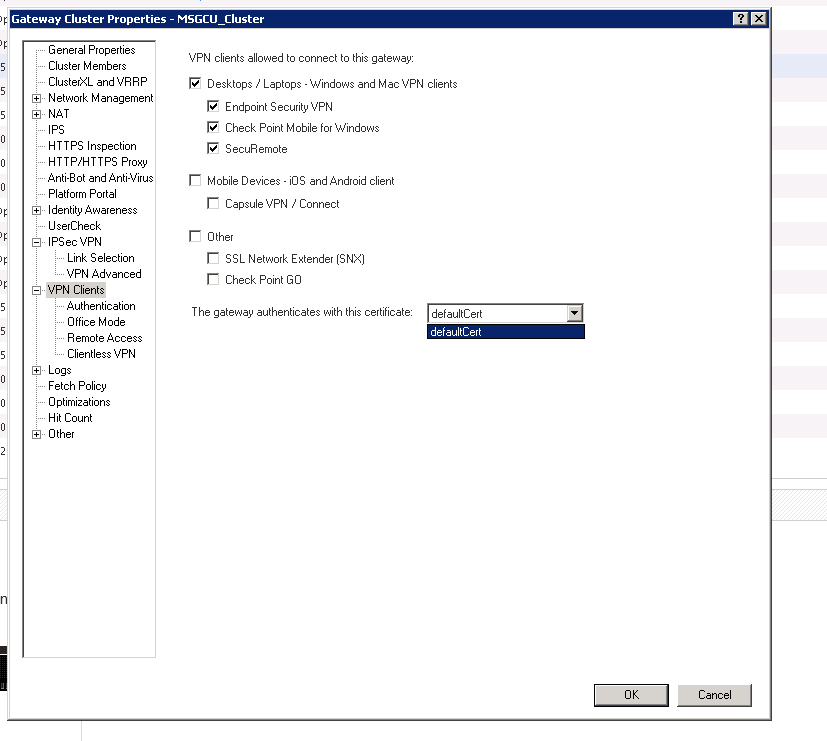
When I go into the gateway cluster properties > VPN Clients - I see that "defaultCert" is selected but have not been successful in finding a way to add a new and more secure certificate.
I see there are options in Global Properties from the file / launch menu but am hesitant to change anything in there.
Can anyone assist? Thank you.
Hello,
Try to add it on IPSec VPN tab. Then you should be able change it for VPN Clients.
R
Hello,
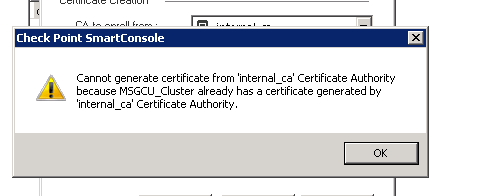
In the IPSEC options in Gateway Cluster Properties I click on "Add" > enter a certificate name > click " Generate" > and then I receive an error stating "Cannot generate certificate from "internal_ca" Certificate Authority because MY_CLUSTER_NAME already has a certificate generated by "internal_ca" Certificate Authority.
all you need really is a p12/capi certificate which can be generated from users group under SmartConsole.
that's all.
Hi Jerry,
I don't know what a p12/capi certificate is. The certificate I am trying to replace is the server certificate, not the user or laptop certificates(s).
The local VPN certificate is actually signed by the Internal CA.
Assuming the remote end is configured to trust certificates signed by the ICA, then replacing the certificate should only involve minimal disruption.
However, the existing VPN certificate must be revoked first.
Hi Dameon,
What you are describing is exactly what I need to do, I just don't know how to to do it and can't find instructions. I am also cautious as I don't want to inadvertently revoke a cert that is used for SIC.
Are you able to point me in the right direction or coach me on how to revoke this VPN cert and generate a new one?
Thank you!
Yeah, I'm having a little trouble figuring that one out as well ![]()
What happens if you merely "renew" the certificate?
This should generate you a new certificate and you can review the number of bits to ensure it's correct.
I believe this will require a policy installation to take effect.
Otherwise, I suggest consulting with the TAC.
In case anyone comes across this post, here is the SK to increase the key size and renew the VPN cert
Dear
I have completed all certificate-base remote access vpn,but it prompt below:
"Connection Failed:User Email=jeff.gao@example.com,CN=Jeff.gao,OU=IT,DC=example,DC=cn unknow"
I can not search the example from sk or google
GW:R80.30 and take 214
CA:windows server 2019 and together with AD
client:Non-join-AD and trust CA root cert
Have you found out the solution? I am having the same issue .-.
We are having the same issue, did you get the solution for the certificate base authetication.
Leaderboard
Epsum factorial non deposit quid pro quo hic escorol.
| User | Count |
|---|---|
| 4 | |
| 3 | |
| 1 | |
| 1 | |
| 1 | |
| 1 | |
| 1 | |
| 1 | |
| 1 | |
| 1 |
Wed 19 Nov 2025 @ 11:00 AM (EST)
TechTalk: Improve Your Security Posture with Threat Prevention and Policy InsightsThu 20 Nov 2025 @ 05:00 PM (CET)
Hacking LLM Applications: latest research and insights from our LLM pen testing projects - AMERThu 20 Nov 2025 @ 10:00 AM (CST)
Hacking LLM Applications: latest research and insights from our LLM pen testing projects - EMEAWed 26 Nov 2025 @ 12:00 PM (COT)
Panama City: Risk Management a la Parrilla: ERM, TEM & Meat LunchWed 19 Nov 2025 @ 11:00 AM (EST)
TechTalk: Improve Your Security Posture with Threat Prevention and Policy InsightsThu 20 Nov 2025 @ 05:00 PM (CET)
Hacking LLM Applications: latest research and insights from our LLM pen testing projects - AMERThu 20 Nov 2025 @ 10:00 AM (CST)
Hacking LLM Applications: latest research and insights from our LLM pen testing projects - EMEAThu 04 Dec 2025 @ 12:30 PM (SGT)
End-of-Year Event: Securing AI Transformation in a Hyperconnected World - APACThu 04 Dec 2025 @ 03:00 PM (CET)
End-of-Year Event: Securing AI Transformation in a Hyperconnected World - EMEAWed 26 Nov 2025 @ 12:00 PM (COT)
Panama City: Risk Management a la Parrilla: ERM, TEM & Meat LunchAbout CheckMates
Learn Check Point
Advanced Learning
YOU DESERVE THE BEST SECURITY