- Products
- Learn
- Local User Groups
- Partners
- More
MVP 2026: Submissions
Are Now Open!
What's New in R82.10?
Watch NowOverlap in Security Validation
Help us to understand your needs better
CheckMates Go:
Maestro Madness
Hi all,
we use the Endpoint Security client for the Remote Access VPN and I'm working to leverage the accessibility since I'd like to completely avoid that an external unauthorized user/device could install the client and connect from everywhere.
The connection is configured with Azure SAML, I know that with the conditional access rules I can limit the authentication to domain registered machines only, but in my case I also need to allow the connection from some external devices (ie. partners and a couple of admins with their personal pc).
Is there a way to configure something like an Access Role that matches for example a machine ID?
When a user connects with a personal device I can see a specific ID in the Host/device section of the log, would it possible to filter such ID?
Or is there any other way to allow the connection only for specific, known devices?
Thanks!
Access Roles do support use of Machine Identities, which usually come from AD.
I believe this information should show in the logs if it's being gathered.
Not sure if it works for external (non-AD) attached).
Hi PhoneBoy,
yes I know about the Machine Identity but as you wrote it can be used for domain computers kerberos authenticated machines, whilst I need another type of ID, not related to any domain I manage.
I tried to work with the Identity Tags, but I didn't understand well which sources are compatible.
When I connect with a personal computer I can see a specific ID for the machine, the best would be use this ID in an Access Role so that external partners could connect with their specific machines only, or in the case of a credential theft a hacker won't be able to just install the CheckPoint client and use them to connect:
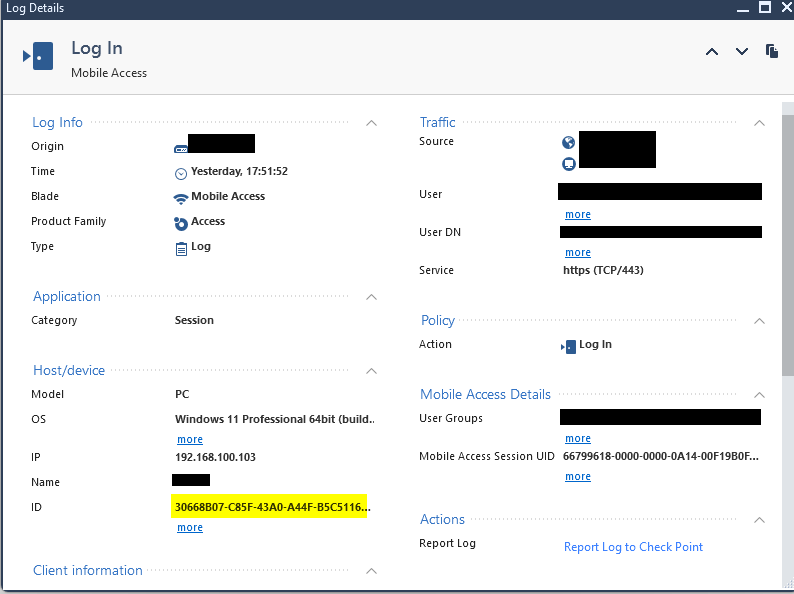
Any other option would be ok, but it must allow to connect a specific device only; I was trying to configure compliant rules as well, but if, for example, it checks for a registry key or file in the device, these could be replicated to any other.

Not sure this would give you much of a posture check...thats what most companies now offer as SASE solution.
Andy
Identity Tags are based on information that either comes from the Identity Awareness API or through SAML.
Which suggests if EntraID can identify the "authorized machines" and the SAML assertion includes this information...we can use it.
See: https://sc1.checkpoint.com/documents/R81.20/WebAdminGuides/EN/CP_R81.20_IdentityAwareness_AdminGuide...
Not sure we can use the contents of the "ID" field that you show in the log to match specific machines.
Access roles came to my mind as well when I read your post.
Andy
Leaderboard
Epsum factorial non deposit quid pro quo hic escorol.
| User | Count |
|---|---|
| 4 | |
| 3 | |
| 2 | |
| 2 | |
| 1 | |
| 1 | |
| 1 | |
| 1 | |
| 1 |
Tue 16 Dec 2025 @ 05:00 PM (CET)
Under the Hood: CloudGuard Network Security for Oracle Cloud - Config and Autoscaling!Thu 18 Dec 2025 @ 10:00 AM (CET)
Cloud Architect Series - Building a Hybrid Mesh Security Strategy across cloudsTue 16 Dec 2025 @ 05:00 PM (CET)
Under the Hood: CloudGuard Network Security for Oracle Cloud - Config and Autoscaling!Thu 18 Dec 2025 @ 10:00 AM (CET)
Cloud Architect Series - Building a Hybrid Mesh Security Strategy across cloudsAbout CheckMates
Learn Check Point
Advanced Learning
YOU DESERVE THE BEST SECURITY