- Products
- Learn
- Local User Groups
- Partners
- More
MVP 2026: Submissions
Are Now Open!
What's New in R82.10?
Watch NowOverlap in Security Validation
Help us to understand your needs better
CheckMates Go:
Maestro Madness
Hi everybody
I have an issue like this:
My VPN pool is 192.168.250.0/24
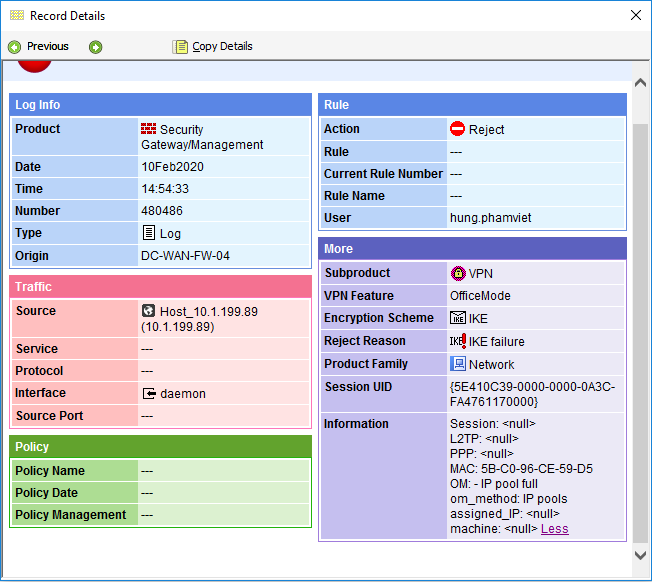
When i try to use Endpoint VPN to connect, the message is appear:
"Connection Failed: You cannot receive an Office Mode IP address at this time. Try to connect again. If the problem persists, contact your administrator."
I checked on Smartview Monitor, the concurrent users are 168, but the Log in Smartview Tracker is IP Pool full
Could anyone explain it to me ?
Thank you so much
Regards
Endpoint RA VPN does not use the concurrent MAB users, but the EP VPN seats !
sk39034 To see the number of currently connected Remote Access users, run this command (in Expert mode) on the VPN Security Gateway:
[Expert@HostName]# fw tab -t userc_users -s
sk14496 To see the username of each "connected" remote access user (in the last 15 minutes), run this command (in Expert mode) on VPN Security Gateway:
[Expert@HostName]# fw tab -t userc_rules -f
You can check the Office Mode state using the following:
sk43883 - What is the difference between marcipan_ippool_users and om_assigned_ips :
The marcipan table lists the office mode ip address. So if you type in the cmd
This will show the list in readable format.
The om_assigned_ips deals with the office mode ip address tied with the user name. Type the tab cmd with the -f switch.
sk36036 - to determine # of SNX users (# of individuals using office mode) on GW issue :
fw tab -t sslt_om_ip_params -s
You can also run the following command on the gateway, in order to see the number of OM IPs which are currently assigned by the gateway:
HOST NAME ID #VALS #PEAK #SLINKS localhost om_assigned_ips 372 1 1 0
The above output (#VALS=1 ) means currently one client is assigned an OM IP. This includes SNX users with OM IPs as well, who take up from a different license (SSL). In order to find out how many there are of those and subtract them to leave only IPsec VPN clients (i.e. SecureClient, Endpoint Security VPN, Endpoint Connect), check the following table:
HOST NAME ID #VALS #PEAK #SLINKS localhost sslt_om_ip_params 372 1 1 0
It's very usefull. Thank you so much
But my question is still unresolved
Because in Smartview Monitor, i saw the Remote User Tunnel is 166 and i cannot connect to VPN because IP pool full
The IP Pool is 192.168.150.0/24, and it should be assign for 254 user, right ?
Regards
I have the same issue with them, currently, I have 760 plus users are already connected but other users are unable to connect and currently impacting their production. May i know the maximum users that can connect through the VPN? is there any command that i can use to check ?
Spent most of the day looking at this issue on one of my gateways. Our connected VPN client count was around 140-150 when we started getting the error "You cannot receive an office Mode IP address because the security gateway does not have a license for Office mode". We are licensed for 205. Eventually I found that the om_assigned_ips table was at 205 when the issue occurs.
In this case we had set the IP Lease Duration to 1day (1440 minutes) while also allowing simultaneous logins. I'm not sure if there is a bug in the VPN client or if it was a user, but I'd see some VPN clients with multiple logins from the same IP, each session tying up a IP in the om_assigned_ips table.
I found this looking at the detail from fw tab -t om_assigned_ips -f - u
I've set the lease time back to the default (15 minutes) and set simultaneous logins to only allow one per user. Hopefully that sorts it out.
Thanks to @G_W_Albrecht for the list of commands. They were invaluable.
Leaderboard
Epsum factorial non deposit quid pro quo hic escorol.
| User | Count |
|---|---|
| 4 | |
| 3 | |
| 2 | |
| 2 | |
| 1 | |
| 1 | |
| 1 | |
| 1 | |
| 1 | |
| 1 |
Tue 16 Dec 2025 @ 05:00 PM (CET)
Under the Hood: CloudGuard Network Security for Oracle Cloud - Config and Autoscaling!Thu 18 Dec 2025 @ 10:00 AM (CET)
Cloud Architect Series - Building a Hybrid Mesh Security Strategy across cloudsTue 16 Dec 2025 @ 05:00 PM (CET)
Under the Hood: CloudGuard Network Security for Oracle Cloud - Config and Autoscaling!Thu 18 Dec 2025 @ 10:00 AM (CET)
Cloud Architect Series - Building a Hybrid Mesh Security Strategy across cloudsAbout CheckMates
Learn Check Point
Advanced Learning
YOU DESERVE THE BEST SECURITY