- Products
- Learn
- Local User Groups
- Partners
- More

MVP 2026: Submissions
Are Now Open!
What's New in R82.10?
Watch NowOverlap in Security Validation
Help us to understand your needs better
CheckMates Go:
Maestro Madness
Hello
For mobile access, I am trying to implement a solution in which members of a particular AD group is required the DynamicID OTP challenge and the rest of the users in the domain do not have this requirement.
I have seen similar discussions to what it is I am trying to do, but nothing that seems to be exactly that.
1) If you are a member of the "OTP AD Group" then you get the OTP challenge.
2) All other users pass thru with only username/password challenge.
Can anyone point me to a discussion where this has been clearly implemented or an SK?
Hi there,
I also have a client who is interested in this type of solution.
Basically the use case is the client wants to force a particular type of Auth to a particular AD group....
(Is this not something that would have to be done on the remote access client rather than the firewall - since the firewall doesnt know which group the client is in until they auth - sort of a "what comes first - the chicken or the egg " type thing....)
Anyone got any ideas?
If you configure something in GW for authentication, it is valid for everyone. You can't configure a group1 to use pass+dynamicid and group2 to use cert+pass based on AD groups.
You select what type of auth to use (when you use SSL portal) or during the installation of a VPN client before even enter your username.
I think of something raw solution.
Let's say you configure 2 ways for authentication in CP GW settings:
1) username+pass+dynamicid
2)username+pass+cert
You can switch between them in the VPN client GUI or in the SSL Mobile portal.
If you find a way to install and configure the laptops for group1 to use pass+dynamicid, for group2 - pass+cert and lock this configuration in the VPN client GUI you will achieve what you're looking for. Of course this is a hard work if you have more of laptops.
Another really raw solution - if you have 2 separate GWs for VPN, on gw1 configure user+pass+dynamicid, on gw2 configure username+pass+cert. Group1 initiate VPN to gw1 and group2 to gw2.
Hi Martin,
Thanks for your reply - yes I also thought of this and I managed to change the trac.config file and use the cpmsi_tool.exe to roll a customised msi that only had the single auth version in the drop down - this seemed to work great ...
The only issue is when it connects to the vpn it learns the other methods and repopulates the Auth settings with all the options 🙂
I have not figured out if one can stop that happening as yet 🙂
Thanks
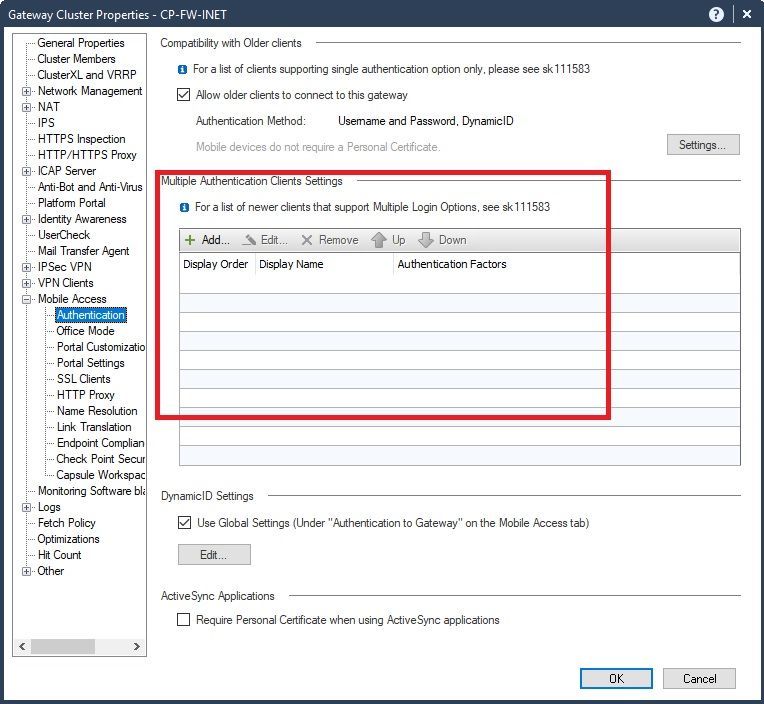
Thanks to everyone for your replies and suggestions. I'm curious what this section of the authentications section would be used for? My VPN clients are working with username/password. Newer clients are bi-passing the Dynamic OTP, and I know how to correct that in the settings, but I am really curious what this section is for.
this is how it's configure on my site. When I open the mobile access portal in the browser I have a drop-down menu where I select which method to use.
Leaderboard
Epsum factorial non deposit quid pro quo hic escorol.
| User | Count |
|---|---|
| 4 | |
| 3 | |
| 2 | |
| 2 | |
| 1 | |
| 1 | |
| 1 | |
| 1 | |
| 1 |
Tue 16 Dec 2025 @ 05:00 PM (CET)
Under the Hood: CloudGuard Network Security for Oracle Cloud - Config and Autoscaling!Thu 18 Dec 2025 @ 10:00 AM (CET)
Cloud Architect Series - Building a Hybrid Mesh Security Strategy across cloudsTue 16 Dec 2025 @ 05:00 PM (CET)
Under the Hood: CloudGuard Network Security for Oracle Cloud - Config and Autoscaling!Thu 18 Dec 2025 @ 10:00 AM (CET)
Cloud Architect Series - Building a Hybrid Mesh Security Strategy across cloudsAbout CheckMates
Learn Check Point
Advanced Learning
YOU DESERVE THE BEST SECURITY