- Products
- Learn
- Local User Groups
- Partners
- More
MVP 2026: Submissions
Are Now Open!
What's New in R82.10?
10 December @ 5pm CET / 11am ET
Announcing Quantum R82.10!
Learn MoreOverlap in Security Validation
Help us to understand your needs better
CheckMates Go:
Maestro Madness
Hi CheckMates,
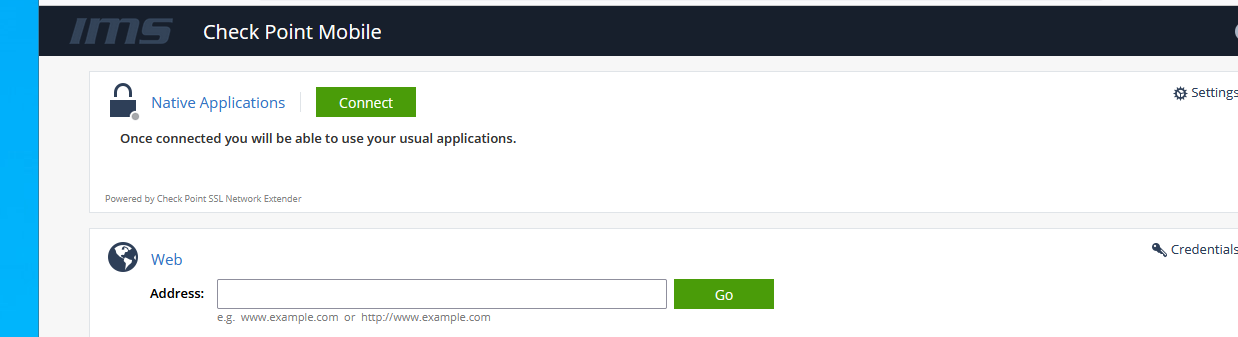
After logging into the portal, there is a Web application section where you can manually enter in an address and go to it. See attached.
A globe icon is displayed then Web
Address:
There is a box to the right of Address where you can enter a URL then click a green Go button. In a meeting today, other members of my team suggested I get rid of the Web and Address section if possible.
How hard would it be to get rid of the Address: section and Go button or is that not recommended?
I was close but needed TAC.
- The Web section's address bar can be hidden from the (new portal UI's) portal page by:
$CVPNDIR/htdocs/Portal/css/Main.css
/*-------------------- Web pane ------------------------------*/
.address-line {
padding-left: 45px;
display: none;
display: -ms-flexbox;
}
Disclaimers:
Please let me know if that helped you solve your issue.
Admin note: moved into the correct space.
I assume it's a matter of editing the relevant PHP file, though I personally haven't looked into it.
If anyone could point to which file(s) in $CVPNDIR/phpnics would allow me to remove the web locator box, that would be helpful and save us some time. Searching on "Web" or "Address" is bringing up many many files. Is there an official name for this module, like "Web Application URL connector"?
The web team also wants to inject CSS now....
In the meantime, I'll put in a RFE to program in a radio button somewhere to hide/move the "web application URL connector" tool from the portal.
Also, in the meantime, I'm seeing an option to create an Alternative Portal for users in a specific group. I'm going to test that out.

I removed the address-line code on Main.css and did a cvpnrestart but the code is still there. I'll try a restart tonight.
Trying to hide the input line with CSS, are you? 🙂
It’s a clever way to do it.
Thanks, I thought so too. 😁
Check Point was smarter though, they overwrote the Main.css file replacing it with the address-line class again.
I found a add Class UrlLinksDisabled option, but for now I'm looking into sk101060
I was close but needed TAC.
- The Web section's address bar can be hidden from the (new portal UI's) portal page by:
$CVPNDIR/htdocs/Portal/css/Main.css
/*-------------------- Web pane ------------------------------*/
.address-line {
padding-left: 45px;
display: none;
display: -ms-flexbox;
}
Disclaimers:
Please let me know if that helped you solve your issue.
Leaderboard
Epsum factorial non deposit quid pro quo hic escorol.
| User | Count |
|---|---|
| 4 | |
| 3 | |
| 2 | |
| 1 | |
| 1 | |
| 1 | |
| 1 | |
| 1 | |
| 1 |
Fri 12 Dec 2025 @ 10:00 AM (CET)
Check Mates Live Netherlands: #41 AI & Multi Context ProtocolFri 12 Dec 2025 @ 10:00 AM (CET)
Check Mates Live Netherlands: #41 AI & Multi Context ProtocolTue 16 Dec 2025 @ 05:00 PM (CET)
Under the Hood: CloudGuard Network Security for Oracle Cloud - Config and Autoscaling!About CheckMates
Learn Check Point
Advanced Learning
YOU DESERVE THE BEST SECURITY