- Products
- Learn
- Local User Groups
- Partners
- More
AI Security Masters
E1: How AI is Reshaping Our World
MVP 2026: Submissions
Are Now Open!
What's New in R82.10?
Watch NowOverlap in Security Validation
Help us to understand your needs better
CheckMates Go:
Maestro Madness
I have had 2 users with VPN Service Lost issues. Both of them the CheckPoint VPN service will start and shutdown. I tried to repair it and it kept rolling back saying the Watchdog service could not shutdown. So I disabled it and rebooted and when I went to uninstall, and upgrade it and kept saying
I am trying to install these version of the CheckPoint VPN
E86.50_CheckPointVPN
E86.60_CheckPointVPN
E86.70_CheckPointVPN
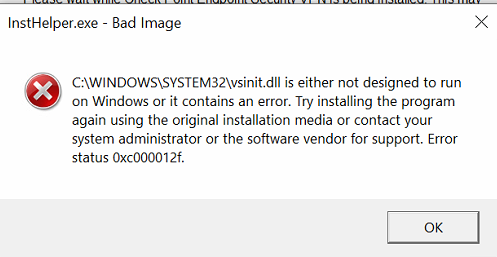
It gets to
All of them BSOD saying this
I used the guide https://supportcenter.checkpoint.com/supportcenter/portal?eventSubmit_doGoviewsolutiondetails=&solut... to remove it. Which worked but I cannot install it. It is the same issue with the BSOD at the same point.
After the user restarted the issue came back.
I had to use Safe Mode to remove it. But you cannot just run MSI files. While in Safe Mode. I had to do this on the registry.
HKEY_LOCAL_MACHINE\SYSTEM\CurrentControlSet\Control\SafeBoot\Minimal
Create new key called MSIServer and change the (Default) value to Service
Open CMD as Administrator and type NET START MSIServer
This allowed me to run the uninstaller and completely remove it without any errors.
Rebooted and then installed it and it worked. I then rebooted and logged into the VPN few times to make sure the issue is 100% resolved.

Can you share more with us about the system that this is being installed on, also are you working through the issue with TAC?
Hi Chris,
I managed to track it down.
In the end I saw that it is still installed just the Network Adapter is missing.
I found this article: ( I amended the steps from it as the folder was missing and there is a reboot requirement)
This worked on 1 users laptop. I have not had a chance to test this on the other user yet.
Hat bei mir auch funktioniert (mit Check Point VPN 88.62 )!
Da ich ich nicht die Endpoint Security, sondern nur den VPN Client installiert hatte, musste ich allerdings den Pfad anpassen zu:
cd "C:\Program Files (x86)\CheckPoint\Endpoint Connect"
Besten Dank !
After the user restarted the issue came back.
I had to use Safe Mode to remove it. But you cannot just run MSI files. While in Safe Mode. I had to do this on the registry.
HKEY_LOCAL_MACHINE\SYSTEM\CurrentControlSet\Control\SafeBoot\Minimal
Create new key called MSIServer and change the (Default) value to Service
Open CMD as Administrator and type NET START MSIServer
This allowed me to run the uninstaller and completely remove it without any errors.
Rebooted and then installed it and it worked. I then rebooted and logged into the VPN few times to make sure the issue is 100% resolved.
Leaderboard
Epsum factorial non deposit quid pro quo hic escorol.
| User | Count |
|---|---|
| 4 | |
| 3 | |
| 2 | |
| 2 | |
| 1 | |
| 1 | |
| 1 | |
| 1 | |
| 1 |
Tue 16 Dec 2025 @ 05:00 PM (CET)
Under the Hood: CloudGuard Network Security for Oracle Cloud - Config and Autoscaling!Thu 18 Dec 2025 @ 10:00 AM (CET)
Cloud Architect Series - Building a Hybrid Mesh Security Strategy across cloudsTue 16 Dec 2025 @ 05:00 PM (CET)
Under the Hood: CloudGuard Network Security for Oracle Cloud - Config and Autoscaling!Thu 18 Dec 2025 @ 10:00 AM (CET)
Cloud Architect Series - Building a Hybrid Mesh Security Strategy across cloudsThu 08 Jan 2026 @ 05:00 PM (CET)
AI Security Masters Session 1: How AI is Reshaping Our WorldAbout CheckMates
Learn Check Point
Advanced Learning
YOU DESERVE THE BEST SECURITY