- Products
- Learn
- Local User Groups
- Partners
- More
MVP 2026: Submissions
Are Now Open!
What's New in R82.10?
Watch NowOverlap in Security Validation
Help us to understand your needs better
CheckMates Go:
Maestro Madness
Hopefully a quick question - we did a full export/fresh install/import of management in a VM to go from r77.30 to r80.40 last year, and have recently upgraded our physical firewall HA cluster to 6600s. These are HA active/passive.
When we moved to the 6600s, we had to rename a few of the physical interfaces as the port names changed. Things have been stable with no issues,
I now need to add VTI interfaces for a VPN tunnel to AWS. Following sk100726 I get down to "re-fetch the interface configuration"
to read and configure the new VTI interfaces and I instantly have changes on ALL of my existing physical interfaces.
I have been advised in the past to use "without topology" so I did that.
Looking at the object itself if seems like everything is the same except for the "Name" at the top.
Network Type, Member IDs, and Topology all look the same. Advanced Tab looks the same.
"Name" changed from "devdot1q" to the actual interface name "eth7.32"
BUT I now have 69 "changes" pending. Most of them seem to be removing then adding back in the anti spoofing rules, etc.
But I now have 69 objects to look at before pushing policy to see what the "changes" are and it's worrying that I am
not going to understand what it did or what the impact is.
1) How do I make sure these changes are harmless/not actually changing anything before pushing policy?
2) Are all these name changes "normal" after an version upgrade like this?
The old "Name" field was something we typed in it looks like.
Thanks in advance.

Whenever you "Get Interfaces" (with or without topology), if there is a change to the interface names compared to what's stored, you will see the object change.
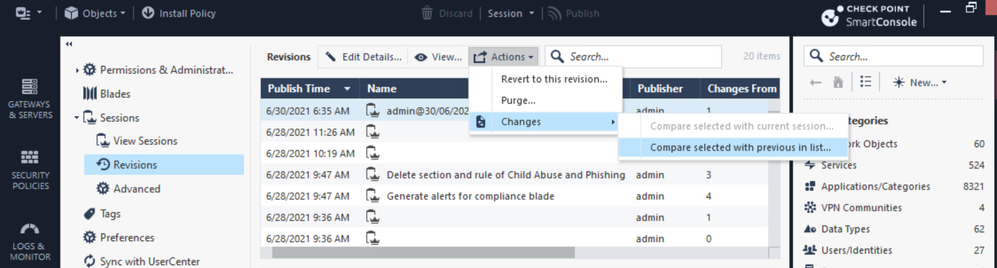
As for the changes, you do realize that SmartConsole has a change report you can review, correct? See sk166435.
That should help you review the various changes that were made to ensure they are not going to cause any issues.
Whenever you "Get Interfaces" (with or without topology), if there is a change to the interface names compared to what's stored, you will see the object change.
As for the changes, you do realize that SmartConsole has a change report you can review, correct? See sk166435.
That should help you review the various changes that were made to ensure they are not going to cause any issues.
Thanks - going to gut it out and compare before and after screenshots.
The version of Management I am using does NOT have that feature - is that an additional management blade?
Or do I need to be on a later version? This is R80.40.
HOTFIX_R80_40_JHF_COMP Take: 120
See attached screenshot.
It's native in R81, for earlier versions refer: sk166435
Outstanding, I had no idea that was possible and will be a HUGE comfort going forward. Thanks for that.
I did the work, turns out the only fallout was now my VPN clients think one of the new virtual interfaces I added (first time on those for me) is the real IP of the gateway, but I sorted that out with apply_resolving_mechanism_to_SR to false in GuiDbEdit thanks to some other hints here on CheckMates.
Leaderboard
Epsum factorial non deposit quid pro quo hic escorol.
| User | Count |
|---|---|
| 16 | |
| 15 | |
| 7 | |
| 5 | |
| 5 | |
| 5 | |
| 4 | |
| 4 | |
| 4 | |
| 4 |
Tue 16 Dec 2025 @ 05:00 PM (CET)
Under the Hood: CloudGuard Network Security for Oracle Cloud - Config and Autoscaling!Thu 18 Dec 2025 @ 10:00 AM (CET)
Cloud Architect Series - Building a Hybrid Mesh Security Strategy across cloudsTue 16 Dec 2025 @ 05:00 PM (CET)
Under the Hood: CloudGuard Network Security for Oracle Cloud - Config and Autoscaling!Thu 18 Dec 2025 @ 10:00 AM (CET)
Cloud Architect Series - Building a Hybrid Mesh Security Strategy across cloudsAbout CheckMates
Learn Check Point
Advanced Learning
YOU DESERVE THE BEST SECURITY