- Products
- Learn
- Local User Groups
- Partners
- More
MVP 2026: Submissions
Are Now Open!
What's New in R82.10?
10 December @ 5pm CET / 11am ET
Announcing Quantum R82.10!
Learn MoreOverlap in Security Validation
Help us to understand your needs better
CheckMates Go:
Maestro Madness
Hello,
I recently learned about the Time object in Security Gateway. This could be great for our scenarios where temporary access to resources is needed.
I found an article with a basic description of the object here:
https://sc1.checkpoint.com/documents/R81.10/SmartConsole_OLH/EN/Topics-OLH/NZWusyHm6c__hj6NSFa-VQ2.h...
However, I am wondering if there are any downsides to using this object. For example, when the time expires in my time object, does the SGW publish a session or Install Policy to apply the rule change? Will the time object interfere with current sessions that are going on in the background at the same time?
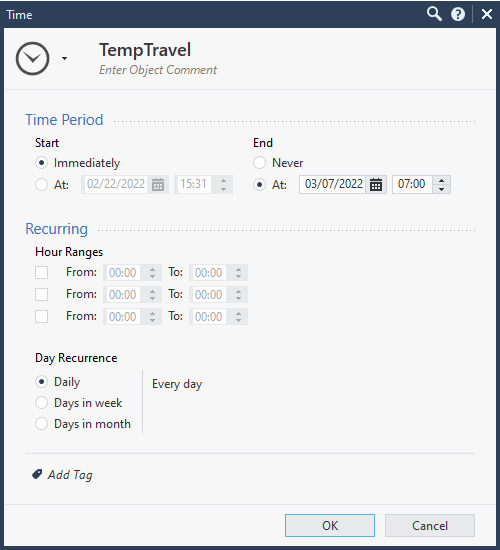
Here is a simple Time object that I setup for a temp rule to help me experiment:
Hopefully the feature works the way I intend it to and we can use it for more temporary rule scenarios.
Hi @jtgetzke,
This has no effect on existing sessions. Existing sessions are only terminated after the session timer in the state table has expired. A rule using a time object applies only to connections that begin during the time object's time frame. If the connection extends past that time frame, it is allowed to continue. The relevant time zone is that of the Security Gateway enforcing the rule.
Unless you have activated in the service that the session should not continue when installing the policy. Then this also happens when installing the policy.
Conclusion:
The time settings only apply to new connections.
Hi @jtgetzke,
This has no effect on existing sessions. Existing sessions are only terminated after the session timer in the state table has expired. A rule using a time object applies only to connections that begin during the time object's time frame. If the connection extends past that time frame, it is allowed to continue. The relevant time zone is that of the Security Gateway enforcing the rule.
Unless you have activated in the service that the session should not continue when installing the policy. Then this also happens when installing the policy.
Conclusion:
The time settings only apply to new connections.
Thanks for the detailed answer.
sk115134: Persisting connections in connections table after installing a new rule with Time object
Per sk32578 in R80.10 and above there shouldn't be any additional considerations.
As a follow up to my own experiment, I did notice one downside to the Time object.
The object persists after the temporary rule expires. If the goal is to create a time object for each temporary rule that pops up you will be stuck having to manage all of those individual time objects at some point. It seems to me that the time object is best used for scenarios where the temporary portion of the rule is frequently occurring or on a repeating basis.
For example a rule that disables access to a resource during normal business hours, but afterhours its allowed. One time object would turn the same rule on and off multiple times and be worth the effort. Or if you have a frequent travel scenario that you need to enable/disable for geoprotection. The time object will likely get used again in either of these scenarios for the same rule. Or another possibility is if you have pressure from someone to specifically turn off a rule afterhours, cool, the time object can do that for you and save you the trouble of logging in until business hours.
But if you have scenarios where the rule is a one time use case and will likely never be used again, its less overhead to just create the rule and then delete it when your done so you don't have to remember to clean up the time object too. For example an employee traveling to a random foreign country with your geoprotection policy. Or setting up a temp rule for your developers while they POC a product. If the POC expires and the rule is no longer needed then you might as well avoid the extra overhead of the time object and setup a reminder for that rule in another way.

Leaderboard
Epsum factorial non deposit quid pro quo hic escorol.
| User | Count |
|---|---|
| 21 | |
| 15 | |
| 7 | |
| 6 | |
| 5 | |
| 5 | |
| 4 | |
| 4 | |
| 4 | |
| 4 |
Fri 12 Dec 2025 @ 10:00 AM (CET)
Check Mates Live Netherlands: #41 AI & Multi Context ProtocolFri 12 Dec 2025 @ 10:00 AM (CET)
Check Mates Live Netherlands: #41 AI & Multi Context ProtocolTue 16 Dec 2025 @ 05:00 PM (CET)
Under the Hood: CloudGuard Network Security for Oracle Cloud - Config and Autoscaling!About CheckMates
Learn Check Point
Advanced Learning
YOU DESERVE THE BEST SECURITY