- Products
- Learn
- Local User Groups
- Partners
- More
MVP 2026: Submissions
Are Now Open!
What's New in R82.10?
10 December @ 5pm CET / 11am ET
Improve Your Security Posture with
Threat Prevention and Policy Insights
Overlap in Security Validation
Help us to understand your needs better
CheckMates Go:
Maestro Madness
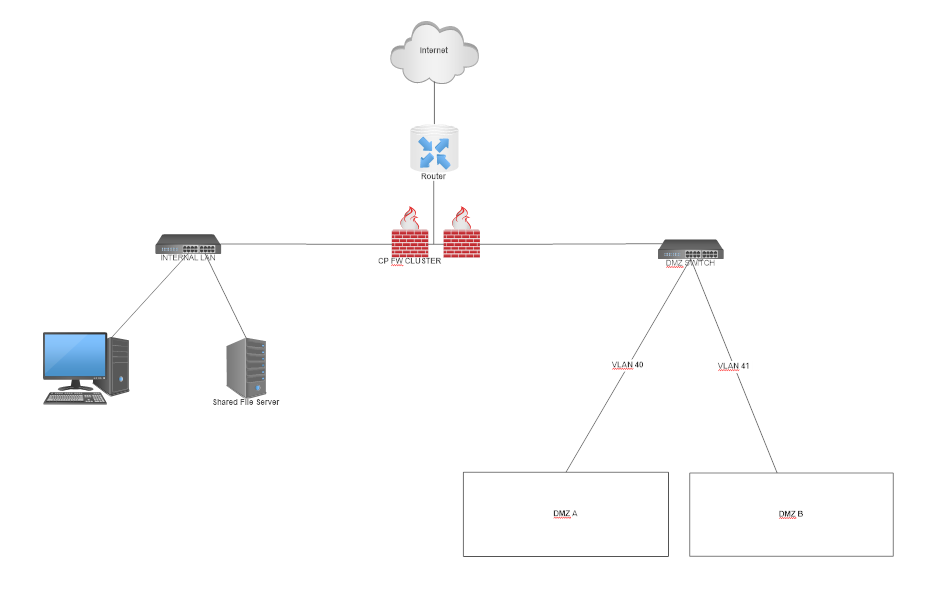
I need some expert advice here. I'm new to Checkpoint Firewall. I have just purchased the appliance. I got it setup and running. Now I want to setup two different DMZ for our Web Servers and mail server for two different business partners. I would like to make it accessible from the Internet and also site to site vpn connection. I would like to ask for your guidance on how do I plan, configure and secure it I have been searching through Checkpoint Support website and Checkmate forums but found little information about it. So, your help would be very much appreciated.
|
Hi,
It will be good if you have 2 separate subnet for 2 DMZ. You can assign this to interfaces. Like below
DMZ A - Subnet A - Interface A
DMZ B - Subnet B - Interface B
Now you can achieve traffic flow/restriction through security policy.
Internet --> Subnet A --> https --> allow and vice versa
If you want to build site to site tunnel then you can build with specific subnet (Subnet A Or Subnet B)
Hope this helps.
Thanks Gaurav,
I only have one physical interface available. That's why plan to to use sub-interface ETH3.1 for Subnet A and ETH3.2 for Subnet B. Is this achievable?
You will treat the sub-interface the exact same way as a physical interface. Configure the VLANs on your Gaia Web Portal and set them as DMZs on the topology page of your GW. Configure your policy accordingly.
I agree with you Pedro 100%, he can configure multiple VLANS on one physical interface,but the problem is sub interfaces or (multiple VLANS on one physical interfaces ) is not supported in case of the firewalls are deployed in cluster mode as the sk89980 indicate there.
Secondary IP is not the same as VLAN interface. Please don't confuse other people.
It is written in the sk89980 provided by you:
If the physical machine does not have enough physical interfaces, then VLAN interfaces should be configured
• Check Point supports up to 256 VLANs per physical interface
• Check Point supports up to 1024 VLAN per Security Gateway
Hi,
Yes. You can achieve same thing with Sub-interface as Pedro suggested. It is easily configurable in GUI.
You need to make trunk port on Switch end.
Thanks all for your responses
Yes you are 100% correct , and I apologize for wrongfully info I presented. I must understood the question in a different way.
Thank you for correcting me in such a gentle way!!!
Leaderboard
Epsum factorial non deposit quid pro quo hic escorol.
| User | Count |
|---|---|
| 17 | |
| 12 | |
| 11 | |
| 7 | |
| 6 | |
| 5 | |
| 4 | |
| 4 | |
| 4 | |
| 4 |
Fri 12 Dec 2025 @ 10:00 AM (CET)
Check Mates Live Netherlands: #41 AI & Multi Context ProtocolTue 16 Dec 2025 @ 05:00 PM (CET)
Under the Hood: CloudGuard Network Security for Oracle Cloud - Config and Autoscaling!Fri 12 Dec 2025 @ 10:00 AM (CET)
Check Mates Live Netherlands: #41 AI & Multi Context ProtocolTue 16 Dec 2025 @ 05:00 PM (CET)
Under the Hood: CloudGuard Network Security for Oracle Cloud - Config and Autoscaling!Thu 18 Dec 2025 @ 10:00 AM (CET)
Cloud Architect Series - Building a Hybrid Mesh Security Strategy across cloudsAbout CheckMates
Learn Check Point
Advanced Learning
YOU DESERVE THE BEST SECURITY