- Products
- Learn
- Local User Groups
- Partners
- More
MVP 2026: Submissions
Are Now Open!
What's New in R82.10?
Watch NowOverlap in Security Validation
Help us to understand your needs better
CheckMates Go:
Maestro Madness
Hi All,
I was wondering is there any way we restrict only http/https traffic from the first layer to move to next policy layer instead of allowing all the accept rules from the first policy layer to go through the next layer policies. The intention we want to separate it out different layer with different blade inspection.
The scenario:
Example Traffic: Internal Users < https (443) > Internet (facebook.com)
1. Network Layer (Firewall only) = Only for normal network rules
2. URL Filtering Layer (URL Filtering & Application Control Only) = Only for http & https traffic that allow from network layer to this layer to perform URL Filtering Inspection
This is because we don't want all traffic that is hit and allow from Network Layer will to go next policy layer if it is not http/https traffic. Because of this, we must create any any allow to the cleanup rule on the second layer policies otherwise even the traffic is accepted by the first layer it will drop at second layer on clean up rule. Therefore, we only just want those http/https traffic affter being allowed from network policy layer will move to next layer to perform URL filtering & Application Control Inspection.
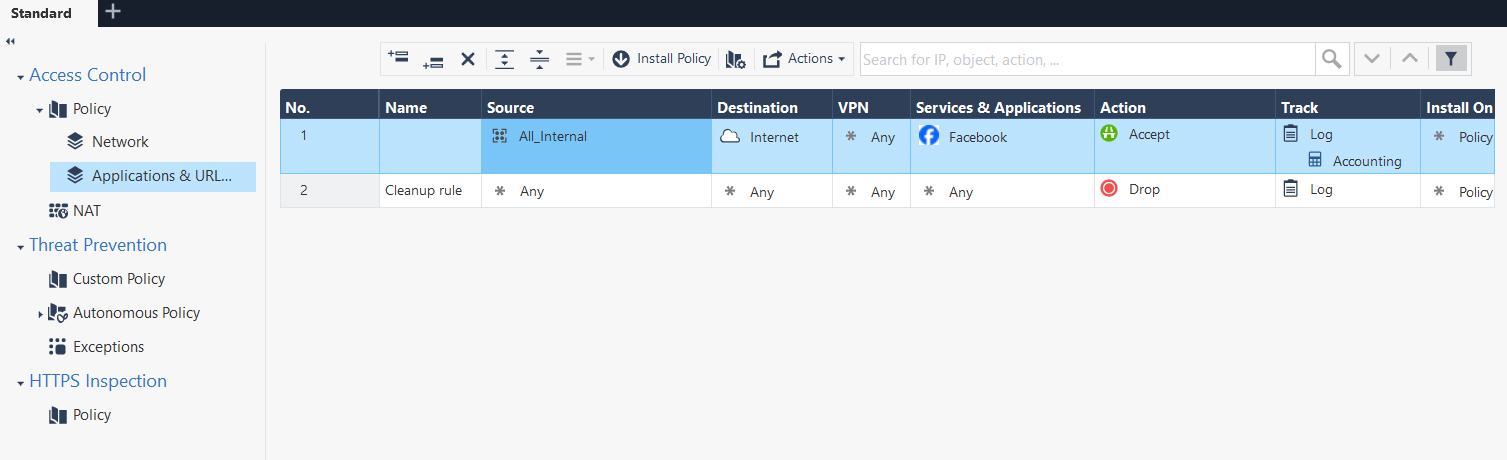
I do select the first layer with firewall blade only and the second policy layer with application & URL filtering blade only but still the second layer policies will be restricted by firewall blade. Please refer to the images.
Best Regards
Keon

There is no mechanism for this in ordered layers. Generally though your Application layer would would be configured as implied accept on it to save you the need for a general cleanup rule. This way you only need to worry about allowing/blocking internet traffic and anything else is silently accepted after being accepted on the Network layer.
Alternatively look at using Inline layers instead of Ordered layers.
Images missing
Regards
Peter
Hi Peter,
You may find the images again on the top.
Best Regards,
Keon
To do this with ordered layers, create another ordered layer before your Application layer that only accepts http and https traffic, blocking everything else.
Or use an inline layer to do the same thing with http/https in the top level rule.
Here's an example of what that might look like.
To create the inline layer:
Leaderboard
Epsum factorial non deposit quid pro quo hic escorol.
| User | Count |
|---|---|
| 19 | |
| 16 | |
| 7 | |
| 5 | |
| 5 | |
| 5 | |
| 4 | |
| 4 | |
| 4 | |
| 4 |
Tue 16 Dec 2025 @ 05:00 PM (CET)
Under the Hood: CloudGuard Network Security for Oracle Cloud - Config and Autoscaling!Thu 18 Dec 2025 @ 10:00 AM (CET)
Cloud Architect Series - Building a Hybrid Mesh Security Strategy across cloudsTue 16 Dec 2025 @ 05:00 PM (CET)
Under the Hood: CloudGuard Network Security for Oracle Cloud - Config and Autoscaling!Thu 18 Dec 2025 @ 10:00 AM (CET)
Cloud Architect Series - Building a Hybrid Mesh Security Strategy across cloudsAbout CheckMates
Learn Check Point
Advanced Learning
YOU DESERVE THE BEST SECURITY