- Products
- Learn
- Local User Groups
- Partners
- More
MVP 2026: Submissions
Are Now Open!
What's New in R82.10?
10 December @ 5pm CET / 11am ET
Announcing Quantum R82.10!
Learn MoreOverlap in Security Validation
Help us to understand your needs better
CheckMates Go:
Maestro Madness
Hey guys,
I wanted to bring this up, as Im not 100% sure if this is indeed an expected behavior and if people are aware of it or not. So, my impression was always that say if you have dedicated SE server, you have to add it to logging options on the gateway(s) object in order for logs to sent to it, but that is supposedly NOT the case.
Reason I say that is because my colleague and I had call with TAC and guy was excellent, he did help us with a different SE server issue, but even he said customer's smart event was not used for logging or getting any logs, which we discovered later was actually not true, as we saw bunch of logs sent to it when we logged in via smart console.
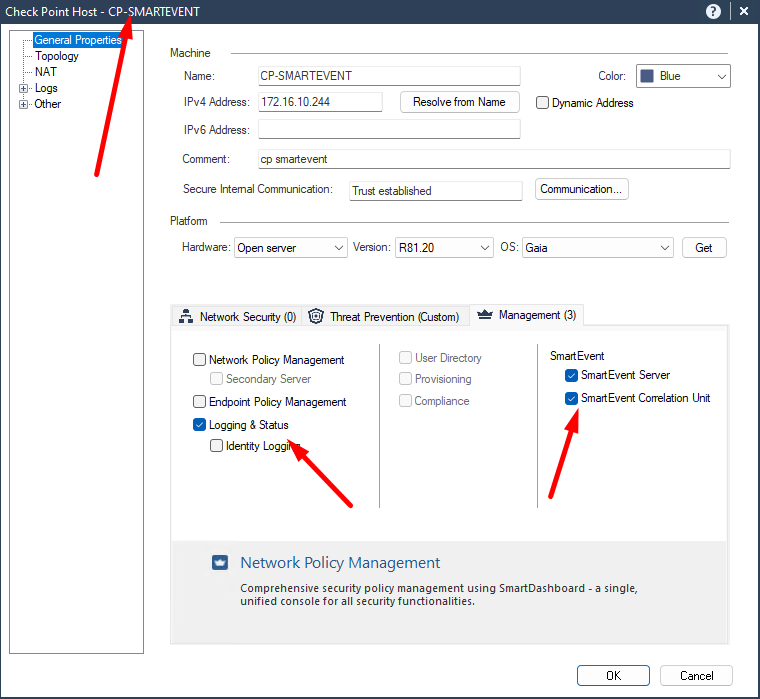
Now, to verify this behavior, I also tested in my own lab, where my mgmt is 172.16.10.252 and se server is 172.16.10.244. Though I dont have smart event object added anywhere for logging options on cluster or single gw, I can see bunch of logs on se server when I open separate smart console instance.
So, my question is...is this NORMAL (expected) behavior?
I also attached screenshots showing what I described.
Best and thanks as always for the help!
Andy
I think it is normal because smart event needs logs to do its job. And will get it from log server. For performance it is better to have 1 log server and 1 event server. If event has no access to logs it will have no data to work with. Under my gateways I always put the log servers as log server (or other name for it: smart mgmt)
Thanks @Lesley ! Yes, I know most people do the same, but it just caught me off guard, as I always thought smart event needs to be in that list to be receiving logs, but supposedly not.
Anyway, appreciate the confirmation 🙂
Andy
SmartEvent could also be a log server. This is a matter of distributing resources if needed.
If SmartEvent is not the log server it will have better performance than doing both, and considering that it can read logs from multiple log servers it very much depends on logging rate.
Hey @Amir_Senn
So, just co confirm 100%, my assumption was indeed correct then that say even if you do NOT add SE object in logging tab for the gateway, it would still be getting logs by default?
Andy
Defined in SmartEvent GUI (Analyzer). When deploying a new SmartEvent server, by default it should apply all log servers currently connected to the environment. If you add new ones you'll need to define them.
Leaderboard
Epsum factorial non deposit quid pro quo hic escorol.
| User | Count |
|---|---|
| 22 | |
| 15 | |
| 11 | |
| 7 | |
| 6 | |
| 5 | |
| 4 | |
| 4 | |
| 4 | |
| 4 |
Fri 12 Dec 2025 @ 10:00 AM (CET)
Check Mates Live Netherlands: #41 AI & Multi Context ProtocolTue 16 Dec 2025 @ 05:00 PM (CET)
Under the Hood: CloudGuard Network Security for Oracle Cloud - Config and Autoscaling!Fri 12 Dec 2025 @ 10:00 AM (CET)
Check Mates Live Netherlands: #41 AI & Multi Context ProtocolTue 16 Dec 2025 @ 05:00 PM (CET)
Under the Hood: CloudGuard Network Security for Oracle Cloud - Config and Autoscaling!Thu 18 Dec 2025 @ 10:00 AM (CET)
Cloud Architect Series - Building a Hybrid Mesh Security Strategy across cloudsAbout CheckMates
Learn Check Point
Advanced Learning
YOU DESERVE THE BEST SECURITY