- Products
- Learn
- Local User Groups
- Partners
- More

Call For Papers
Your Expertise, Our Stage
Ink Dragon: A Major Nation-State Campaign
Watch HereAI Security Masters E5:
Powering Prevention: The AI Driving Check Point’s ThreatCloud
The Great Exposure Reset
AI Security Masters E4:
Introducing Cyata, Securing the Agentic AI Era
CheckMates Go:
CheckMates Fest
Dear team,
I need your help to better understand IPS Core protections.
I found in documentation:
Why is that ?
If IPS Core protections are assigned globally (per gateway), why in Signature I have option to change/assigned different IPS profile to gateway ?
What will be if I assign here TP profile that is different than Optimized ?
Please see the attached picture.
BR,
Slobodan
Hello Slobodan
Core protections are some general protections that aren't necessarily related to specific software or product vulnerabilities.
They are assigned globally, which means that when you click a signature you will enter the "Core protections" window shown in your screenshot and will change the profile for all core protections. This won't affect the ThreatCloud protections profile, which is assigned in the IPS rules tab.
IPS Core Protections are the Inspection Settings.
Previously these were configured as part of IPS but they were separated in R80.
Actually, IPS Core Protections and Inspection Settings are 2 different things although both installed with Access Control. I wrote about it at https://community.checkpoint.com/thread/5159-where-did-all-my-ips-protections-go
It would be less confusing if they were listed as part of Inspection Settings, IMO.
In my opinion this is very confusing. Is there any reason for this Core Protections to be assigned as a different profile in the Gateway?
Any change is being considered on future versions?
By separating them from IPS protections, it's clear:
As far as I know, there are no plans to change this.
Hey Dameon,
I understand Core Protections and Inspection Settings are both enforced in the firewall and applied with Access Policy, but what differentiates them from Threat Cloud protections? From what I can tell, it appears that Inspection Settings deal with network packets that are not exhibiting 'normal' behavior but Core Protections have CVE reference numbers similar to Threat Cloud protections so that's where I'm a bit lost in understanding the difference.
As described in my IPS class, Core Protection/Activations are protections that are in a bit of a "no man's land" between Inspection Settings and IPS ThreatCloud protections. The only clarification I've been able to get about why Core Protections are handled like this is for "technical reasons". I suspect that one of the technical reasons was the ability to use Protected Servers definitions to more precisely control which defined servers would have these Core Activations applied to them. The Protected Servers mechanism is obsolete in R80.10+ due to the ability to apply different IPS profiles to the same gateway with separate Threat Prevention rules. Another reason might be that they are not typically just set to Prevent/Detect/Inactive and have various individual adjustments under a "See Details..." link; and also that exceptions must be added for each Core Protection individually. You can't add a single exception rule for a group of Core Activations or for "Any" of them.
Most of the Core Activations look like they belong under Inspection Settings to me since they are looking for various network protocol weaknesses.
--
"IPS Immersion Training" Self-paced Video Class
Now Available at http://www.maxpowerfirewalls.com
Thank you Tim, that is helpful
Note that Geo Protection (now called "Geo Policy" in R80+ management) was also separated from the IPS blade and has its own profile assignments per gateway.
--
Second Edition of my "Max Power" Firewall Book
Now Available at http://www.maxpowerfirewalls.com
And in R80.20, you can do Geo rules in the regular Access Policy ![]()
> And in R80.20, you can do Geo rules in the regular Access Policy
How is this done in R80.20? Can't seem to find it...
Using GEO Location Objects in Firewall Policy (with Dynamic Objects), brilliant as it is, doesn't count. 🙂
--
Second Edition of my "Max Power" Firewall Book
Now Available at http://www.maxpowerfirewalls.com
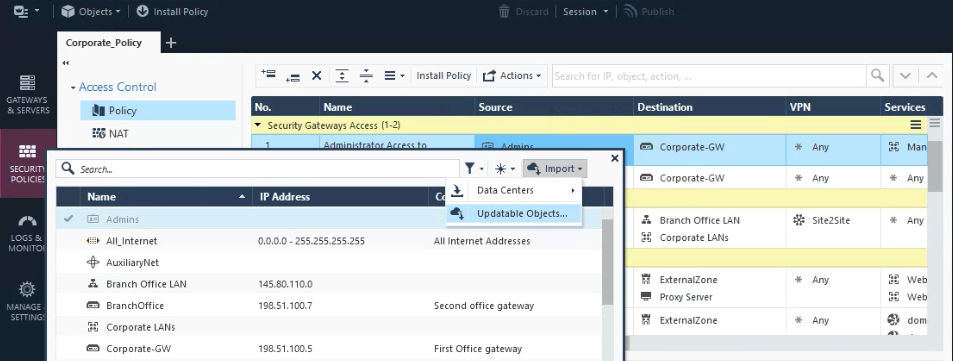
Click on the + in the Source/Destination field of a rule.
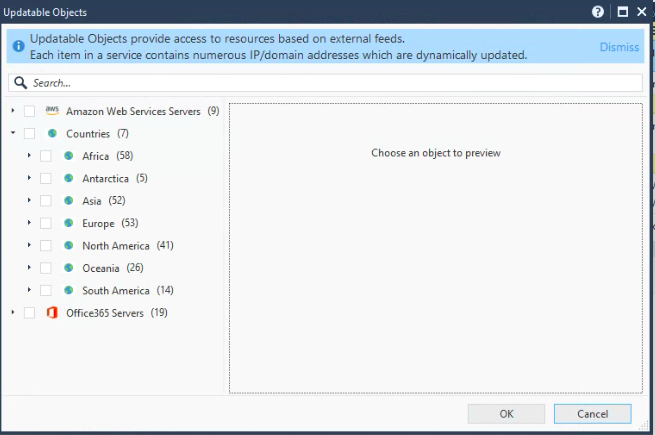
Select Import > Updatable Objects.

You can find updatable objects for:

Because Geo Policy can now be implemented directly in the Network Policy Layer (among others) using updatable objects in R80.20 management, I assume these can be applied via policy to the Gaia Embedded appliances models 1100-1400 running R77.20.XX? There has been a longstanding limitation that these models do not directly support the separate Access Control Geo Policy/Protection feature (which I assume still applies in R80.20), but using these updatable objects as shown above appears to be a way to achieve the same effect on these models via the main Access Control policy layers. Is my assumption correct Dameon Welch-Abernathy?
--
Second Edition of my "Max Power" Firewall Book
Now Available at http://www.maxpowerfirewalls.com
This feature requires R80.20 gateway support as the updating of these objects occurs on the gateway.
Which means the SMB appliances do not support this functionality currently.
Leaderboard
Epsum factorial non deposit quid pro quo hic escorol.
| User | Count |
|---|---|
| 35 | |
| 22 | |
| 17 | |
| 12 | |
| 9 | |
| 9 | |
| 8 | |
| 8 | |
| 8 | |
| 7 |
Tue 17 Mar 2026 @ 03:00 PM (CET)
From SASE to Hybrid Mesh: Securing Enterprise AI at Scale - EMEATue 17 Mar 2026 @ 02:00 PM (EDT)
From SASE to Hybrid Mesh: Securing Enterprise AI at Scale - AMERWed 18 Mar 2026 @ 10:00 AM (CET)
The Cloud Architects Series: An introduction to Check Point Hybrid Mesh in 2026 - In Seven LanguagesThu 19 Mar 2026 @ 11:00 AM (EDT)
Tips and Tricks 2026 #2: AI Security Challenges and SolutionsTue 17 Mar 2026 @ 03:00 PM (CET)
From SASE to Hybrid Mesh: Securing Enterprise AI at Scale - EMEATue 17 Mar 2026 @ 02:00 PM (EDT)
From SASE to Hybrid Mesh: Securing Enterprise AI at Scale - AMERWed 18 Mar 2026 @ 10:00 AM (CET)
The Cloud Architects Series: An introduction to Check Point Hybrid Mesh in 2026 - In Seven LanguagesThu 19 Mar 2026 @ 11:00 AM (EDT)
Tips and Tricks 2026 #2: AI Security Challenges and SolutionsTue 24 Mar 2026 @ 04:00 PM (CET)
Maestro Masters EMEA: Hyperscale Firewall Architectures and OptimizationTue 24 Mar 2026 @ 06:00 PM (COT)
San Pedro Sula: Spark Firewall y AI-Powered Security ManagementThu 26 Mar 2026 @ 06:00 PM (COT)
Tegucigalpa: Spark Firewall y AI-Powered Security ManagementAbout CheckMates
Learn Check Point
Advanced Learning
YOU DESERVE THE BEST SECURITY