- Products
- Learn
- Local User Groups
- Partners
- More

The State of Ransomware Q1 2026
Key Trends and Their Impact
Good, Better, Best:
Prioritizing Defenses Against Credential Abuse
AI Security Masters E7:
How CPR Broke ChatGPT's Isolation and What It Means for You
Blueprint Architecture for Securing
The AI Factory & AI Data Center
Call For Papers
Your Expertise. Our Stage
CheckMates Go:
CheckMates Fest
We have Cloudguard R80.10 gws [48 of them] running on a VMWARE NSX-V Cluster 's hosts.
These Cloud guard gws are managed by R80.40 manager.
When VMs are moved between hosts in the VMWARE cluster, all connections drop, and we were of the understanding that all individual Cloudguard gateways are in sync, so that when VMs are moved, traffic will flow without drops [ie... without seeing First packet is no syn].
When I looked at fw tab -t connections -s in individual gateways, I can see the numbers are very different, meaning, Cloud guard gateways are not in sync so it is obvious that when VMs move between hosts in the VMWARE cluster, Is there any fix or workaround that we can apply? This must be a common issue for many out there.
I dont see there is any mechanism that runs among these Cloud guard gateways to do tcp/ udp state synchronisation like Cluster XL, so I can guess the answer. I am bit confused because at the time of selling the product, we questioned the same feature and the answer was it does keep "in sync" the statetable among Cloud gurads, not sure whether we tried that indeed in a lab and took the word on its own merit.
So your expert reply is very much appreciated with any tips and tricks.
Thank you and Kind regards,
Kanishka
Also, the cluster object itself should have dedicated sync network. Considering the nature of your question, I would advise looking for professional services engagement with Check Point or a third party having some experience in this kind of deployment.
If not, build a lab environment, study the guide and make it work in the lab first, to build up expertise.
Did you configure your group of CloudGuard gateways as a cluster object (CloudGuard NSX Admin Guide, page 34 and below)?
Thank you _Val_.
Please see below. Yes we have a cluster defined and the same policy is applied to all members.
How do I verify state sync is happening and all the members have the same tcp state info, (and udp state info as well if applicable for udp).
Appreciate your reply with thanks.
Kanishka
cphaprob stat on any of the cluster members should show you the cluster status.
Hi _Val_
It says "HA module not started". What steps can I take to enable HA among members?
Thank you
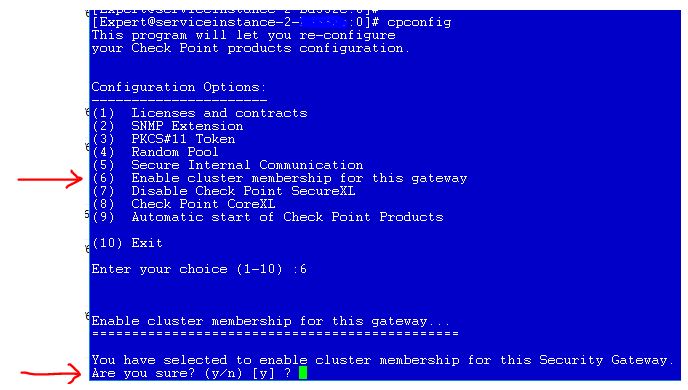
"cpconfig", look for clusterxl settings. Also, policy push is required again.
yes and yes
Also, the cluster object itself should have dedicated sync network. Considering the nature of your question, I would advise looking for professional services engagement with Check Point or a third party having some experience in this kind of deployment.
If not, build a lab environment, study the guide and make it work in the lab first, to build up expertise.
Thanks _Val_. We are going to enable Sync link and ClusterXL in a maint window. Thanks for the replies which clarified what should be done.
Leaderboard
Epsum factorial non deposit quid pro quo hic escorol.
| User | Count |
|---|---|
| 33 | |
| 10 | |
| 10 | |
| 9 | |
| 8 | |
| 7 | |
| 7 | |
| 6 | |
| 6 | |
| 6 |
Tue 12 May 2026 @ 10:00 AM (CEST)
The Cloud Architects Series: Check Point Cloud Firewall delivered as a serviceWed 13 May 2026 @ 11:00 AM (EDT)
TechTalk: The State of Ransomware Q1 2026: Key Trends and Their ImpactThu 14 May 2026 @ 07:00 PM (EEST)
Under the Hood: Presentando Check Point Cloud Firewall como ServicioTue 12 May 2026 @ 10:00 AM (CEST)
The Cloud Architects Series: Check Point Cloud Firewall delivered as a serviceAbout CheckMates
Learn Check Point
Advanced Learning
YOU DESERVE THE BEST SECURITY