- Products
- Learn
- Local User Groups
- Partners
- More

MVP 2026: Submissions
Are Now Open!
What's New in R82.10?
10 December @ 5pm CET / 11am ET
Announcing Quantum R82.10!
Learn MoreOverlap in Security Validation
Help us to understand your needs better
CheckMates Go:
Maestro Madness
Hi,
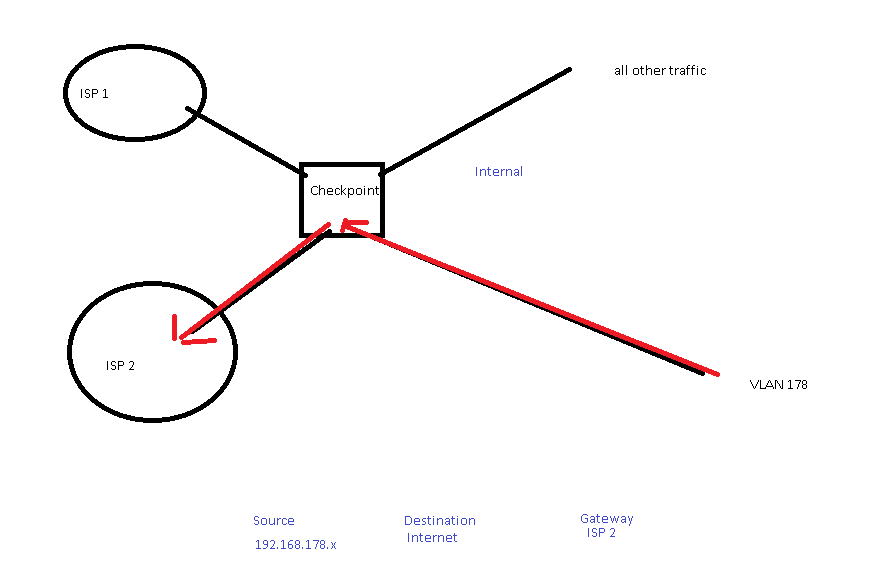
Need some assistance setting up policy based routing or a static route. Basically just looking to route traffic from one VLAN out a secondary ISP link. Reading through the Policy based routing article SK100500 this does not give me the scenario. There is no way to specific "internet" as a destination.
Source: 192.168.178.x - Destination: Internet - Gateway - ISP 2 (eth1)
See my mspaint diagram below. Can anyone advise how i would route this traffic our my second ISP link?
Any advice/assistance would be great!
Cheers,

Called checkpoint support, they didnt really understand what i meant, even after i drew them a basic diagram in paint.
Hi Mike,
PBR is based on IP and Ports, there is no Internet Object as on regular policy.
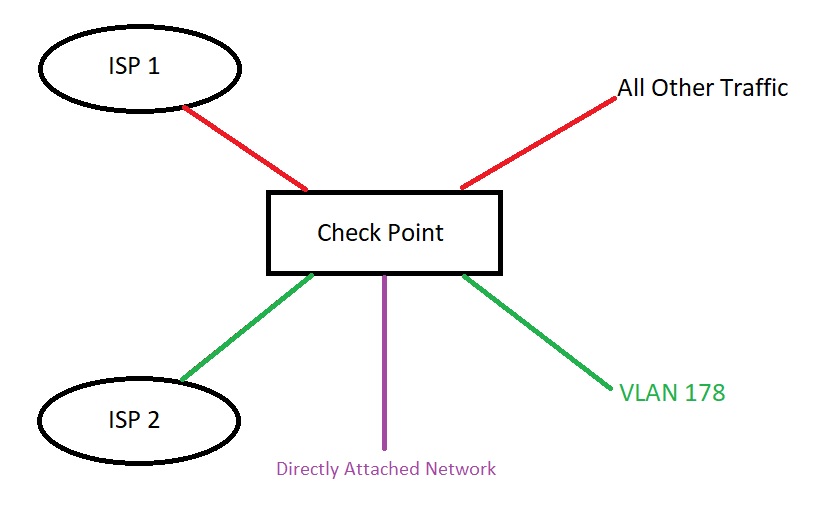
To route VLAN178 through ISP2 and assuming ISP1 is configured as your default route, yo have to do the following:
1. Create a new PBR table of type Default Route that points to ISP2 next hop address.
2. Add a new PBR rule with source Inbound Interface of VLAN178 (I'm assuming is locally conected on a subinterface ethx.178) who uses the PBR table created earlier. On this case, you can't solely use the segment 192.168.178.X/XX since the Firewall probably has an IP address on this segment and could derive on unwanted behavior.
Please note the following:
- Hide behind Gateway NAT or Hide Behind IP (on ISP2 range) must be configured for VLAN178's Network Object to allow traffic leave the ISP2 interface with correct IP address. If you use Hide behind IP, Proxy ARP may be neccesary
- Since PBR is processed before regular Routing Table, if you follow the two steps mentioned above, all traffic from VLAN178 will be redirected to ISP2 link no matter which is the final destination. If you want to route to local networks, you will have to create a new PBR table including those you need to reach locally and specify the output interface (like a copy of your routing table); after that you need to create a PBR rule with lower priority pointing to this table.
- There is no automatic failover, so if ISP2 is down on some place along the path; all traffic still be sent to this link.
- If you have ISP Redundancy configured, PBR is bypassed.
Regards.
Hi Mike,
PBR is based on IP and Ports, there is no Internet Object as on regular policy.
To route VLAN178 through ISP2 and assuming ISP1 is configured as your default route, yo have to do the following:
1. Create a new PBR table of type Default Route that points to ISP2 next hop address.
2. Add a new PBR rule with source Inbound Interface of VLAN178 (I'm assuming is locally conected on a subinterface ethx.178) who uses the PBR table created earlier. On this case, you can't solely use the segment 192.168.178.X/XX since the Firewall probably has an IP address on this segment and could derive on unwanted behavior.
Please note the following:
- Hide behind Gateway NAT or Hide Behind IP (on ISP2 range) must be configured for VLAN178's Network Object to allow traffic leave the ISP2 interface with correct IP address. If you use Hide behind IP, Proxy ARP may be neccesary
- Since PBR is processed before regular Routing Table, if you follow the two steps mentioned above, all traffic from VLAN178 will be redirected to ISP2 link no matter which is the final destination. If you want to route to local networks, you will have to create a new PBR table including those you need to reach locally and specify the output interface (like a copy of your routing table); after that you need to create a PBR rule with lower priority pointing to this table.
- There is no automatic failover, so if ISP2 is down on some place along the path; all traffic still be sent to this link.
- If you have ISP Redundancy configured, PBR is bypassed.
Regards.
Wow! , thanks for the detailed response. Didn't expect that!
Will be giving this a shot today. Cheers
Just reporting back that this worked perfectly. not sure why checkpoint support couldn't have pointed me in this direction. Cheers.
It's great to know that, Mike!
We're here to help.
Regards.
Hi, sorry for the late answer, I wasnt available on the community for a while.
When you're using default route statement, all traffic goes through that interface. So is neccesary to add each directly connected network entry to a PBR Rule/Table before the default route entry.
If I remember correctly, without the additional network entries, you're able to reach all firewall interfaces on any net (as long you have firewall permissions) but not beyond that.
Regards.
Leaderboard
Epsum factorial non deposit quid pro quo hic escorol.
| User | Count |
|---|---|
| 22 | |
| 20 | |
| 16 | |
| 7 | |
| 6 | |
| 3 | |
| 3 | |
| 3 | |
| 3 | |
| 3 |
Fri 12 Dec 2025 @ 10:00 AM (CET)
Check Mates Live Netherlands: #41 AI & Multi Context ProtocolTue 16 Dec 2025 @ 05:00 PM (CET)
Under the Hood: CloudGuard Network Security for Oracle Cloud - Config and Autoscaling!Fri 12 Dec 2025 @ 10:00 AM (CET)
Check Mates Live Netherlands: #41 AI & Multi Context ProtocolTue 16 Dec 2025 @ 05:00 PM (CET)
Under the Hood: CloudGuard Network Security for Oracle Cloud - Config and Autoscaling!About CheckMates
Learn Check Point
Advanced Learning
YOU DESERVE THE BEST SECURITY