- Products
- Learn
- Local User Groups
- Partners
- More
MVP 2026: Submissions
Are Now Open!
What's New in R82.10?
10 December @ 5pm CET / 11am ET
Announcing Quantum R82.10!
Learn MoreOverlap in Security Validation
Help us to understand your needs better
CheckMates Go:
Maestro Madness
parsing mgmt_cli using JQ delivers not expected result
I am on R80.10 SMS T462 and run the following command:
[Expert@R80.10:0]# mgmt_cli login user admin password vpn123 > id.txt
[Expert@R80.10:0]# mgmt_cli show service-tcp -s id.txt name http --format json | jq '{name: .name, port: .port}'
{
"name": null,
"port": null
}I would have expected to get the following result :
{
"name": "http",
"port": "80"
}when I run the following command I get correct results:
[Expert@R80.10:0]# mgmt_cli show service-tcp -s id.txt name http --format json > input.txt
[Expert@R80.10:0]# cat input.txt | jq '{name: .name, port: .port}'
{
"name": "http",
"port": "80"
}the input looks like follows (result of "mgmt_cli show service-tcp name http") :
{
"uid" : "97aeb3d4-9aea-11d5-bd16-0090272ccb30",
"name" : "http",
"type" : "service-tcp",
"domain" : {
"uid" : "a0bbbc99-adef-4ef8-bb6d-defdefdefdef",
"name" : "Check Point Data",
"domain-type" : "data domain"
},
"port" : "80",
"protocol" : "HTTP",
"match-by-protocol-signature" : false,
"override-default-settings" : true,
"session-timeout" : 3600,
"use-default-session-timeout" : true,
"match-for-any" : true,
"sync-connections-on-cluster" : false,
"aggressive-aging" : {
"enable" : true,
"timeout" : 60,
"use-default-timeout" : false,
"default-timeout" : 60
},....
.....
What am I doing wrong ?
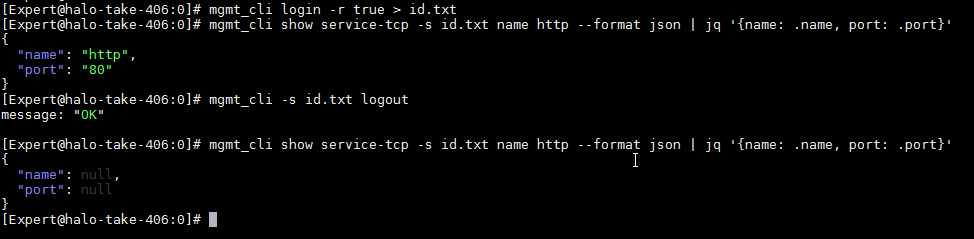
It can be in case the show-service-tcp command fails (object not found, session expired, etc.)
For example here is the reproduction of the issue because of expired session:

Is the value output enough? example:
mgmt_cli -r true show service-tcp name http --format json|jq '.name, .port'
Help us understand what the desire is, are you trying to add the attribute as a string before the value?
Interesting, I've tested the same syntax as you have provided and it is working just fine for me. If you forgo the pipe to jq does the command return a json response?
```
[Expert@Hatter-2200:0]# mgmt_cli show service-tcp -s id.txt name http --format json | jq '{name: .name, port: .port}'
{
"name": "http",
"port": "80"
}
```
It can be in case the show-service-tcp command fails (object not found, session expired, etc.)
For example here is the reproduction of the issue because of expired session:

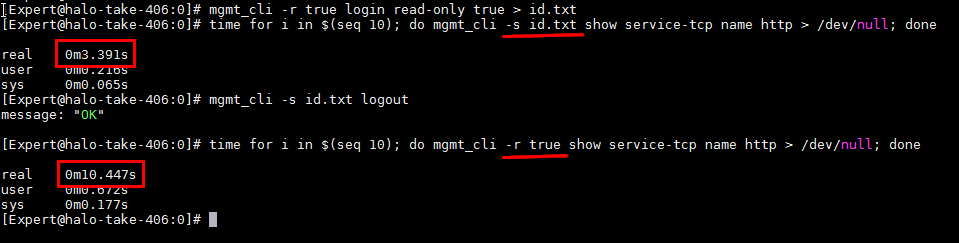
Why not just use
mgmt_cli -r true
?
When running on SMS and using - r(oot), no need to take care about expired session.
It depends of the needs. For example calling a read command many times will be much slower with -r true (because of overhead for login and logout on each call). It is also recommended to login with read only permissions when one is interested only in reads (it's impossible to achieve when using -r true for an actual command).

Good to know, thanks for that hint.
Leaderboard
Epsum factorial non deposit quid pro quo hic escorol.
| User | Count |
|---|---|
| 4 | |
| 2 | |
| 1 | |
| 1 | |
| 1 | |
| 1 | |
| 1 | |
| 1 | |
| 1 | |
| 1 |
Fri 12 Dec 2025 @ 10:00 AM (CET)
Check Mates Live Netherlands: #41 AI & Multi Context ProtocolTue 16 Dec 2025 @ 05:00 PM (CET)
Under the Hood: CloudGuard Network Security for Oracle Cloud - Config and Autoscaling!Fri 12 Dec 2025 @ 10:00 AM (CET)
Check Mates Live Netherlands: #41 AI & Multi Context ProtocolTue 16 Dec 2025 @ 05:00 PM (CET)
Under the Hood: CloudGuard Network Security for Oracle Cloud - Config and Autoscaling!Thu 18 Dec 2025 @ 10:00 AM (CET)
Cloud Architect Series - Building a Hybrid Mesh Security Strategy across cloudsAbout CheckMates
Learn Check Point
Advanced Learning
YOU DESERVE THE BEST SECURITY