- Products
- Learn
- Local User Groups
- Partners
- More

MVP 2026: Submissions
Are Now Open!
What's New in R82.10?
Watch NowOverlap in Security Validation
Help us to understand your needs better
CheckMates Go:
Maestro Madness
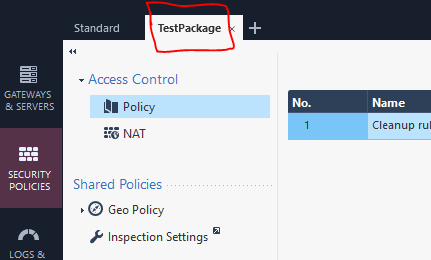
Ok, I've got two policy packages on an R80.20 SMS (Standard and TestPackage):

What I want to do is to import a set of firewall rules into the TestPackage via the api with the following command:
mgmt_cli add access-rule --batch fwpolicy-final.csv
The problem though is that the firewall rules are added to the Standard package and NOT the TestPackage one.
So my question is, is there an argument I could add to the above command to specify the policy package I want to add the firewall rules to? I can't find one in the api reference: Check Point - Management API reference .
Thanks in advance.
What are the headers of the used csv file "fwpolicy-final.csv"? Or to be precise - which command arguments are you currently using in order to create new rules?
Hi Maik,
The headers of the csv file are the following:
| layer | position | name | source | destination | vpn | service action |
The issue though is that the same problem occurs when trying to add a single rule via the api as well. I've tried the package "TestPackage" argument as well but it doesn't seem to work.
Hey Nicholas,
I see what you mean. Did you create that policy package before? Because the parameter "layer" is actually referring to a policy package and inline layers as well. That means if you execute the api command "show access-layers" it will provide you with a list of all access layers - including the policy packages (name wise). Each object in the list that the previously mentioned command provides to you can then be used to mention in the "layer" argument of the "add access-rule" command. The strange thing, that I also currently do not understand, is that the names often include a " Network" at the end of their name which is not visible via the SmartConsole. So for example, a package that you see in the SmartConsole which is named "TestPackage" is actually called "TestPackage Network" when accessing it via the API. Some older packages in my environment also include the ending of " Security" instead of " Network". You can verify this - again - with the command show access-layers.
Thanks to your comment Maik, I made it work with the following:
mgmt_cli add access-rule layer "TestPackage" position 1 name "Rule 1"
I will now try the batch mode which should work just as well.
Thanks again!
Hi
Please help me verify this header of csv. I got problem with "action"
layer,name,position,comments,source.1,source.2,source.3,source.4,destination.1,destination.2,destination.3,destination.4,service.1,service.2,service.3,service.4,service.5,service.6,service.7,service.8,service.9,service.10,service.11,service.12,service.13,service.14,service.15,service.16,service.17,service.18,service.19,service.20,service.21,service.22,service.23,service.24,action,track
API Version 1.6
R80.40
Leaderboard
Epsum factorial non deposit quid pro quo hic escorol.
| User | Count |
|---|---|
| 4 | |
| 1 | |
| 1 | |
| 1 | |
| 1 | |
| 1 | |
| 1 | |
| 1 | |
| 1 | |
| 1 |
Tue 16 Dec 2025 @ 05:00 PM (CET)
Under the Hood: CloudGuard Network Security for Oracle Cloud - Config and Autoscaling!Thu 18 Dec 2025 @ 10:00 AM (CET)
Cloud Architect Series - Building a Hybrid Mesh Security Strategy across cloudsTue 16 Dec 2025 @ 05:00 PM (CET)
Under the Hood: CloudGuard Network Security for Oracle Cloud - Config and Autoscaling!Thu 18 Dec 2025 @ 10:00 AM (CET)
Cloud Architect Series - Building a Hybrid Mesh Security Strategy across cloudsAbout CheckMates
Learn Check Point
Advanced Learning
YOU DESERVE THE BEST SECURITY