- Products
- Learn
- Local User Groups
- Partners
- More

MVP 2026: Submissions
Are Now Open!
What's New in R82.10?
Watch NowOverlap in Security Validation
Help us to understand your needs better
CheckMates Go:
Maestro Madness
I'm looking in the UI under "Access Control" and I see some different groups "Firewall Management", "Infrastructure rules," etc, and inside them are what I am assuming are the "rules" (DNS access, NTP access, etc). My question is: how do I identify which of these I need to reference when making a REST call for show access-rulebase? The API call requires only a name field, and so far everything returns 404.
Full disclosure: I am not a networking engineer, we are just creating some automation to clean up firewall rules for server lifecycle management. If this is the wrong place to ask, I apologize.
The "Firewall Management" and "Infrastructure rules" are what we call access-sections.
A rulebase is actually part of a layer.
To get a rulebase, you need to know what layer it is a part of.
The name at the API level may be different than what SmartConsole shows.
To get the layer names, you use the API call show-layers.
From that, you can see the actual name of the layer.
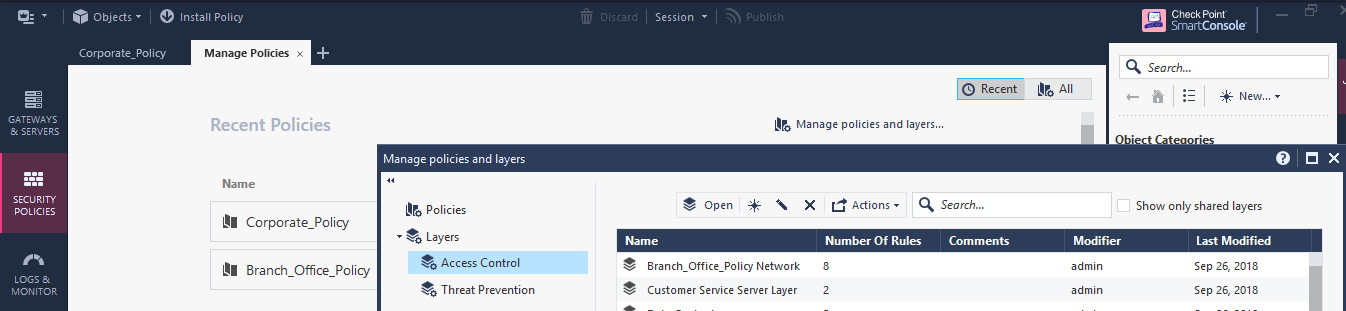
You can also see it in this screen in SmartConsole if you uncheck the "Show only shared layers" checkbox:

Thanks for the response.
When I make the API call for show-access-layers, I get a 400 bad request.
I'm using Powershell to do this:
$layerbody = @{
"Limit" = "100";
}
$layerjson = $layerbody | ConvertTo-JSON
$layers = irm https://checkpointserver/web_api/v1.1/show-access-layers -method POST -headers $headers -body $layerjson -ContentType application/json
It returns the same if I don't supply a request body. Suggestions?
Here's how I'm able to get the output of show-access-layers using curl:
curl --silent --insecure -XPOST https://mgmtip/web_api/v1.1/show-access-layers --data-binary "{ \"limit\": 100 }" -H "Content-Type: application/json" -H "X-chkp-sid: $SID"
Based on what you've done above, I'm guessing the ; is causing an issue.
Because when I include it in my call, I get:
{
"code": "generic_err_invalid_syntax",
"message": "Payload is not a valid JSON"
}
It's possible you're also missing the SID header, but I can't tell if you're including it in your headers.
The ";" is required by Powershell when I set the variable otherwise it complains about setting something like "x" = "y", once you pipe it to the ConvertTo-JSON it goes away and looks like regular JSON. I am including the login SID in my $headers variable, it just happens earlier in the code.
What about the quotes around 100?
That would imply you're setting the limit to a string when it should be an integer.
The L in limit needs to be lowercase is the first problem, capital L would give a 400 with json response describing Limit as an unrecognized parameter.
Leaderboard
Epsum factorial non deposit quid pro quo hic escorol.
| User | Count |
|---|---|
| 4 | |
| 1 | |
| 1 | |
| 1 | |
| 1 | |
| 1 | |
| 1 | |
| 1 | |
| 1 | |
| 1 |
Tue 16 Dec 2025 @ 05:00 PM (CET)
Under the Hood: CloudGuard Network Security for Oracle Cloud - Config and Autoscaling!Thu 18 Dec 2025 @ 10:00 AM (CET)
Cloud Architect Series - Building a Hybrid Mesh Security Strategy across cloudsTue 16 Dec 2025 @ 05:00 PM (CET)
Under the Hood: CloudGuard Network Security for Oracle Cloud - Config and Autoscaling!Thu 18 Dec 2025 @ 10:00 AM (CET)
Cloud Architect Series - Building a Hybrid Mesh Security Strategy across cloudsAbout CheckMates
Learn Check Point
Advanced Learning
YOU DESERVE THE BEST SECURITY