- Products
- Learn
- Local User Groups
- Partners
- More

Step Into the Future of
AI-Powered Cyber Security
The State of Ransomware Q1 2026
Key Trends and Their Impact
AI Security Masters E8:
Claude Mythos: New Era in Cyber Security
Blueprint Architecture for Securing
The AI Factory & AI Data Center
Call For Papers
Your Expertise. Our Stage
CheckMates Go:
CheckMates Fest
ElasticXL is a new cluster technology that enables simplified operation with a single management object with automatic configuration and software synchronisation between all cluster members.
ElasticXL is expected to be delivered with R82 or later versions. ElasticXL is based on similar technology to Maestro, but without MHOs. It is based on Check Point's SP versions for a scalable platform that allows you to increase the performance of the security gateways almost linearly.
This is achieved naturally by load balancing between individual gateways that operate in a cluster as a single entity.
This new cluster technology will some of the Maestro featchers such as SMO (Singel Management Object) use.
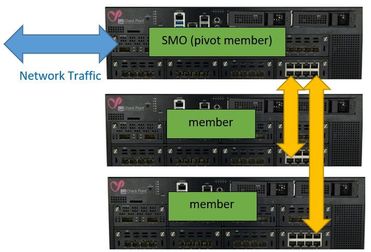
A ElasticX gateway will work as a pivot member and act simelar as a MHO's in a Maestro environment and simultaneously takes on the role of SMO.
The pivot member takes over the network connection and controls the ARP requests in the network. The pivot member distributes the connections via a distribution matrix to the connected member in the security group similar to a Maestro environment.
Same as the Maestro environments, the familiar SP commands will also be available here and there will also be a gclish. The management traffic will be handled by the SMO (pivot member).
Installation process:
1) The gateways are installed as usual via the First Configuration Wizard. ElasticXL" is now selected instead of "ClusterXL" on the product page.
2) After that, the SIC to the first gateway (pivot member) will be established single gateway (not as a cluster object). Afterwards, the policy can be installed.
3) In the following step the next gateways can be added by (host name, serial number).
>>> Please note that this information is not yet an official statement from Check Point and may change at any time. <<<
About CheckMates
Learn Check Point
Advanced Learning

YOU DESERVE THE BEST SECURITY