- Products
- Learn
- Local User Groups
- Partners
- More

Stop Babysitting Rules.
Go Agentic
Step Into the Future of
AI-Powered Cyber Security
The State of Ransomware Q1 2026
Key Trends and Their Impact
AI Security Masters E8:
Claude Mythos: New Era in Cyber Security
Blueprint Architecture for Securing
The AI Factory & AI Data Center
Call For Papers
Your Expertise. Our Stage
CheckMates Go:
CheckMates Fest
Hi all,
I have a simple question to ask to the community. How I can set permanently an entry on the hosts file of the firewall?
My setup is a 1590 Quantum Spark appliance running R80.20.25.
I need to resolve a specific FQDN into a specific IP and not using public DNS servers.
There is no way to do this from GUI, also clish commands are not working or accepted.
So I've tried to edit /etc/hosts file in expert mode, but any change is overwritten automatically after some time. When I write inside /etc/hosts file an entry, this works only for some time. After a while it's overwritten and deleted reverting back the file to default.
Any idea?
Thank you,
Gianluigi Carella
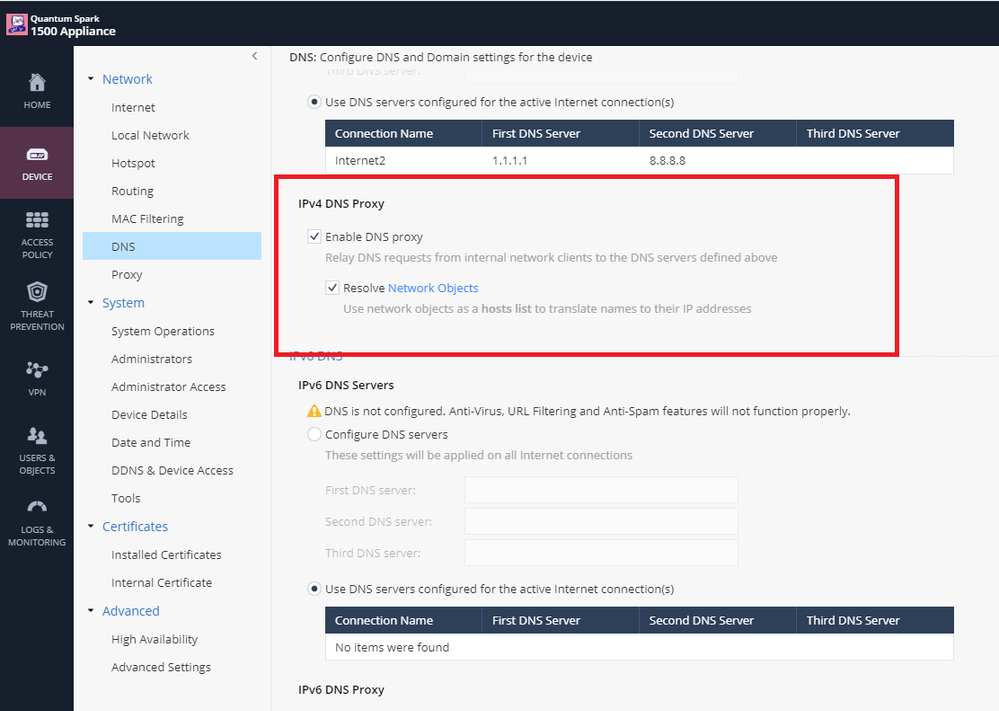
Do you have [Enable DNS Proxy] and [Resolve Network Objects] checked in global DNS settings?
Also not to forget to check [Allow DNS server to resolve this object name] on your network object, and it should work.
Editing certain underlying Unix files like that is not supported.
You need to create a specific object for that FQDN either in the WebUI or via the add host CLI command.
OK but I've tried using a network object and it doesn't work.
When I try to ping the FQDN the IP is resolved with the public IP and not the private one that I have explicitly configured in the network object.
What I'm doing wrong?
Thanks.
Is an entry being created in the /etc/hosts file when you create the object?
It is for me when I do it on R80.20.30 firmware anyway.
tried many times, but /etc/hosts doesn't reflect what I've configured as network object.
Do you have [Enable DNS Proxy] and [Resolve Network Objects] checked in global DNS settings?
Also not to forget to check [Allow DNS server to resolve this object name] on your network object, and it should work.
Yeah. This works for me. The solution was for all this time under my eyes.
After doing [Enable DNS Proxy] and [Resolve Network Objects] checked in global DNS settings and [Allow DNS server to resolve this object name] on network object, do we still need to make the entries in /etc/hosts file...? Or only making these settings on firewall level only will resolve the DNS since after these settings on firewall level only, I am not able to ping the network object from my desktop while in firewall DNS lookup, object is resolving the IP...
Can any one plz help here...
No, entries in firewall /etc/hosts file are defined in WebGUI. Did you look at the hops ?
While checking by tracert in command prompt it is showing as 'Unable to resolve target system name xyz.in' 😕
I just got it work... Since I have manually entered the Google DNS (8.8.8.8) on end user nodes that's why it was not resolving the network objects of CP firewall. Now I mentioned the gateway address in DNS and it starts working...😃
If I don't mention the gateway address in DNS on end user node on ethernet then it doesn't work. Please suggest that mentioning the gateway address in DNS on end user node ethernet is good idea ...?
Setting the gateway LAN IP in the client DNS settings is a requirement for DNS proxy to work, correct.
Leaderboard
Epsum factorial non deposit quid pro quo hic escorol.
| User | Count |
|---|---|
| 4 | |
| 3 | |
| 3 | |
| 2 | |
| 2 | |
| 2 | |
| 2 | |
| 1 | |
| 1 | |
| 1 |
Fri 29 May 2026 @ 09:00 AM (EDT)
Caracas: Executive Breakfast: Innovación en Ciberseguridad – IA y Threat IntelligenceTue 02 Jun 2026 @ 10:00 AM (AEST)
The Cloud Architect Series: Check Point WAF. The next generation of AI-Powered Protection - APACTue 02 Jun 2026 @ 06:00 PM (IDT)
Under the Hood | Check Point SASE: Identity Integration & Access Policy Design Best PracticesTue 02 Jun 2026 @ 10:00 AM (AEST)
The Cloud Architect Series: Check Point WAF. The next generation of AI-Powered Protection - APACTue 02 Jun 2026 @ 06:00 PM (IDT)
Under the Hood | Check Point SASE: Identity Integration & Access Policy Design Best PracticesThu 04 Jun 2026 @ 02:00 PM (CEST)
Deep Dive Webinar: New CloudGuard GWLB Deployment Without NAT Gateways - EuropeThu 04 Jun 2026 @ 07:00 PM (IDT)
Deep Dive Webinar: New CloudGuard GWLB Deployment Without NAT Gateways - AmericaFri 29 May 2026 @ 09:00 AM (EDT)
Caracas: Executive Breakfast: Innovación en Ciberseguridad – IA y Threat IntelligenceAbout CheckMates
Learn Check Point
Advanced Learning
YOU DESERVE THE BEST SECURITY