- Products
- Learn
- Local User Groups
- Partners
- More

MVP 2026: Submissions
Are Now Open!
What's New in R82.10?
10 December @ 5pm CET / 11am ET
Announcing Quantum R82.10!
Learn MoreOverlap in Security Validation
Help us to understand your needs better
CheckMates Go:
Maestro Madness
Now, we can also run SmartMove from the CLI.
Usage:
SmartMove.exe [-s config_file_name] [-v vendor] [-t target_folder] [-d domain] [-n] [-l LDAP_Account_unit] [-k]
Mandatory flags:
-s | --source |
Full path to the vendor configuration file |
-v | --vendor |
Vendor for conversion (available options: CiscoASA, JuniperSRX, JuniperSSG, FortiNet, PaloAlto, Panorama) |
Optional flags:
-t | --target |
Migration output folder |
-d | --domain |
Domain name (for CiscoASA, JuniperSRX, JuniperSSG only) |
-n | --nat ("-n false" |" -n true" [default]) |
Convert NAT configuration [enabled by default] |
-l | --ldap |
LDAP Account unit for convert user configuration option (for FortiNet, PaloAlto, and Panorama only) |
-k | --skip ("-k false" |" -k true" [default]) |
Do not import unused objects (for FortiNet, PaloAlto and Panorama only) [enabled by default] |
-f | --format |
Format of the output file (JSON[default], TEXT) |
Example:
SmartMove.exe -s "D:\SmartMove\Content\config.txt" -v CiscoASA - t "D:\SmartMove\Content" -n true -k false -f json
How can i download latest Version?
i think that Latest version is not available in official site
download link information
I uploaded the version to the same link id 🙂
if there are issues, please let me know .
I downloaded from the link
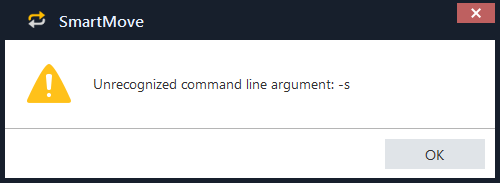
but CLI command was not working in CMD
i confirmed files, last modified date is 23 May.
i think that new version of smartmove is 6.2,but the version is 6.0 in official site
My mistake, I re-uploaded it
I think tool is actually really good. I used it twice for Cisco conversion and worked fine both times. One odd thing I found, but not real sure if this is just cosmetic or way tool works...for example, if you run show runn on Cisco from enable mode and then output it into text file, conversion may not work right, so what you need to do is go to conf t mode on Cisco, run pager 0 and that will eliminate "page breaks" when running any commands, so you dont need to keep pressing space bar on your keyboard.
Anyway, thought would share this, if anyone else encountered this problem.
Thanks for the feedback 🙂
I added it a few weeks ago to the SmartMove SK.
Cisco configuration migration:
Before you run SmartMove, replace DHCP / DAIP interfaces with static IP addresses on your cisco Gateway.
- Get the Cisco configuration file from the gateway. See vendor documentation for "show configuration" commands.
- SSH:https://www.cisco.com/c/en/us/td/docs/security/asa/asa-command-reference/S/cmdref3/s12.html " -> "terminal pager 0" ->show running-config"
ASDM: https://www.cisco.com/c/en/us/td/docs/security/asa/asa97/asdm77/general/asdm-77-general-config/admin...
On the ASDM we need to drive to Tools>Backup Configurations, select 'running-configuration', browse the folder we would like to save the ASA configuration, click backup and wait until you get the confirmation message.
Once this is done we get a .zip file with the ASA configuration
Is the "asa-spread-acl-remarks" flag still supported with the latest SmartMove.exe? This was an undocumented option that was needed to fully migrate comments from ASA rules to Check Point comments.
I never seen that issue even in older version, always worked fine...after migrating, I was able to see all the comments that where there for Cisco rules.
Interesting, we've always needed that option. Because of the way ASA comments it's rules in chunks (one comment covers multiple rules) if there are multiple rules under the same 'comment', SmartMove will only migrate that comment into the first rule only. By launching SmartMove.exe with the 'asa-spread-acl-remarks' flag, the ASA comments will 'spread' and be copied to each individual rule. I don't believe it was every documented though.
"asa-spread-acl-remarks" is support and documented 🙂
Fri 12 Dec 2025 @ 10:00 AM (CET)
Check Mates Live Netherlands: #41 AI & Multi Context ProtocolTue 16 Dec 2025 @ 05:00 PM (CET)
Under the Hood: CloudGuard Network Security for Oracle Cloud - Config and Autoscaling!Fri 12 Dec 2025 @ 10:00 AM (CET)
Check Mates Live Netherlands: #41 AI & Multi Context ProtocolTue 16 Dec 2025 @ 05:00 PM (CET)
Under the Hood: CloudGuard Network Security for Oracle Cloud - Config and Autoscaling!Thu 18 Dec 2025 @ 10:00 AM (CET)
Cloud Architect Series - Building a Hybrid Mesh Security Strategy across cloudsAbout CheckMates
Learn Check Point
Advanced Learning
YOU DESERVE THE BEST SECURITY