- Products
- Learn
- Local User Groups
- Partners
- More
MVP 2026: Submissions
Are Now Open!
What's New in R82.10?
Watch NowOverlap in Security Validation
Help us to understand your needs better
CheckMates Go:
Maestro Madness
good morning,
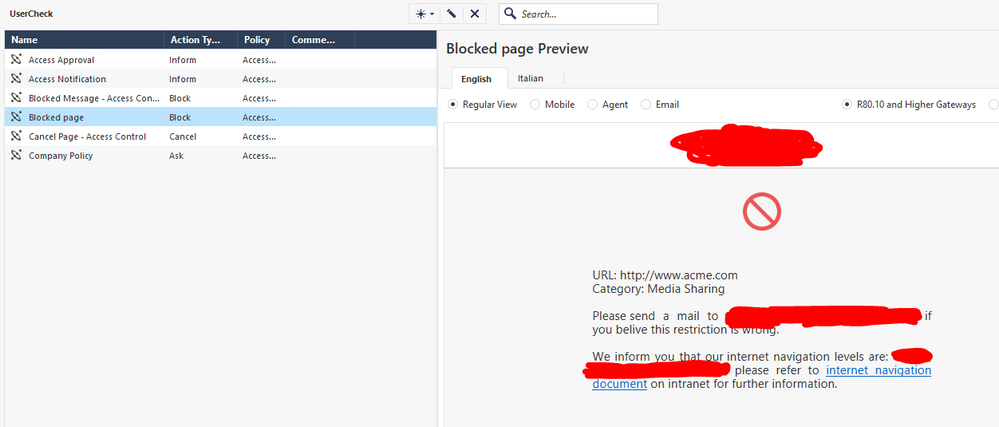
I have created a rule specifically to block internet pages that a group of users cannot access and it works, they are blocked, the problem is that I have set up a usercheck page to make it clear to users that they cannot open it due to permissions, but this does not open. I put some screenshots to make you understand. suggestions on what the problem might be? thank you in advance, any suggestion is welcome 🙂
gaia 80.40 jumbo HF 158
As I can see in the logs, the traffic is HTTPS. Redirect on HTTPS only works if you enable HTTPS Inspection. HTTP clear text sites will be redirected to the UserCheck.
I have activated HTTPS inspection but it does not block the page, below I show the logs and the rule created to block that specific page. The rule is ignored and the web page is allowed to pass by a subsequent rule ... What am I doing wrong?
thanks!
I assume, in rule 51 the source is an internal host, correct?
However, the destination is unclear. What do you use there, exactly? IP ranges? And why is service any? It should be web services only. There will be no blocking page for anything but HTTP/HTTPS
yes, as a source was my ip address, i'v tried to change it with my domain user, i'v tried to specify https service too:
but it doesnt work, there is the logs:
what am i doing wrong? it should work, right?
As already mentioned, please add a user role to the source, and limit services to http/https. Once done, push the policy and check again. Also, the logs about the CLR issue need to be investigated
thank you for the support, at the end i have figured it out. was my mistake on the rule in the application layer... i was using in source ad user access role that can't be retrieved from my DC, so, the rule was skipped bue this problem and iw as using in the destination, the site i wanted to block. instead of putting it in the destination, it goes in the services / applications column. Now it's working but, like you sayd... the usercheck page display only with https inspection enabled. I hope this can help someone struggling like me with simple mistakes.
I am glad you figured this out. Simple mistakes are the hardest to spot 🙂
Agree with Val, rule 51 needs changes at a minimum to the services column.
Leaderboard
Epsum factorial non deposit quid pro quo hic escorol.
| User | Count |
|---|---|
| 20 | |
| 19 | |
| 18 | |
| 8 | |
| 7 | |
| 3 | |
| 3 | |
| 3 | |
| 3 | |
| 3 |
Tue 16 Dec 2025 @ 05:00 PM (CET)
Under the Hood: CloudGuard Network Security for Oracle Cloud - Config and Autoscaling!Thu 18 Dec 2025 @ 10:00 AM (CET)
Cloud Architect Series - Building a Hybrid Mesh Security Strategy across cloudsTue 16 Dec 2025 @ 05:00 PM (CET)
Under the Hood: CloudGuard Network Security for Oracle Cloud - Config and Autoscaling!Thu 18 Dec 2025 @ 10:00 AM (CET)
Cloud Architect Series - Building a Hybrid Mesh Security Strategy across cloudsAbout CheckMates
Learn Check Point
Advanced Learning
YOU DESERVE THE BEST SECURITY