- Products
- Learn
- Local User Groups
- Partners
- More
MVP 2026: Submissions
Are Now Open!
What's New in R82.10?
Watch NowOverlap in Security Validation
Help us to understand your needs better
CheckMates Go:
Maestro Madness
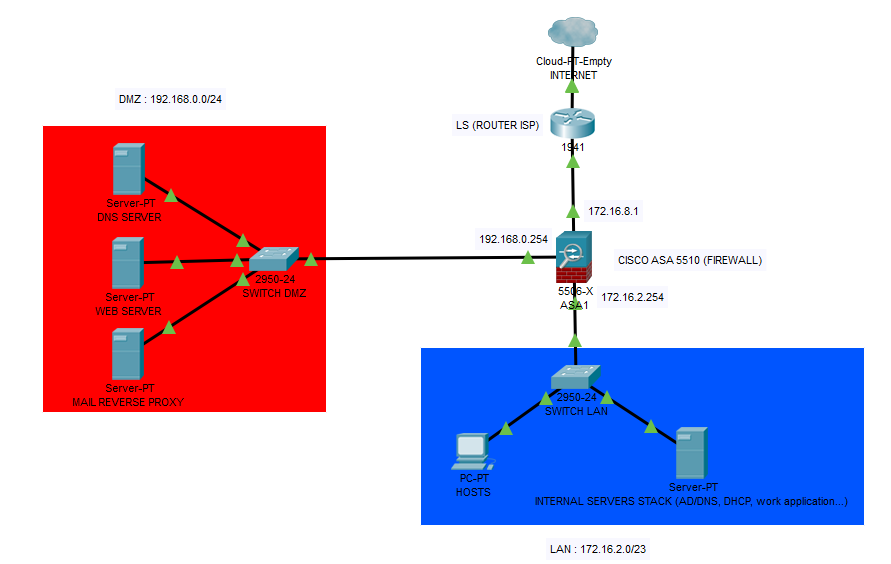
Hello community, I need your help. in fact I had to deploy a 3200 applicance under GAIA R80.20 to a client who already has an ASA cisco that I have to replace. So after configuring the interfaces, the default route, the DNS and importing the cisco ASA rules, I connected the appliance to the network. But no communication possible through the 3200.
attached the existing architecture with the ASA
Can you describe what troubleshooting you've done to date?
I tend to start with the basics like making sure you can ping "near" and "far" addresses of the security gateway from the LAN and DMZ. And, of course, ping from the gateway itself to various locations.
And of course, look at the logs and see what they have to say. From there it depends on what you find.
being in the LAN I can ping the interface close to the gateway, but I can not reach remote interfaces. gateway I manage to join the interfaces that are pockets but not internet. I will now check my logs.
but can you tell me a little what type of log I can find and what will be the possible solutions?
Hi,
Would first have a look at ARP tables from Clients and Gateway, if IP<->MAC Resolution is ok? Maybe some VLAN Tags are missing or old ARP entries. If this is OK, try pinging around, as Dameon said.
if Pinging to Gateway is ok, try next step to ISP Router. Also had the case, that on the ISP router there are static or very slowly updated ARP entries.
Daniel
Two things that are missing from the description of the steps you have taken configuring 3200 are:
1. Definition of the gateway topology
2. NAT configuration for the network and server objects
Please check the "Networking/Topology" and define them as "External", "Internal"and "DMZ" with later two having appropriate networks behind interfaces.
Additionally, for objects representing hosts in DMZ, configure Static NAT parameters and for networks behind Internal, configure "Hide" NAT behind Gateway Object.
You may want to temporary enable ICMP in the Global Policy properties for troubleshooting and check logs for the NAT action, looking at XLate source and destination.
Regards,
Vladimir

Leaderboard
Epsum factorial non deposit quid pro quo hic escorol.
| User | Count |
|---|---|
| 20 | |
| 19 | |
| 18 | |
| 8 | |
| 7 | |
| 3 | |
| 3 | |
| 3 | |
| 3 | |
| 3 |
Tue 16 Dec 2025 @ 05:00 PM (CET)
Under the Hood: CloudGuard Network Security for Oracle Cloud - Config and Autoscaling!Thu 18 Dec 2025 @ 10:00 AM (CET)
Cloud Architect Series - Building a Hybrid Mesh Security Strategy across cloudsTue 16 Dec 2025 @ 05:00 PM (CET)
Under the Hood: CloudGuard Network Security for Oracle Cloud - Config and Autoscaling!Thu 18 Dec 2025 @ 10:00 AM (CET)
Cloud Architect Series - Building a Hybrid Mesh Security Strategy across cloudsAbout CheckMates
Learn Check Point
Advanced Learning
YOU DESERVE THE BEST SECURITY