- Products
- Learn
- Local User Groups
- Partners
- More

The Great Exposure Reset
24 February 2026 @ 5pm CET / 11am EST
CheckMates Fest 2026
Watch Now!AI Security Masters
Hacking with AI: The Dark Side of Innovation
CheckMates Go:
CheckMates Fest
Hello Team,
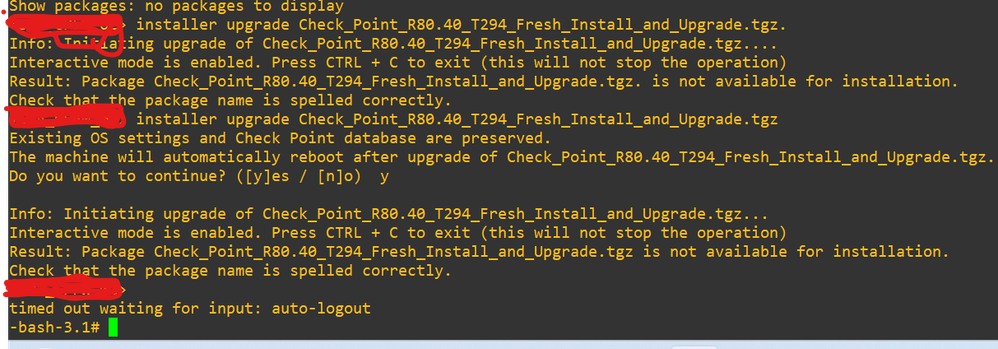
I am trying to upgrade checkpoint security gateway from R80.10 to R80.40 via CLI without upgrade tool or without CPUSE.I have uploaded OS image on device successfully but at the time of upgradation I am getting error Package Check_Point_R80.40_T294_Fresh_Install_and_Upgrade.tgz is not available for installation.
Check that the package name is spelled correctly. image is downloaded from checkpoint portal only (I tried with tgz as well as iso image). please find below attached snap for more clarification.
Thanks in advance for your time and response
Regards,
Axe
Please show here you invoke the installer command with all arguments.
Also, what hardware is this on?
Before you do any upgrade (whether online or offline), you also need to ensure you are using the latest Deployment Agent.
See: https://support.checkpoint.com/results/sk/sk92449
Hello Phoneboy,
thank you so much for your response.
the command which I am using here is installer upgrade<package name> I am using virtual platform which is running on Vcenter. for deployment agent I don't have credentials to download it here I am trying without deployment agent.
Regards,
Axe
Maybe it does not recognize . after tgz? Also, why not use web ui? Thats RECOMMENDED way anyhow.
Andy
Hello the_rock,
thanks for your response but I tried with removing that . as well, customer wants to upgrade it via CLI only that is the reason we are trying it via CLI.
Regards,
Axe
I get thats what the customer wants, but why?
Hello the_rock,
customer is doing automation for that automation task he wants to know the cli upgradation commands that's why we are upgrading it via cli.
Regards,
Axe
The 'installer' commands are the deployment agent, operated via clish. You need to follow the clish section of the R80.40 upgrade and install guide appropriate to your platform to do this.
Hello emmap,
Thank you for your response.
I am able to upgrade my firewall on targeted version.
Run "show installer packages all".
I suspect the R80.40 package hasn't been imported to the CPUSE repository. Did you run a command like "installer import local /some/path/here/Check_Point_R80.40_T294_Fresh_Install_and_Upgrade.tgz" after copying the package to the system?
Hello Bob_Zimmerman,
Thank you so much for your reply.
I have successfully upgraded checkpoint firewall on R80.40 version.
Why the installation of not supported version?
Valid point.
If it's a standalone (or management, but OP said gateway), the path from R80.10 to any supported version officially requires upgrading to R80.40 first.
Leaderboard
Epsum factorial non deposit quid pro quo hic escorol.
| User | Count |
|---|---|
| 57 | |
| 43 | |
| 15 | |
| 14 | |
| 14 | |
| 11 | |
| 11 | |
| 10 | |
| 9 | |
| 8 |
Thu 12 Feb 2026 @ 05:00 PM (CET)
AI Security Masters Session 3: AI-Generated Malware - From Experimentation to Operational RealityFri 13 Feb 2026 @ 10:00 AM (CET)
CheckMates Live Netherlands - Sessie 43: Terugblik op de Check Point Sales Kick Off 2026Thu 19 Feb 2026 @ 03:00 PM (EST)
Americas Deep Dive: Check Point Management API Best PracticesThu 12 Feb 2026 @ 05:00 PM (CET)
AI Security Masters Session 3: AI-Generated Malware - From Experimentation to Operational RealityFri 13 Feb 2026 @ 10:00 AM (CET)
CheckMates Live Netherlands - Sessie 43: Terugblik op de Check Point Sales Kick Off 2026Thu 19 Feb 2026 @ 03:00 PM (EST)
Americas Deep Dive: Check Point Management API Best PracticesAbout CheckMates
Learn Check Point
Advanced Learning
YOU DESERVE THE BEST SECURITY