- Products
- Learn
- Local User Groups
- Partners
- More
MVP 2026: Submissions
Are Now Open!
What's New in R82.10?
Watch NowOverlap in Security Validation
Help us to understand your needs better
CheckMates Go:
Maestro Madness
Hi,
I have updated my licenses and contracts for each gateway in smart console and all licenses were showing valid. Roughly a year later, the licenses are showing as "expired" in smart console, even though the Gateway itself is showing another year left on the license.
Can anybody assist me in fixing this ? I'm assuming the issue is minor as the appliances are showing correctly licensed - its just the smart console that thinks they've expired.
Best Regards,
Sabeel
Screenshots from SmartConsole and 'cplic print' outputs will be necessary to offer meaningful advice.
Please redact any sensitive detail.
Hey Sabeel,
As Chris indicated, output of cplic print and screenshots from smart update would help. I actually had a call with customer yesterday about similar issue and lady from License team had them download contract file from their UC and then upload in smart update and she also asked them to delete any current eval licenses. I honestly never had anyone do that before (remove eval licenses) and personally, I believe she was mistaken in thinking thats actually required, but either way, we got everything working afterwards.
Andy
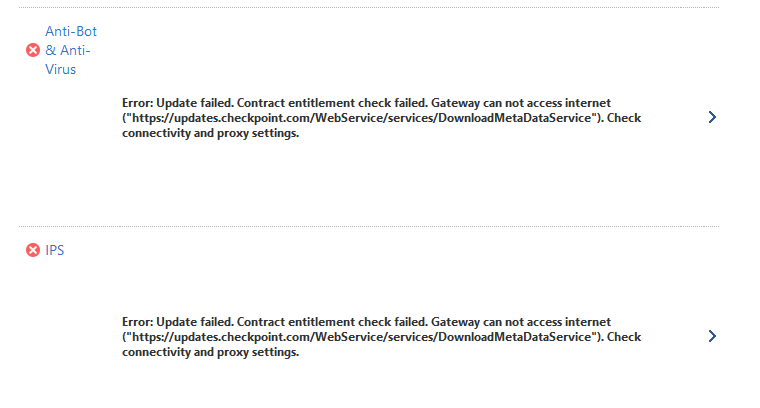
K, this may be slightly different, if IPS and av/ab cannot be updated. I would try manually, but if that fails, you may wish to do curl_cli -k command on updates.checkpoint.com and cws.checkpoint.com
this is expected:
[Expert@quantum-firewall:0]# curl_cli -k updates.checkpoint.com
Page not found![Expert@quantum-firewall:0]# curl_cli -k cws.checkpoint.com
<html><body><h1>It works!</h1></body></html>[Expert@quantum-firewall:0]#
Also, check out below post and verify:
I also posted there for IPS blade.
Andy
@sabeelshakeel My HR KP wrote:Hi,
I have updated my licenses and contracts for each gateway in smart console and all licenses were showing valid. Roughly a year later, the licenses are showing as "expired" in smart console, even though the Gateway itself is showing another year left on the license.
Can anybody assist me in fixing this ? I'm assuming the issue is minor as the appliances are showing correctly licensed - its just the smart console that thinks they've expired.
Best Regards,
Sabeel
Here are a few suggestions on how to troubleshoot expired licenses showing in SmartConsole when the gateways themselves still show valid licenses:
All valid points...TAC should be able to fix this faster via remote session.
Leaderboard
Epsum factorial non deposit quid pro quo hic escorol.
| User | Count |
|---|---|
| 21 | |
| 20 | |
| 17 | |
| 8 | |
| 7 | |
| 3 | |
| 3 | |
| 3 | |
| 3 | |
| 3 |
Fri 12 Dec 2025 @ 10:00 AM (CET)
Check Mates Live Netherlands: #41 AI & Multi Context ProtocolTue 16 Dec 2025 @ 05:00 PM (CET)
Under the Hood: CloudGuard Network Security for Oracle Cloud - Config and Autoscaling!Fri 12 Dec 2025 @ 10:00 AM (CET)
Check Mates Live Netherlands: #41 AI & Multi Context ProtocolTue 16 Dec 2025 @ 05:00 PM (CET)
Under the Hood: CloudGuard Network Security for Oracle Cloud - Config and Autoscaling!Thu 18 Dec 2025 @ 10:00 AM (CET)
Cloud Architect Series - Building a Hybrid Mesh Security Strategy across cloudsAbout CheckMates
Learn Check Point
Advanced Learning
YOU DESERVE THE BEST SECURITY