- Products
- Learn
- Local User Groups
- Partners
- More

MVP 2026: Submissions
Are Now Open!
What's New in R82.10?
Watch NowOverlap in Security Validation
Help us to understand your needs better
CheckMates Go:
Maestro Madness
Using Azure AD for Authorization (checkpoint.com)
Identity Awareness R81.10 Administration Guide (Using Azure AD for Authorization)
Hi,
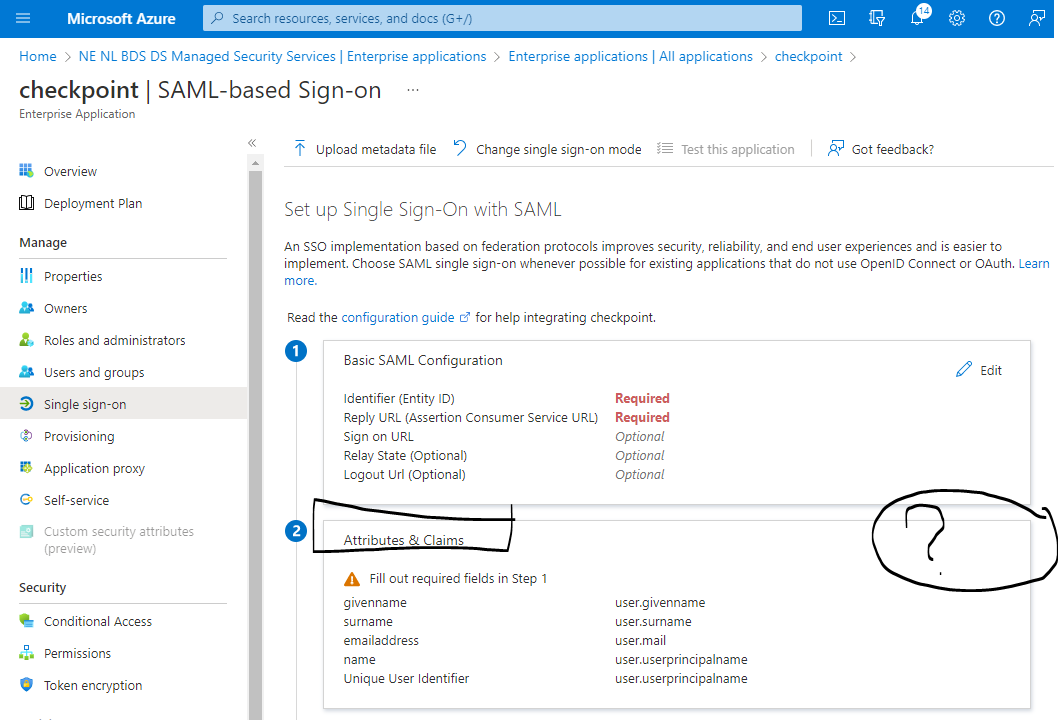
i follow the explanation 'Using Azure AD for Authorization' in Identity Awareness R81.10 Administration Guide and at step 2.f we do no get the option as explained in the step 2.f edit 'User Attributes & Claims'
As you can see in our screenshot we are Required to fill in "Basic SAML Configuration" first and number 2 is not called 'User Attributes & Claims' but just 'Attributes & Claims'.
Our example:
1) Basic SAML Configuration (Edit option)
2) Attributes & Claims <-- this option is different then the manual
Manual example:
2) User Attributes & Claims
Having tried different options any idea what we are missing?
@Royi_Priov can you have someone on your team look at this?
Hi,
Microsoft has a tutorial on how to configure Azure AD for Authorization with Check Point Identity Awareness
They refer to an application "Check Point Identity Awareness" which is indeed available under Enterprise applications.
The 'Identity Awareness R81.10 Administration Guide' however is still refering to creating your own non-gallery application. The admin guide is outdated and i am looking to understand the full process to integrate Azure AD with Check Point Identity Awareness.
The Check Point video "Using Azure AD for Authorization" in the Identity Awareness R81.10 Administration Guide is also outdated and takes a different path then Microsoft tutorial
Can anybody explain (or refer a source) how to set this up and what test we can use to test end to end?
I have put together my own steps, see attached, as a combination of the three sources referred to in the PDF
Thx a million.
Arend
Hi Arend,
You are right, some of the attributes name were changed in MS Azure portal, we will work on update it in our Admin guide.
Regarding to your specific question - 'User Attributes & Claims' was changed to 'Attributes & Claims'. The reason you don't see the 'Edit' option is because you must fill in the required fields in 'Basic SAML Configuration', only after you fill these fields you will see the 'Edit'. The instructions how to fill these fields appear in 'SAML configuration procedure' prior the Azure AD configuration phase.
Please let me know if it help you.
Thanks,
Adi
Hi Adi, thank you for your response regarding Attributes & Claims.
'non-gallery' versus template
For Identity Awareness with Endpoint Security VPN would you choose the 'non-gallery' App as mentioned in the manual or would you choose the new Check Point Azure template App called "Check Point Identity Awareness" ?
Leaderboard
Epsum factorial non deposit quid pro quo hic escorol.
| User | Count |
|---|---|
| 20 | |
| 19 | |
| 19 | |
| 8 | |
| 7 | |
| 3 | |
| 3 | |
| 3 | |
| 3 | |
| 3 |
Tue 16 Dec 2025 @ 05:00 PM (CET)
Under the Hood: CloudGuard Network Security for Oracle Cloud - Config and Autoscaling!Thu 18 Dec 2025 @ 10:00 AM (CET)
Cloud Architect Series - Building a Hybrid Mesh Security Strategy across cloudsTue 16 Dec 2025 @ 05:00 PM (CET)
Under the Hood: CloudGuard Network Security for Oracle Cloud - Config and Autoscaling!Thu 18 Dec 2025 @ 10:00 AM (CET)
Cloud Architect Series - Building a Hybrid Mesh Security Strategy across cloudsAbout CheckMates
Learn Check Point
Advanced Learning
YOU DESERVE THE BEST SECURITY