- Products
- Learn
- Local User Groups
- Partners
- More

MVP 2026: Submissions
Are Now Open!
What's New in R82.10?
Watch NowOverlap in Security Validation
Help us to understand your needs better
CheckMates Go:
Maestro Madness
Hello
We are seeing this issue. and We have a problem with VPN communication.
Do you have any idea about that?
1. SG5100: R80.10 (Take 249)
2. Topology: 3rd party VPN <--- SG5100 (bridge mode) ---> 3rd party VPN
SG5100 is not set to VPN. It's just a bridge mode firewall.
3. Policy
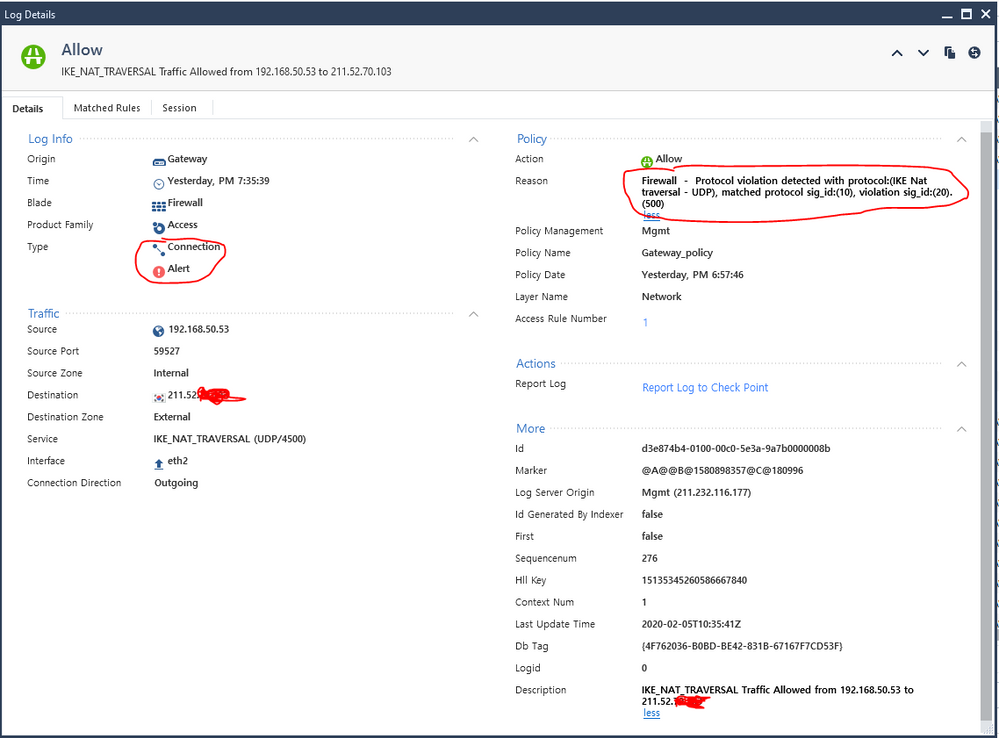
4. Logs
Firewall - Protocol violation detected with protocol:(IKE Nat traversal - UDP), matched protocol sig_id:(10), violation sig_id:(20). (500)
Kim,
first of all. Very interesting policy "any => any, allow" Hope this will be only for testing.
It looks like your VPN partners are not doing correctly the specifications for IKE_NAT-traversal.
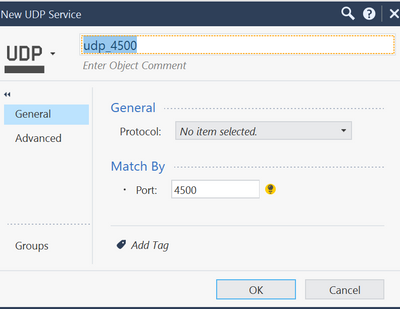
You can try to create a new service-object with no protocol definition like this:
and use this service object in your rulebase.
Wolfgang
Wolfgang,
Yes, it's only for testing. "any=>any,allow"
I created a new service-object with no protocol definition.
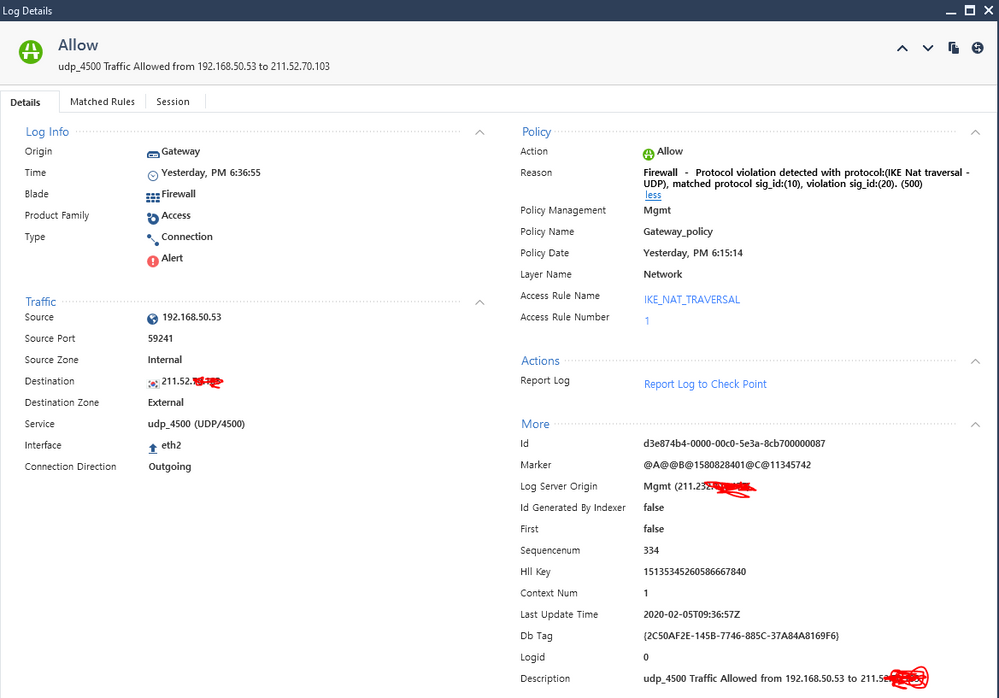
but the result was the same.
Firewall - Protocol violation detected with protocol:(IKE Nat traversal - UDP), matched protocol sig_id:(10), violation sig_id:(20). (500)
Yeah, you get an alert - but what is your issue when i see action accept in log ?
I'm seeing similar log for Protocol violation, but it's for (DNS-UDP). Even though the log will say "Allow" for action, it actually cause problem.
Not sure if the packet is drop but the DNS did not resolve. Basically if I do a nslookup from client machine, I'll see a log of Protocol violation coming from internal DNS, and on client machine the nslookup will not resolve the url and just time out.
This doesn't always happen though. It happen from time to time so it's hard to replicate the issue with support on the phone. Just curious what cause it to think there's Protocol violation?
The temporary workaround we did was a Global Exception rule from the Inspection Settings for said traffic, while waiting on support to figure out what cause it to think there's protocol violation
Every Next Generation firewall maintains protocol signature to validate the authenticity of the protocol/service.
If any traffic does not match with the defined service/protocol signature standard, it will alert you with the protocol violation error message.
In Check Point, Application and URL filtering blade must be in enabled state on the gateway for the protocol signature validation.
Protocol Signature - A unique signature created by Check Point for each protocol and stored on the gateway. The signature identifies the protocol as genuine. This option is used to limit the port to the specified protocol.
Regards,
Hitesh Brahmbhatt
Leaderboard
Epsum factorial non deposit quid pro quo hic escorol.
| User | Count |
|---|---|
| 20 | |
| 19 | |
| 18 | |
| 8 | |
| 7 | |
| 3 | |
| 3 | |
| 3 | |
| 3 | |
| 3 |
Tue 16 Dec 2025 @ 05:00 PM (CET)
Under the Hood: CloudGuard Network Security for Oracle Cloud - Config and Autoscaling!Thu 18 Dec 2025 @ 10:00 AM (CET)
Cloud Architect Series - Building a Hybrid Mesh Security Strategy across cloudsTue 16 Dec 2025 @ 05:00 PM (CET)
Under the Hood: CloudGuard Network Security for Oracle Cloud - Config and Autoscaling!Thu 18 Dec 2025 @ 10:00 AM (CET)
Cloud Architect Series - Building a Hybrid Mesh Security Strategy across cloudsAbout CheckMates
Learn Check Point
Advanced Learning
YOU DESERVE THE BEST SECURITY