- Products
- Learn
- Local User Groups
- Partners
- More
MVP 2026: Submissions
Are Now Open!
What's New in R82.10?
10 December @ 5pm CET / 11am ET
Improve Your Security Posture with
Threat Prevention and Policy Insights
Overlap in Security Validation
Help us to understand your needs better
CheckMates Go:
Maestro Madness
Good day!
We have:
1. SG 81.20
2. IC 81.040
3. Cisco ISE 3.0
GW taking logs from Identity Collector -> Identity collector taking logs from Cisco ISE -> Cisco ISE taking Identites and logs from Active Directory
In SMS (Smarconsole):
1) We have LDAP account unit object of LDAP
2) We have only Identity Collector identity source
In IC:
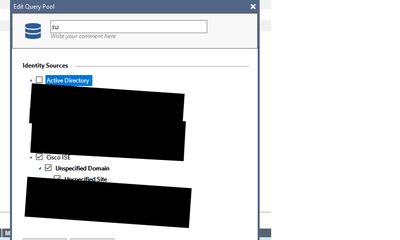
1) We have only ISE group in the Query pool. ISE machine is green. Log collected with Username.
3) In GW
pdp don t take username, because of it rules don t work properly (ise-1 computer that admins ise, just example)
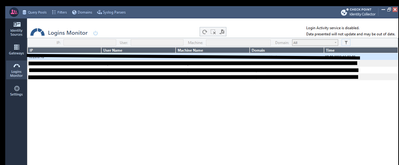
In smartconsole we see this on every login attempt:
I checked every setting on everything, but I still don’t understand what could be wrong.
Do you receive sAMAccountName or UserPrincipalName as user name?
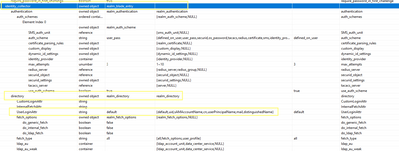
I remember in the past to be forced to define the ldap search query accordingly in Guidbedit to be able to get correct ldap search results.
nothing at all
I meant from ISE. What's the Username collected from ISE? sAMAccountName or UserPrincipalName?
PDP needs something to make ldap query for group membership resolution.
Error message from Smartlog in your post may point to the issue that the wrong one is used.
In case the Attr received leads to errors when trying to resolve group memberships, sometimes UserLoginAttr is to be modified in the Checkpoint Database using guidbedit.
In case pdp process queries using wrong attr, user cannot be found, leading to same error message as above.
To clarify, you might want to debug.
Then first enable debug on the PDP
fw debug fwd off PDP_LOG_SIZE=50000000
fw debug fwd off PDP_NUM_LOGS=20
fw kill pdpd
pdp debug off
pdp debug reset
pdp debug set all all
replicate issue
disable debug
fw debug fwd off PDP_LOG_SIZE=10000000
fw debug fwd off PDP_NUM_LOGS=10
pdp debug off
pdp debug reset
fw kill pdpd
and then you are able to analyse the collected files in $FWDIR/logs/pdpd.elg*
In case my idea is correct, you could see hints pointing to that.
Or maybe pointing to a different root cause.
Hello,
Are the tshoot commands similar for "SMB" machines?
I have a "negotiation" problem between my GW 1590 SMB, and my SRV AD which has the IDC installed.
On these machines, is it viable to "restart" the PDP process with the command, "fw kill pdpd"?
Greetings.
Can you verify ldap account unit is configured properly in smart console? You still need that even with IC set up.
Andy
Gateways must be able to query Active Directory to obtain the groups the user is associated with.
This points to an issue in your LDAP configuration.
For troubleshooting that, see: https://support.checkpoint.com/results/sk/sk100406
Leaderboard
Epsum factorial non deposit quid pro quo hic escorol.
| User | Count |
|---|---|
| 23 | |
| 19 | |
| 8 | |
| 6 | |
| 6 | |
| 6 | |
| 5 | |
| 5 | |
| 4 | |
| 4 |
Thu 04 Dec 2025 @ 03:00 PM (CET)
End-of-Year Event: Securing AI Transformation in a Hyperconnected World - EMEAThu 04 Dec 2025 @ 02:00 PM (EST)
End-of-Year Event: Securing AI Transformation in a Hyperconnected World - AmericasThu 04 Dec 2025 @ 03:00 PM (CET)
End-of-Year Event: Securing AI Transformation in a Hyperconnected World - EMEAThu 04 Dec 2025 @ 02:00 PM (EST)
End-of-Year Event: Securing AI Transformation in a Hyperconnected World - AmericasFri 12 Dec 2025 @ 10:00 AM (CET)
Check Mates Live Netherlands: #41 AI & Multi Context ProtocolAbout CheckMates
Learn Check Point
Advanced Learning
YOU DESERVE THE BEST SECURITY