Hi CheckMates,
Because I've not found answers to my questions in documentation and community ... I decided to just ask if anyone from you already have any experience with the new enhanced mode for IPSec that was introduced in R82.
What I want to achieve is IPsec redundancy.
With legacy mode I can do it for example that way:
1) configure ISP Redundancy ... here provide Primary and Backup interfaces and check "Apply settings to VPN traffic" - it will automatically change Link Selection as probing:
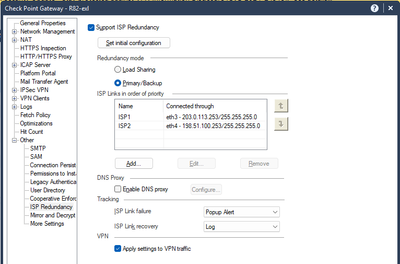
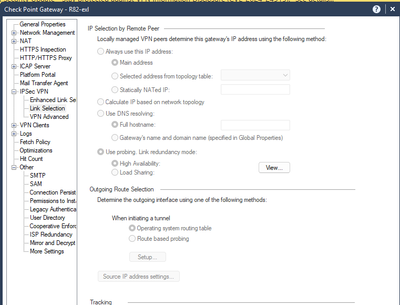
2) then I can create two Interoperable Devices in case peer also has two ISPs (1st = Peer's ISP1, 2nd = Peer's ISP2)
3) and VPN Community object with 3 gateways (Check Point + 2x Interoperable Devices with the same VPN Domain)
With the above configuration everything works as expected - once my Primary ISP will fail new IPSec tunnel is instantly established via Backup ISP.
Then when Primary ISP will be back online ... I will have two IPSec tunnels unless I will shutdown this one that is already establised via Backup ISP.... and with this Check Point will send traffic via Primary ISP, and will receive response via Backup ISP (a little strange ... but also expected if peer will not switch to this "repaired" Check Point's primary ISP).
So everything is fine... except one minor issue.
For some reason Check Point is using Main IP for "local ID" in IPsec and not the one from Link Selection.
So if my Main IP is for example from my management network tunnel will not be established unless I will provide this Main IP in peer's configuration for IPsec. Without ISP Redundancy "local ID" is the same that is selected in "Link selection".
Probably it can be changed in GuiDbEdit ... but yeah ... it's weak.
If you don't understood what I meant ... this screenshot should explain it:
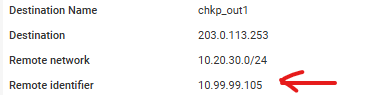
Above screenshot shows information from peer's log ... as you can see it receives from Check Point 10.99.99.105 instead of 203.0.113.253.
I decided to check this new enhanced mode.
I expected that it should work like that:
1) for Check Point I'm selecting Primary and Backup interface
2) then I have one Interoperable Device with two IPs (external) and here also one will be Primary, another Backup
And if everything will be fine they should connect via Primary<->Primary.
In case any of ISPs should fail it will be Primary<->Backup or Backup<->Primary, or Backup<->Backup.
But ... it doesn't work like that...
First issue:
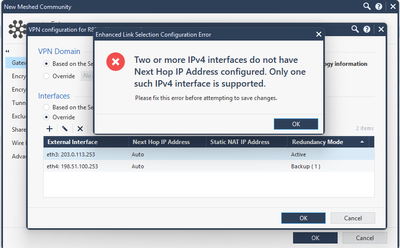
I can't have "Auto" for both interfaces ... so I need to select "Next Hop IP Address".
So ... I selected Next Hop IP Address for one of them ... and it didn't work at all - no IPsec tunnel was established with peer.
Then after some strugling and troubleshooting I've found that Next Hop IP Address was wrong one.
For me ... Next Hop in this case = my gateway .... but I had to change it to Peer's IP ! ... so it should be named "Peer's IP"... really strange.
With that tunnel was established via Primary<->Primary.
Then I decided to break connection for this Primary interface.
I expected that new tunnel sbould be established via Backup interface ... it took like one minute and then it was established between Backup<->Backup.
It's not what I expected...
Do you have some experience with this ?
Can you show me what I'm doing wrong, what I could do better ?
How it should be done to achieve the best results ?
Best
m.





