- Products
- Learn
- Local User Groups
- Partners
- More

MVP 2026: Submissions
Are Now Open!
What's New in R82.10?
10 December @ 5pm CET / 11am ET
Announcing Quantum R82.10!
Learn MoreOverlap in Security Validation
Help us to understand your needs better
CheckMates Go:
Maestro Madness
Check Point’s CheckMe is a free and instant network security assessment tool. Using a series of simulations, CheckMe instantly identifies security risks on your network, and provides you with a detailed report on network vulnerabilities and recommendations.
To learn more watch this 3-minute video - CheckMe: FREE and Instant Network Security Assessment - YouTube
CheckMe is a great tool. In fact it only checks if, in case of zero day analysis, it is allowed to download a malware file. I know we have the link to the malware file it tries to download in a SK, however, is this file a real malware?
Some customers are saying that if the file is downloaded, their endpoint solution should block the infection. I wanna know if I can ask the customer to download the malware file at their own risk to test their antimalware solutions.
Thanks!
The point of the CheckMe test is to validate the efficacy of your existing security controls.
Which means it's entirely possible existing endpoint and/or network security controls will block the files.
The files in question exhibit behaviors that are consistent with malicious files.
Hi Danilo, keep in mind that CheckMe assess only the network so their endpoint solutions are not "part of the game" and they can't block CheckMe tests.
I admit to CheckMe is the easiest and fastest assessment tool.
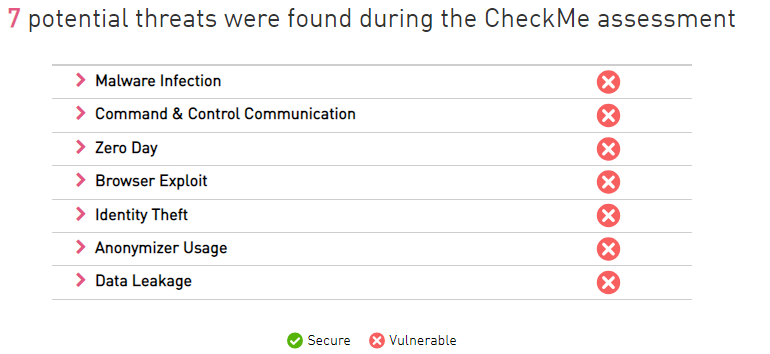
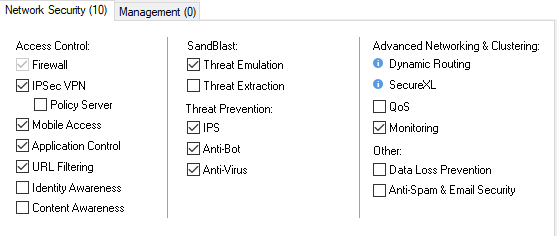
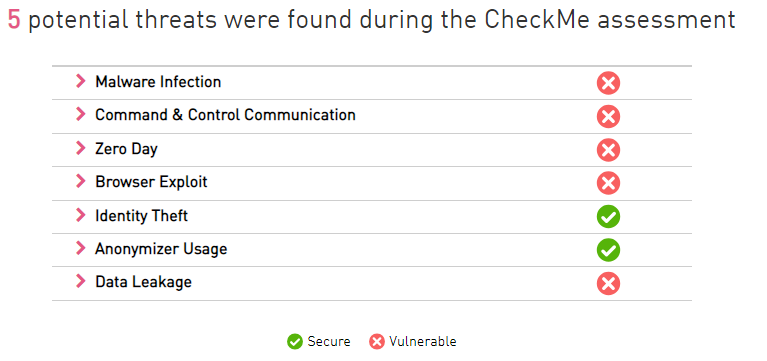
We are using all Threat Prevention blades with Optimized Profile excluding Threat Extraction. Today I used to CheckMe(Network) assessment tool in environment. But the result is a disaster. We blocked Anonymizer, Critical Risk, Botnets, Tunnels and Phishing Application/Site_Group using Application Control Blade with URLF.
Maybe I'm doing something wrong?
Hi Gomboragchaa,
Are you sure that all blades are activated?
Did you review all the remediation steps in the report?
Hi Elad Goldenberg,
I reviewed remediation steps from report. Such as BROWSER EXPLOIT.
Remediation Guide:
The IPS is part of the NGTX and NGTP and it blocks cross-site scripting attack with its recommended / optimized profile. In case that IPS protections are not updated, enable cross-site scripting attempt in your IPS policy to protect your computer from this threat.
Reviewed Firewall Configs:
1. IPS Blade is active

2. I am using Optimized Profile on Threat Prevention.

3. Cross-Site Scripting Scanning Attempt protection must to prevent(default-config) on Optimized Profile.

4. IPS Blade is Up-to-date

Another thing: I used CheckMe again without any changes. Result is different.....

Gomboragchaa Jamganjav, can you confirm that the your traffic go through this GW?
Did you install policy?
let's continue the thread via emails. my email is eladgo@checkpoint.com
Leaderboard
Epsum factorial non deposit quid pro quo hic escorol.
| User | Count |
|---|---|
| 22 | |
| 20 | |
| 16 | |
| 5 | |
| 4 | |
| 4 | |
| 3 | |
| 3 | |
| 3 | |
| 3 |
Fri 12 Dec 2025 @ 10:00 AM (CET)
Check Mates Live Netherlands: #41 AI & Multi Context ProtocolFri 12 Dec 2025 @ 10:00 AM (CET)
Check Mates Live Netherlands: #41 AI & Multi Context ProtocolTue 16 Dec 2025 @ 05:00 PM (CET)
Under the Hood: CloudGuard Network Security for Oracle Cloud - Config and Autoscaling!About CheckMates
Learn Check Point
Advanced Learning
YOU DESERVE THE BEST SECURITY