- Products
- Learn
- Local User Groups
- Partners
- More

MVP 2026: Submissions
Are Now Open!
What's New in R82.10?
Watch NowOverlap in Security Validation
Help us to understand your needs better
CheckMates Go:
Maestro Madness
Hello Mates!
I need to configure an iBGP peer where the peer is in the site-to-site tunnel. This environment is currently running on Fortinet Firewall and I need to migrate that from it to Check Point Firewall.
I made a lab to try to resolve this demand and when I try to put the peer up with the configuration inside the tunnel it doesn't work at all. Testing the out the tunnel, the peer goes up normally.
Does anybody know if it is possible or compatible with Check Point this iBGP inside IPSEC tunnel configuration?
Is there any specific configuration that I need to do to the peer goes up?
If you guys need prints from my configurations I can send it.
Thank you!
Here is an example how this works with Azure.
Instead of Azure, this can also be any other VPN destination.
| GAIA Web GUI |
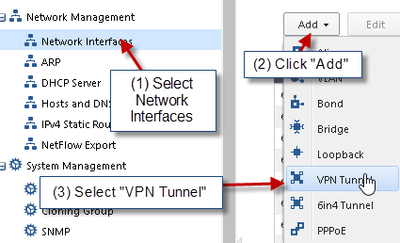
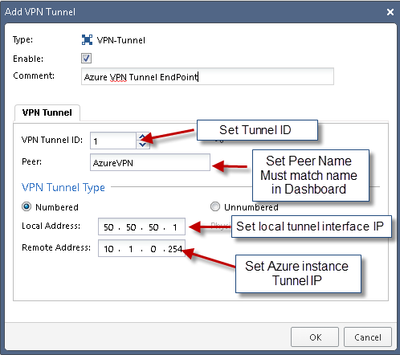
1) Create VPN Tunnel Interface (VTI)
NOTE:
THE PEER NAME MUST MATCH THE SMARTDASHBOARD OBJECT NAME OTHERWISE THE VTI WILL NOT WORK
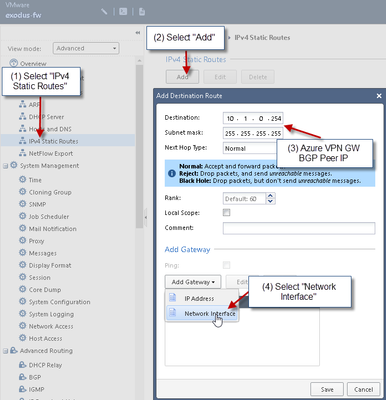
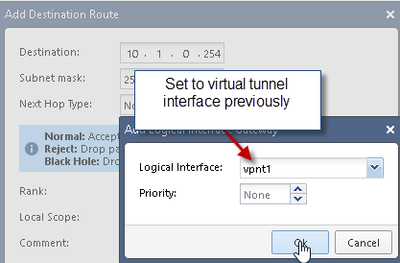
2) Add Static Route for Azure VPN Peer BGP IP:
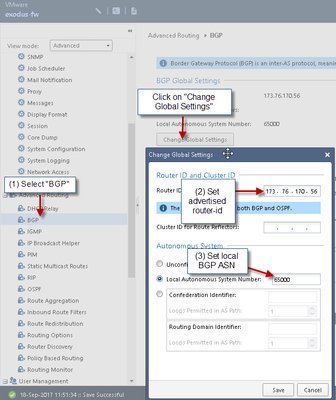
3) Setup BGP in GAIA WebUI
WARNING:
Without “ALL” of these configurations completed BGP will not be successful
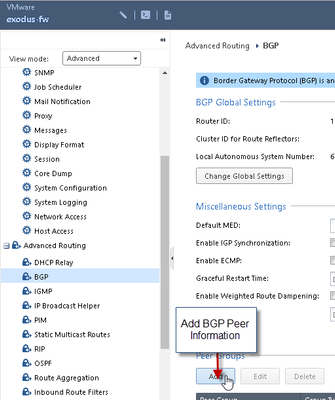
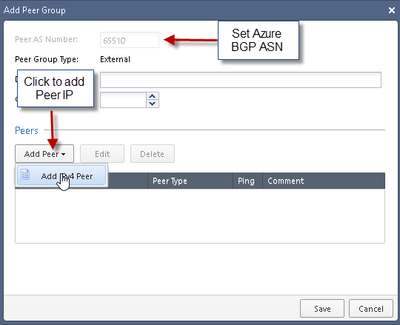
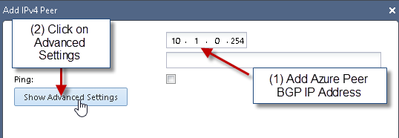
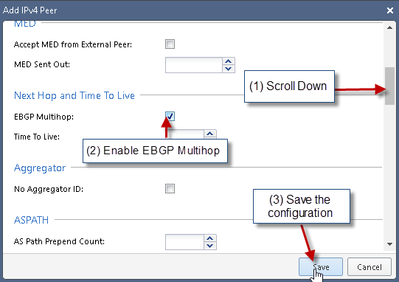
4) Add Azure Gateway BGP Information:
Fill in information based on Azure Gateway BGP Settings:
NOTE:
Without Multihop enabled the BGP session will not be established
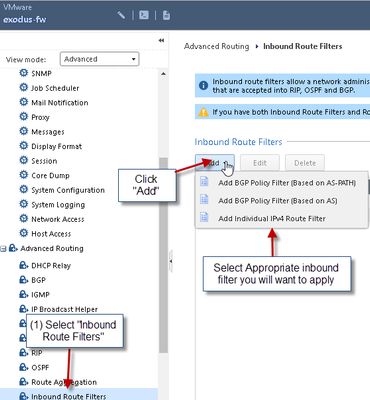
5) Set BGP Inbound route filters
NOTE:
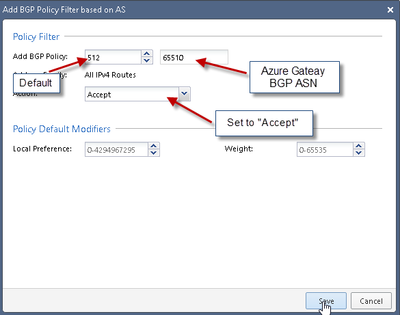
For the purpose of this documentation the inbound filter has been set to accept all routes – this will vary in each environment
6) Set inbound route filter settings
| SmartConsole |
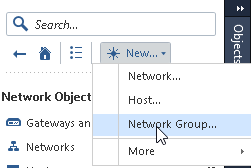
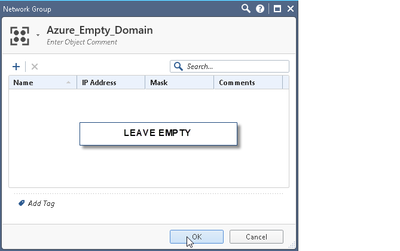
7) Create an empty VPN group which will represent the Azure VPN Gateway’s vpn domain:
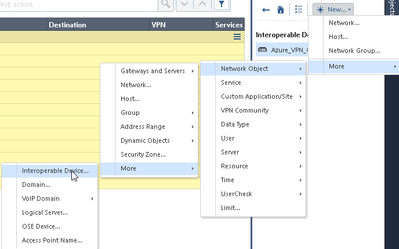
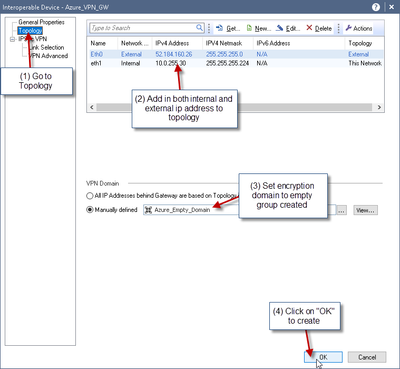
8 ) Next create Azure VPN Gateway object:
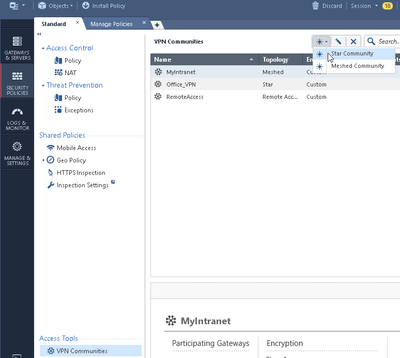
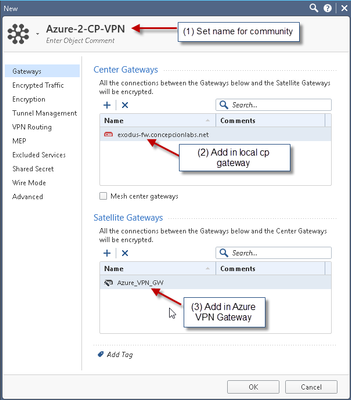
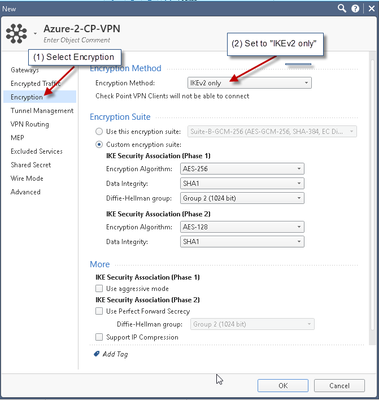
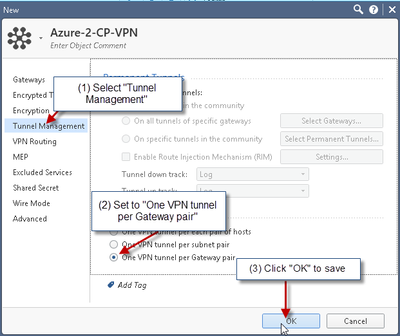
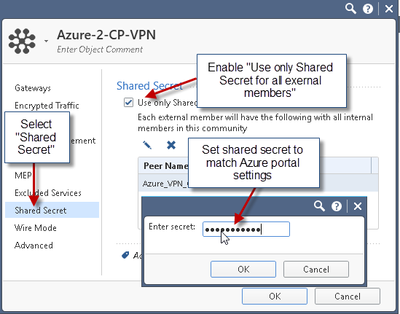
9) Create VPN Community
10) Create VPN ruleset
...
Here is an example how this works with Azure.
Instead of Azure, this can also be any other VPN destination.
| GAIA Web GUI |
1) Create VPN Tunnel Interface (VTI)
NOTE:
THE PEER NAME MUST MATCH THE SMARTDASHBOARD OBJECT NAME OTHERWISE THE VTI WILL NOT WORK
2) Add Static Route for Azure VPN Peer BGP IP:
3) Setup BGP in GAIA WebUI
WARNING:
Without “ALL” of these configurations completed BGP will not be successful
4) Add Azure Gateway BGP Information:
Fill in information based on Azure Gateway BGP Settings:
NOTE:
Without Multihop enabled the BGP session will not be established
5) Set BGP Inbound route filters
NOTE:
For the purpose of this documentation the inbound filter has been set to accept all routes – this will vary in each environment
6) Set inbound route filter settings
| SmartConsole |
7) Create an empty VPN group which will represent the Azure VPN Gateway’s vpn domain:
8 ) Next create Azure VPN Gateway object:
9) Create VPN Community
10) Create VPN ruleset
...
Wow...the effort you put in your answer @HeikoAnkenbrand is truly outstanding!👌👌
How would this be configured on a cluster? Great explanation by the way.
My colleague and I did this in the lab, ONLY way we could make it work with cluster and BGP was using UNNUMBERED vti.
Andy
Each cluster member has its own VTI with IP Address, then you 'get' interfaces in smartconsole and create the VIP that the other end will talk to. Details are in the VPN admin guide.
Hello, @HeikoAnkenbrand
Is this the same process that must be followed in a VSX environment?
I have a VS where I currently have several S2S VPNs.
There is a need to “migrate” one of the traditional VPNs we have so that it now works using BGP.
So, are there many changes that would need to be considered to achieve this?
I understand that BGP in VSX is configured only by CLI, and that CLI is also where you have to work with VTIs?
Is there any documentation or post that talks about BGP over S2S VPNs in VSX environments?
Thanks for your comments.
For some hints please see: https://community.checkpoint.com/t5/Security-Gateways/VPN-SITE-TO-SITE-CHECKPOINT-VSX-ROUTE-BASED/td...
@Bernardes ...just to add to what @HeikoAnkenbrand said, sometimes you may need to edit VTI in dashboard fw topology and possibly enable "dont check packets from.." to make this work 100%.
Just wanted to throw that out there...I had seen it few times, but not too too often.
Andy
Leaderboard
Epsum factorial non deposit quid pro quo hic escorol.
| User | Count |
|---|---|
| 20 | |
| 19 | |
| 19 | |
| 8 | |
| 7 | |
| 3 | |
| 3 | |
| 3 | |
| 3 | |
| 3 |
Tue 16 Dec 2025 @ 05:00 PM (CET)
Under the Hood: CloudGuard Network Security for Oracle Cloud - Config and Autoscaling!Thu 18 Dec 2025 @ 10:00 AM (CET)
Cloud Architect Series - Building a Hybrid Mesh Security Strategy across cloudsTue 16 Dec 2025 @ 05:00 PM (CET)
Under the Hood: CloudGuard Network Security for Oracle Cloud - Config and Autoscaling!Thu 18 Dec 2025 @ 10:00 AM (CET)
Cloud Architect Series - Building a Hybrid Mesh Security Strategy across cloudsAbout CheckMates
Learn Check Point
Advanced Learning
YOU DESERVE THE BEST SECURITY