- Products
- Learn
- Local User Groups
- Partners
- More

Stop Babysitting Rules.
Go Agentic
Step Into the Future of
AI-Powered Cyber Security
Bridge the CAASM Gap
with Exposure Management
AI Security Masters E8:
Claude Mythos: New Era in Cyber Security
Call For Papers
Your Expertise. Our Stage
CheckMates Go:
CheckMates Fest
Hello guys,
How to prevent the user on the LAN internal network from connecting to the SSL VPN/Client itself. We come across this case, where the user should only be able to access an SSL VPN/Client when they are internal, not when they are internal.
I wouldn't want users to access our own SSL/Client VPN from the internal network.
Congrats,
Cristian Rosa
Yep - it is rather old and called Location Awareness:
SmartDashboard - go to Policy menu - click on Global Properties... - expand Remote Access - click on Endpoint Connect - in the Connectivity Settings section, refer to Network Location Awareness field - select Yes - click on Configure... button - enjoy the options...
Im not real sure what you are trying to achieve here. You dont want user thats internal to be able to access VPN client??
240 / 5,000
You can restrict it, but there is no need to do this from internal.
And how would I do?
Can you help me ?
Congrats,
Cristian Rosa
Dont you have the ability to select the interface its accesible from?
i got that on several things if you open the gateway properties
I don't know how to inform. I searched but couldn't find where to configure it.
Honestly, I never heard of a way to do this specifically from the firewall object itself or even global properties. There might be some way possible via gw file trac_client_1.ttm, but not 100% sure how. Maybe someone else will chime in and confirm for you. Personally, there would need to be some sort of mechanism that would recognize user being internal that would prevent them from even being able to connect, unless they come from external source.
Lets see if someone else may have an idea, Im also interested to see the suggestions/advice or if its even possible.
Yep - it is rather old and called Location Awareness:
SmartDashboard - go to Policy menu - click on Global Properties... - expand Remote Access - click on Endpoint Connect - in the Connectivity Settings section, refer to Network Location Awareness field - select Yes - click on Configure... button - enjoy the options...
Ah, yes, good point, totally forgot about that.
Hello Abrecht,
Your help resolved my case.
Thanks a lot...
Cristian Rosa
CCSA
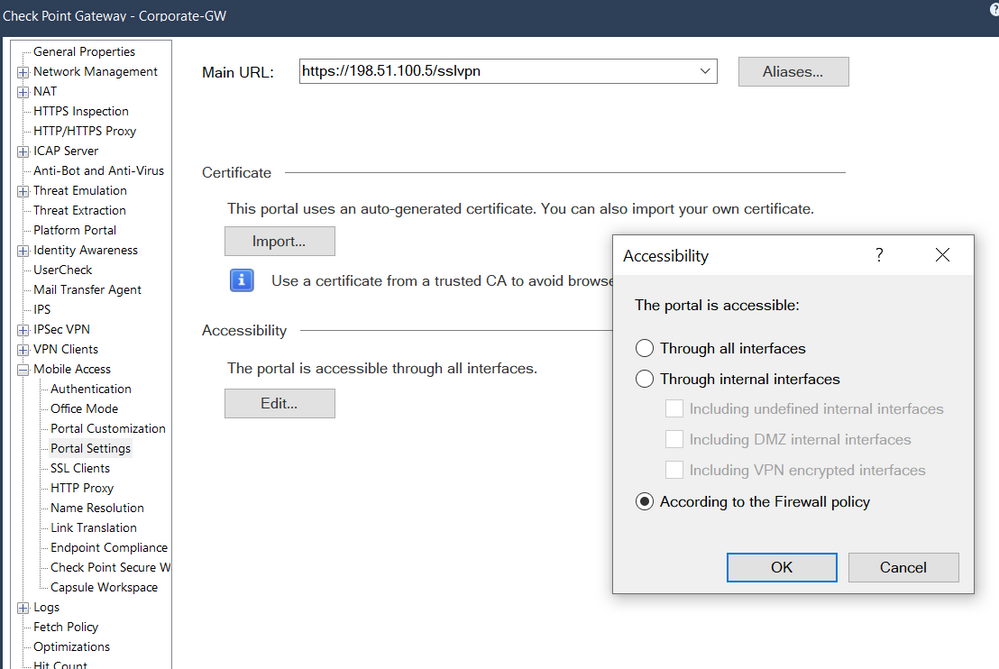
@Cristian_Rosa you can disable the implied rule for MOB access if you switch your gateway object configuration "Accessibility" to "According to the Firewall policy"
With these setting you have to define access rules for access to the MobileAccessPortal like this one
Leaderboard
Epsum factorial non deposit quid pro quo hic escorol.
| User | Count |
|---|---|
| 3 | |
| 2 | |
| 1 | |
| 1 | |
| 1 |
Tue 02 Jun 2026 @ 10:00 AM (AEST)
The Cloud Architect Series: Check Point WAF. The next generation of AI-Powered Protection - APACTue 02 Jun 2026 @ 06:00 PM (IDT)
Under the Hood | Check Point SASE: Identity Integration & Access Policy Design Best PracticesThu 04 Jun 2026 @ 02:00 PM (CEST)
Deep Dive Webinar: New CloudGuard GWLB Deployment Without NAT Gateways - EuropeTue 02 Jun 2026 @ 10:00 AM (AEST)
The Cloud Architect Series: Check Point WAF. The next generation of AI-Powered Protection - APACTue 02 Jun 2026 @ 06:00 PM (IDT)
Under the Hood | Check Point SASE: Identity Integration & Access Policy Design Best PracticesThu 04 Jun 2026 @ 02:00 PM (CEST)
Deep Dive Webinar: New CloudGuard GWLB Deployment Without NAT Gateways - EuropeThu 04 Jun 2026 @ 07:00 PM (IDT)
Deep Dive Webinar: New CloudGuard GWLB Deployment Without NAT Gateways - AmericaThu 04 Jun 2026 @ 10:00 AM (PDT)
AI Security Masters E9: READY OR NOT: Securing the AI Enterprise 1/5 - AI Agent SecurityAbout CheckMates
Learn Check Point
Advanced Learning
YOU DESERVE THE BEST SECURITY